

Introduction
Do you know whether your current capacity can realistically support upcoming project demand, or are decisions still driven by assumptions instead of data?
Without clear visibility into resource availability and utilization, aligning capacity with project demand becomes challenging. The result is overburdened talent, idle resources, rising delivery costs, and delayed projects.
This is where a capacity report plays a critical role. It provides a clear, data-backed view of how existing resources align with ongoing projects and pipeline opportunities. When reviewed regularly, the capacity report enables managers to identify potential shortages or excesses and take corrective action proactively. Consequently, it ensures optimized resource utilization and successful project delivery.
In this blog, we will understand about a capacity report, its types, benefits, and how to build a robust one in your firm.
What is a Capacity Report?
A capacity report, also called a capacity planning report, is a structured document that shows whether an organization has sufficient capacity to meet current and future work demands.
It consolidates key data such as resource availability, utilization, and forecasted demand to help understand how much work teams can realistically handle, and where shortages or excesses exist. Typically, the report is expressed in hours or percentages and enables firms to gain a holistic view of operational capacities.
So, to summarise, here is what it helps you figure out:
- Can we deliver ongoing work with the people we have?
- Who’s overloaded or not being utilized enough?
- Are there available resources for confirmed pipeline projects?
- Do we need to hire soon or shift things around?
- What kind of work can we realistically commit to next?
Now that we understand what a capacity report is, let us move on to its benefits for a firm.
Read in detail about resource capacity planning and how it drives project success.
What are the Benefits of a Capacity Report?
Capacity planning reports offer several strategic and operational advantages that improve overall project resource management. So, here are some crucial benefits of the capacity report:
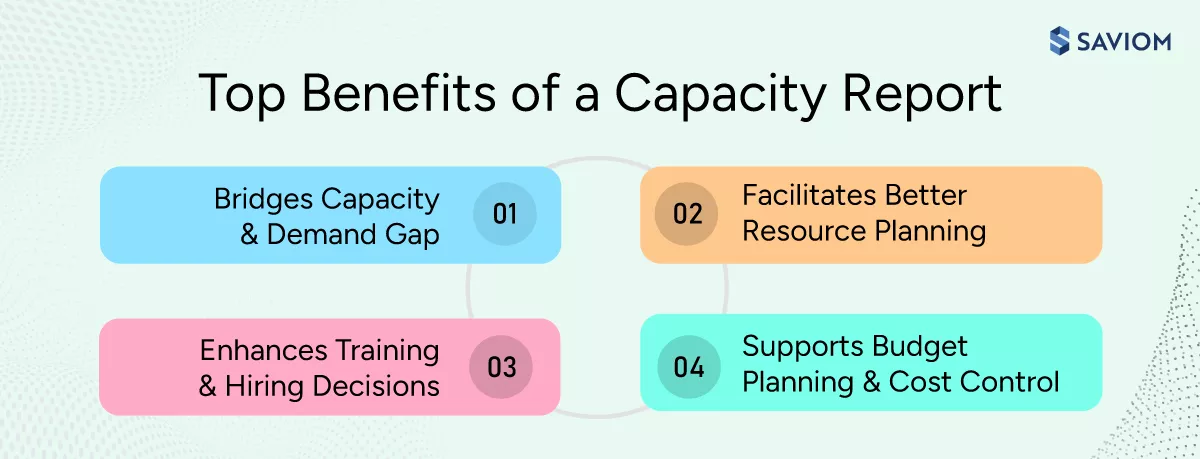
Bridges Capacity vs. Demand Gap
A capacity report helps mitigate gaps between resource capacity and demand by identifying imbalances, such as shortages or surpluses. In case of shortages, managers can plan training/upskilling or recruitment efforts; if there’s an excess, they can bring forward project timelines or sell extra capacity at discounted rates. This reduces operational risk and ensures timely project initiation.
Facilitates Better Resource Planning
With a well-defined capacity report, managers can gain clear visibility into resource availability, current workloads, and future demand across projects. These data-driven insights enable them to align the right people to the right tasks and ensure optimal resource utilization. Moreover, the capacity report also helps account for constraints such as skill unavailability and planned leave, ensuring timely project delivery.
Explore how effective resource planning helps maximize workforce and project efficiency.
Ensures Informed Training and Hiring Decisions
A well-structured capacity report helps identify skill gaps and resource shortages based on current and anticipated project demands. This enables managers to make informed decisions regarding skill development initiatives or targeted hiring. As a result, firms can ensure their teams are equipped with the right skills when needed. Over time, it helps build a more agile, capable, and future-ready workforce.
Supports Budget Planning and Cost Control
A capacity report enables managers to anticipate workforce needs well in advance. This foresight allows them to strategically deploy the cost-effective mix of local or global talent, permanent or contingent staff, and junior or senior skill sets, based on project requirements. Consequently, they can minimize last-minute hiring, reduce reliance on premium resources, and ensure tighter control over resource-related spend.
Gain deeper insights into 6 resource cost reduction strategies to boost profitability.
Having understood the rewarding benefits, the following section explores the different types of capacity reports.
Types of Capacity Reports
Depending on planning requirements, organizations use different types of capacity reports, outlined below
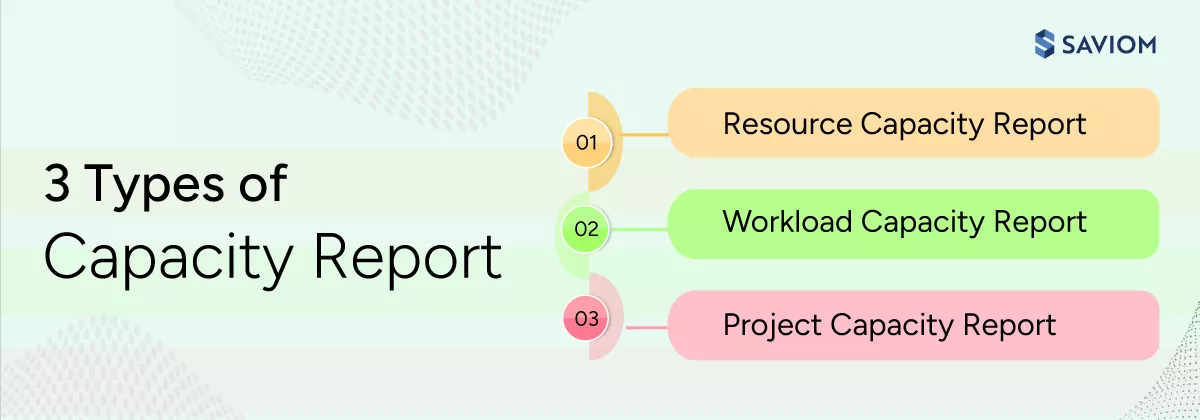
Resource Capacity Report
A resource capacity report provides comprehensive visibility into the workforce’s total availability, demand, and capacity across teams, roles, and skills. It helps organizations assess whether existing resources have the capacity to sustain ongoing work while supporting upcoming project demands. Subsequently, managers can make informed decisions on redeployment, upskilling, or planned hiring.
Workload Capacity Report
A workload capacity report outlines the distribution of work across teams and individuals within an organization. It helps identify imbalances, such as overutilized resources exceeding their available capacity or underutilized individuals who could take on more work. This visibility allows managers to act proactively by redistributing tasks, adjusting project timelines, or bringing in additional resources to ensure optimal productivity.
Discover 6 effective ways to address resource underutilization in your firm.
Project Capacity Report
This report provides a comprehensive overview of available resources and the capacity required for specific projects. It helps organizations assess whether they have sufficient bandwidth to take on additional work while maintaining delivery commitments. Additionally, the report highlights potential resource constraints that could disrupt project execution, allowing managers to take corrective actions.
Read this comprehensive eBook to understand how organizations can perform resource capacity planning effectively and deliver every project confidently.
Now that we know the different types of capacity reports, let us move on to the steps involved in the subsequent section.
6 Steps to Build a Capacity Report
It is very important to build a robust capacity report to get a clear view of resource capacity versus project demand. Here are six simple steps to create one manually:
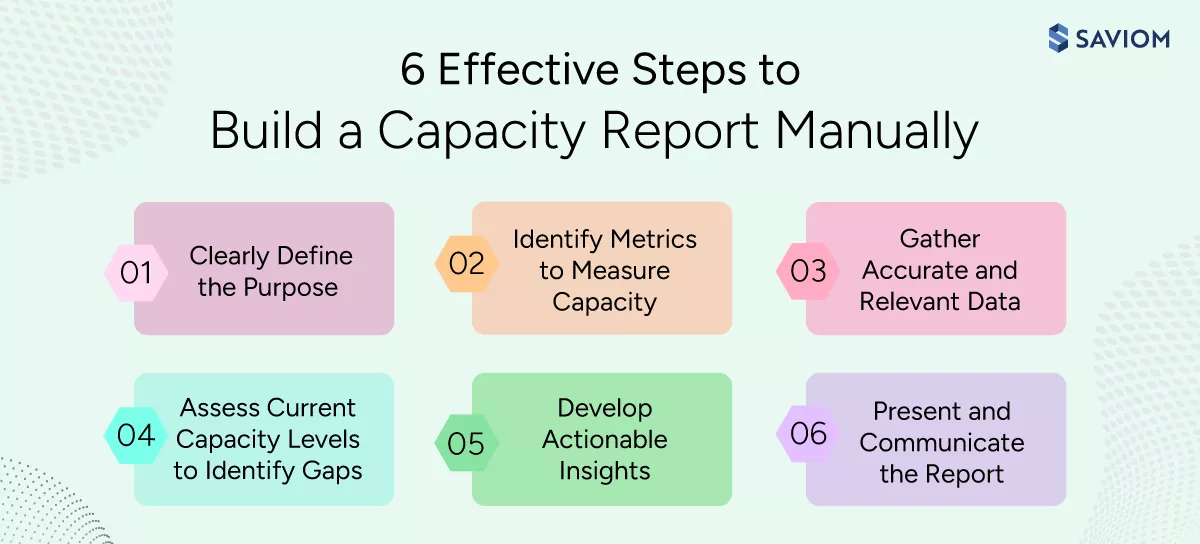
Clearly Define the Purpose
The first step is defining the objective of the capacity report; whether the organization wants to evaluate overall workforce capacity or focus on a specific team, such as IT, finance, or sales. Then, firms must set the reporting frequency (weekly, monthly, or quarterly) to ensure the report delivers relevant and timely insights.
For example, if the objective is to evaluate team readiness for upcoming projects, the report should highlight resource availability, task duration, and potential scheduling conflicts. On the other hand, if the goal is to identify organization-wide shortages, the report must provide department-level capacity insights.
Identify Key Metrics to Measure Capacity
The next step is selecting the right metrics to ensure the capacity report delivers actionable insights. Commonly tracked metrics include billable resource utilization, workload distribution, available capacity, and total scheduled hours, which may vary depending on industry requirements and business needs.
For instance, an IT team’s capacity report may track total weekly capacity, allocated hours, and the remaining availability. This helps managers quickly determine utilization levels and determine readiness for upcoming work.
Dive deeper into understanding the steps to do resource capacity requirement planning.
Gather Accurate and Relevant Data
Accurate data forms the foundation of a reliable capacity report. This involves collecting up-to-date information on resource availability, current workloads, and project schedules. Managers typically gather this data from time tracking or resource management tools.
For example, if a resource is scheduled for 40 hours a week with two days of planned leave, then their effective capacity should be calculated as 24 hours. Accounting for such constraints ensures reporting accuracy and helps managers make realistic planning decisions.
Assess Current Capacity Levels to Identify Gaps
Once data is gathered, the next step is to compare available capacity with project demand to identify resource shortages or excesses. By performing capacity vs. demand analysis, managers can spot variances and take corrective actions.
For instance, if a resource is assigned 45 hours against 40 available, it signals overallocation. Conversely, if another individual has only 20 hours assigned, the remaining 20 hours could be used productively, thereby preventing capacity waste.
Develop Actionable Insights and Recommendations
Based on identified gaps, managers can take targeted actions to balance capacity and demand effectively. For instance, to address resource surpluses, managers can initiate targeted training/upskilling programs, implement out rotation or backfill strategies, or hire permanent or contingent workers.
On the contrary, excess capacity can be addressed by advancing project timelines or monetizing additional capacity. Acting on these insights helps organizations avoid last-minute firefighting, budget overruns, and delivery risks.
Continue reading how capability building ensures a future-ready workforce.
Present and Communicate the Report
The final step is to present the capacity report to key stakeholders, including project managers, department heads, and senior leadership. This involves translating data into clear insights on what’s working and where intervention is needed.
Using visual elements, such as Gantt charts, graphs, and tables, along with providing context on timelines, workloads, and risks, ensures stakeholders can quickly understand capacity challenges and make informed decisions.
Gain early foresight into upcoming project demands and perform accurate capacity planning using SAVIOM’s advanced resource management tool. Book a demo to see it in action.

Next, let us see how capacity planning software helps in analyzing a capacity report effectively.
How SAVIOM Helps Businesses Create and Interpret Capacity Reports?
SAVIOM’s 5th gen resource capacity planning software automatically generates capacity reports by consolidating real-time resource capacity, availability, and demand data into unified dashboards. Let’s explore how SAVIOM helps organizations develop, visualize, and interpret capacity reports effectively.
Gain Real-Time Visibility into Resource Availability & Utilization
The tool features an integrated all-in-one resource planner that allows managers to quickly analyze capacity, utilization, and availability across dimensions such as role, region, department, and project.
Identify Shortages, Excesses, and Resource Risks Early
SAVIOM’s capacity vs. demand report clearly displays each resource’s availability, demand, and capacity. Additionally, the report includes a summary stickers that highlight:
- Total demand and availability
- Named and unnamed demand
- Overallocated resources
If resources are overbooked or underutilized, the system automatically flags discrepancies using color indicators (e.g., red negative values). These early warning signals help managers rebalance workloads or initiate upskilling or hiring actions before delivery risks escalate.
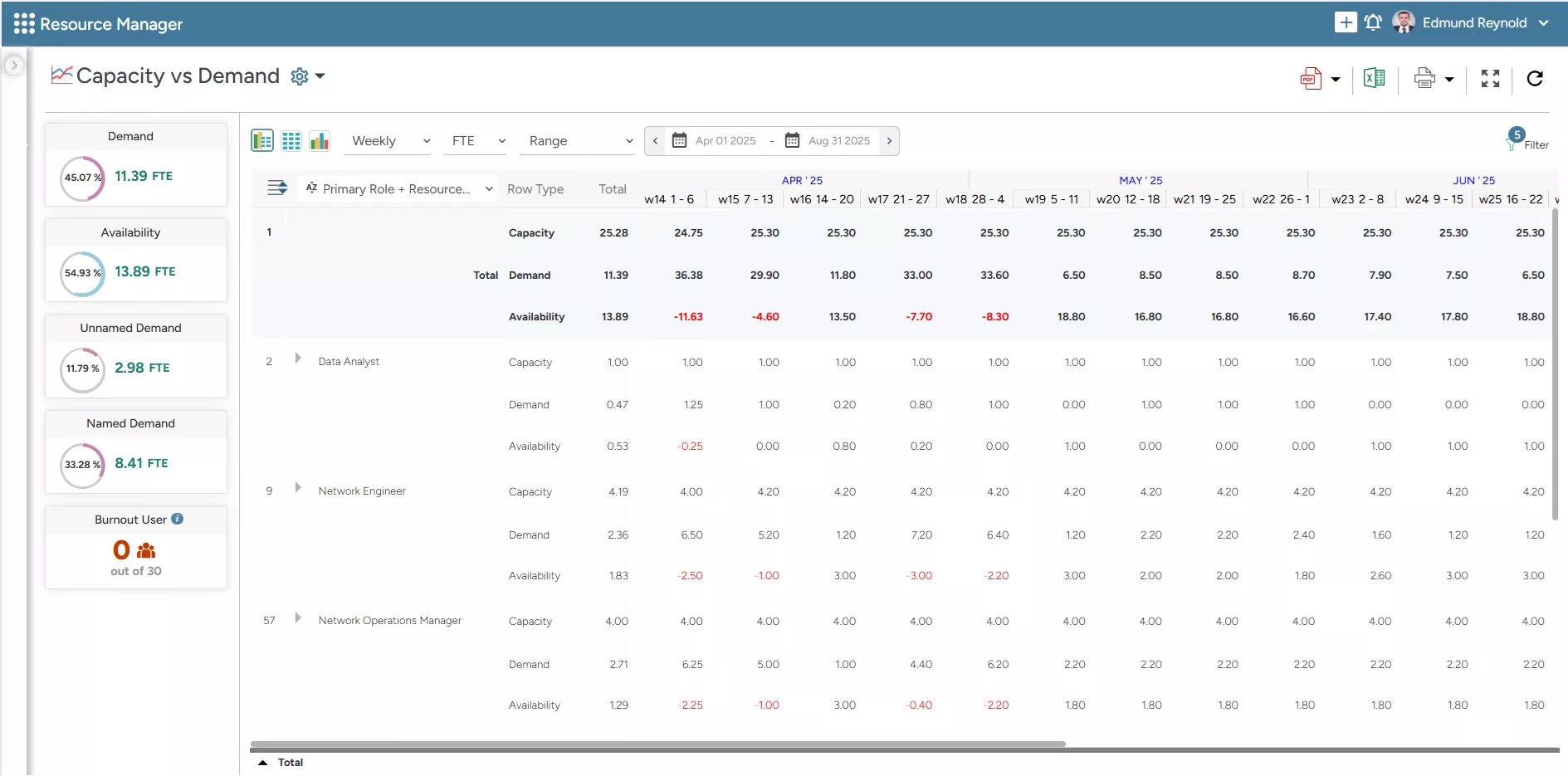
SAVIOM’s Capacity vs. Demand Report highlights resources’ total capacity, demand, and availability, enabling managers to make data-driven decisions.
Visualize Capacity vs. Demand Through Flexible Views
SAVIOM enables managers to view capacity data in graphical, tabular, or combined formats, providing both visual clarity and numerical precision. Managers can:
- Compare capacity and demand trends easily
- Identify shortages and excess capacity visually
- Customize group-by filters such as location, role, department, or project
This flexibility allows organizations to focus on the most relevant workforce insights for resource forecasting and planning.
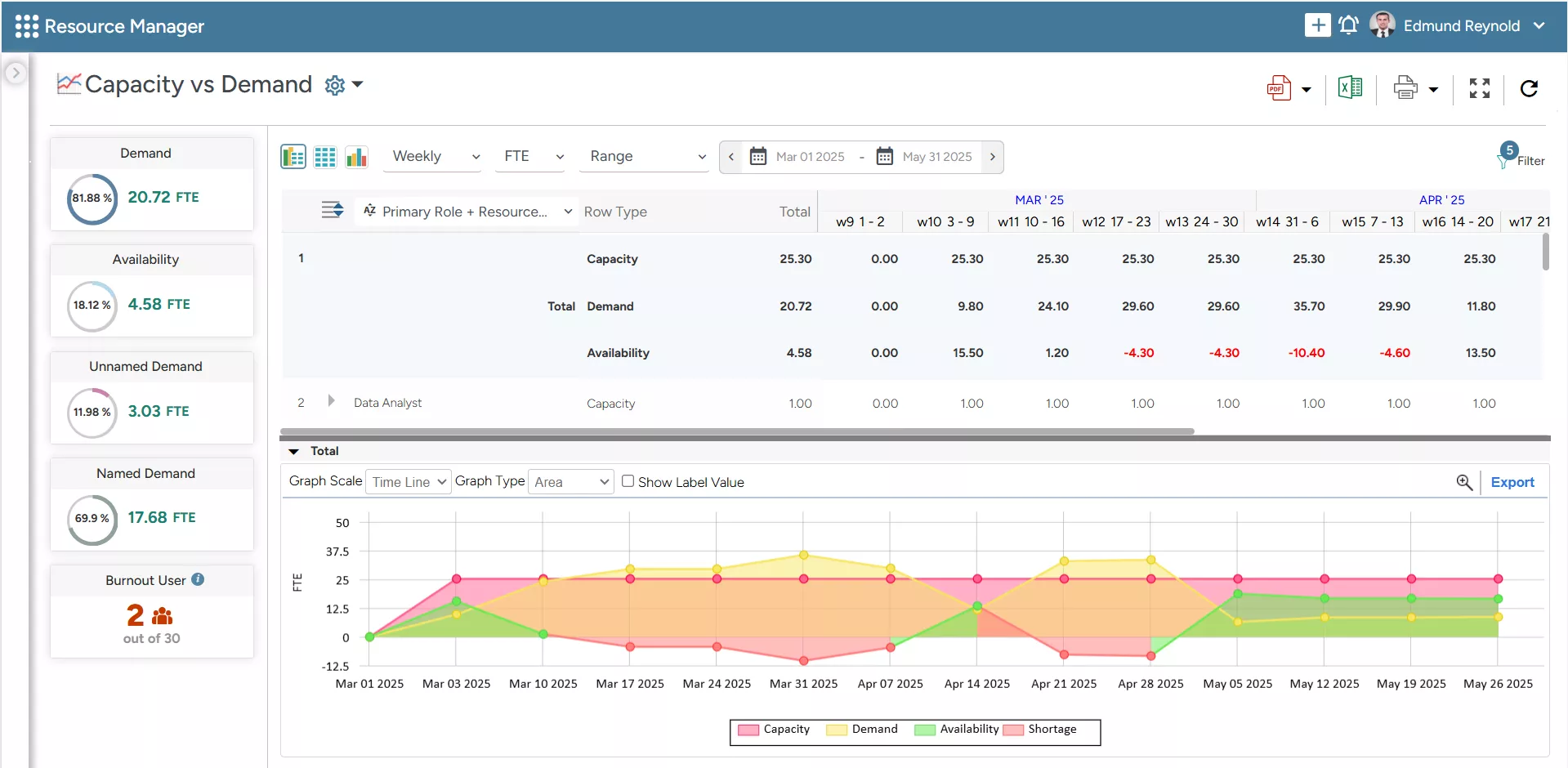
SAVIOM’s Capacity vs. Demand Graph enables managers to quickly spot resource shortages or excesses and take timely action to balance supply and demand.
Analyze Capacity Using Flexible Time and Unit Granularity
SAVIOM’s advanced capacity planning tool allows users to evaluate capacity across multiple timeframes and measurement units, ensuring deeper planning insights. This enables managers to:
- View capacity data daily, weekly, monthly, or quarterly
- Switch between units such as Full-Time Equivalent (FTE), hours, days, or percentages
- Analyze short-term workload spikes and long-term capacity trends
This multi-dimensional analysis helps organizations optimize resource deployment and manage project demand efficiently.
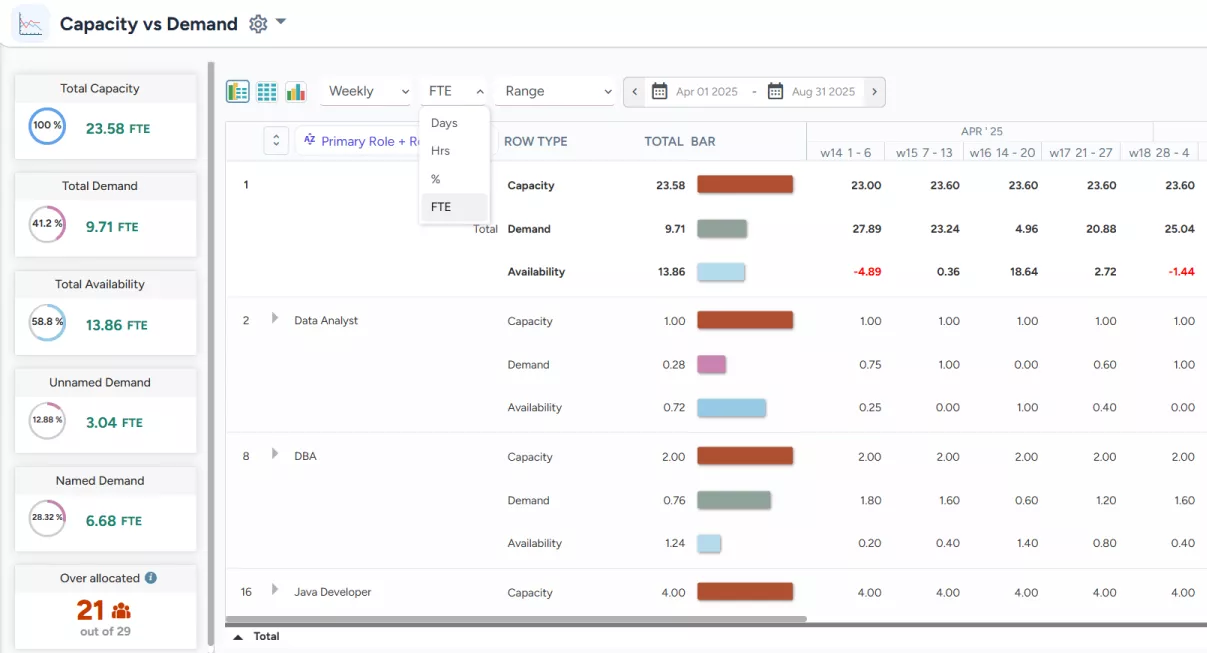 SAVIOM’s Capacity vs. Demand report shows time granularity, enabling managers to view data on different scales and units.
Final Thoughts
A well-structured capacity report empowers organizations to align their resources effectively with business demands. It enables proactive planning, minimizes resource-related risks, such as shortages and excesses, and supports informed decision-making. Therefore, it lays the foundation for smarter planning and better resource decisions.
Frequently Asked Questions
A capacity report is a structured document that provides a clear overview of available resources versus current and upcoming project demand. This helps managers understand how much work can be handled without overloading or underutilizing resources.
A capacity report plays a crucial role by helping organizations bridge resource capacity and demand gaps, optimize utilization, prevent employee burnout, and ensure projects are staffed and scheduled effectively.
Creating a capacity report primarily involves the following critical steps:
1. Define the purpose
2. Identify key metrics to measure capacity
3. Gather accurate and relevant data
4. Assess current capacity levels to identify gaps
5. Develop actionable insights and recommendations
6. Present and communicate the report
The frequency of updating a capacity report depends on the organization’s project complexity, workload volatility, and planning needs. In fast-paced or project-driven environments, capacity reports should ideally be updated weekly or in real time. In relatively stable environments, monthly or quarterly updates may be sufficient.
A capacity report improves decision-making by providing clear visibility into resource availability, utilization, and demand. By comparing capacity with workload, managers can spot shortages/excesses or overutilization early and take corrective action. This helps reduce delivery risk, optimize utilization, control costs, and improve resource planning accuracy.