

Introduction
Most organizations don’t realize they’ve chosen the wrong resource management software until it’s too late, the tool is live, the data is in, and the complaints are already rolling in. A poor decision doesn’t just waste budget; it leads to low adoption, constant workarounds, and months of lost productivity.
So, how do you avoid investing in a tool that looks good in demos but fails in real-world planning?
To select resource management software effectively, organizations must define requirements upfront, evaluate real-world use cases, and look beyond feature-heavy demos. The right approach ensures better adoption, improved resource utilization, and long-term scalability.
This blog covers the signs suggesting the need, key factors to consider, must-have features, and how to choose resource management software with confidence.
What is Resource Management Software?
Resource management software is a centralized tool that helps organizations plan, allocate, schedule, and optimize resources such as people, time, and equipment across projects. It provides real-time visibility into resource availability, capacity, and utilization, enabling better forecasting, efficient allocation, and improved project delivery outcomes.
By centralizing resource data and enabling proactive planning, it helps businesses align resources with project priorities, reduce scheduling conflicts, and minimize overallocation and bench time. As a result, firms can maximize utilization, improve productivity, avoid cost overruns, and boost overall profitability.
Having understood the resource management software definition, let us explore its critical benefits.
Read our detailed guide to understand the fundamentals of resource management.
Why Choosing the Right Resource Management Software Matters?
Selecting resource management software directly determines how effectively organizations align resources with project demand, improve operational efficiency, and ensure predictable project delivery outcomes. Given below are some of the essential benefits of resource management software:
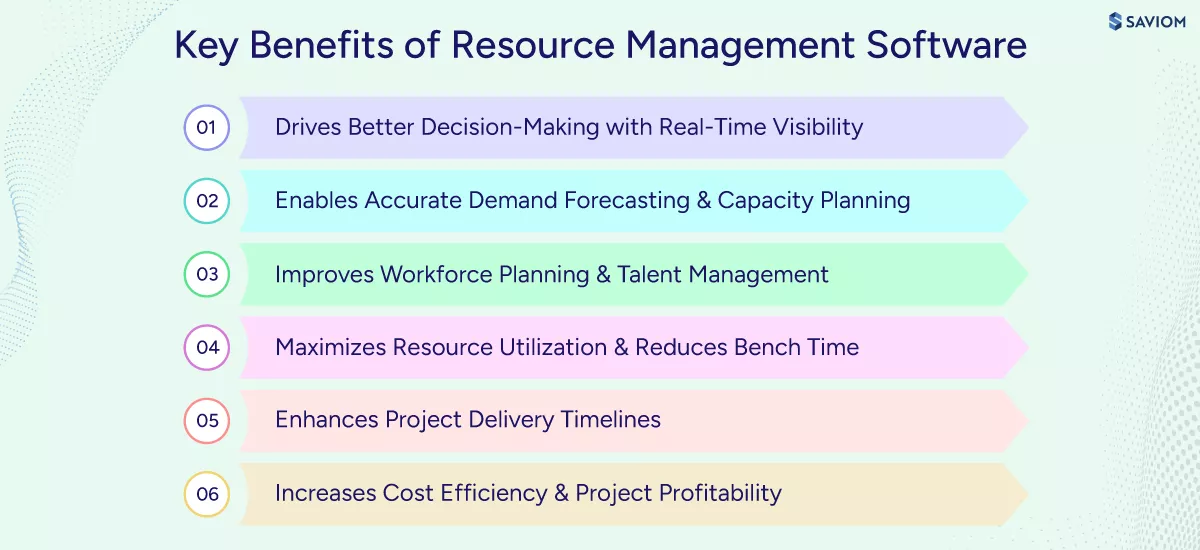
Drives Better Decision-Making with Real-Time Visibility
A resource management system provides a centralized view into key resource attributes like capacity, availability, utilization, etc. This single source of truth eliminates fragmented data and assumptions, enabling leaders to make data-driven decisions. Moreover, with real-time insights, managers can prioritize high-value initiatives and align resource allocation with strategic business goals.
Understand what resource management is and its importance in firms.
Enables Accurate Demand Forecasting and Capacity Planning
An advanced resource management software allows firms to accurately anticipate future demand based on project pipelines, historical data, and workload trends. This offers early visibility into resource shortages/excesses, enabling managers to make workforce planning decisions proactively. As a result, this reduces last-minute firefighting.
Improves Workforce Planning and Talent Management
With a robust resource management platform, firms can clearly identify existing skill gaps and proactively plan talent management initiatives. This allows businesses to build a future-ready workforce and ensure the right expertise is available when needed. Thus, firms can meet future project demands effectively.
Read our blog on strategic workforce planning and understand its benefits.
Maximizes Resource Utilization and Reduces Bench Time
By implementing a powerful resource management tool, managers can track resource utilization and gain real-time visibility into over-/underutilization. In case of discrepancies, they can mobilize resources to improve billable utilization and minimize bench time. As a result, firms can increase productivity and prevent burnout caused by uneven workload distribution.
Enhances Project Delivery Timelines
Resource management software helps managers identify and allocate the most suitable talent to projects. This minimizes delays caused by overbooking, last-minute changes, or skill mismatches, and ensures work progress as scheduled. As a result, organizations can improve delivery timelines and ensure projects are completed within the scope and budget.
Explore our guide on project resource management.
Increases Cost Efficiency and Project Profitability
Advanced resource management software enables firms to forecast project demand and plan resource capacity more accurately, preventing costly last-minute hirings. Moreover, the right solution helps optimize resource utilization, reduce bench time. As a result, organizations can maximize ROI from the existing workforce, control delivery costs, and improve overall profitability.
Given the advantages, we will explore the common signs firms encounter that indicate the need for a resource management system.
Signs You Need Resource Management Software in Your Firm
Many organizations operate with hidden inefficiencies in resource management until they begin to affect project outcomes. These signs often indicate that existing tools and processes can no longer support efficient planning. Here are some signs that suggest the same:
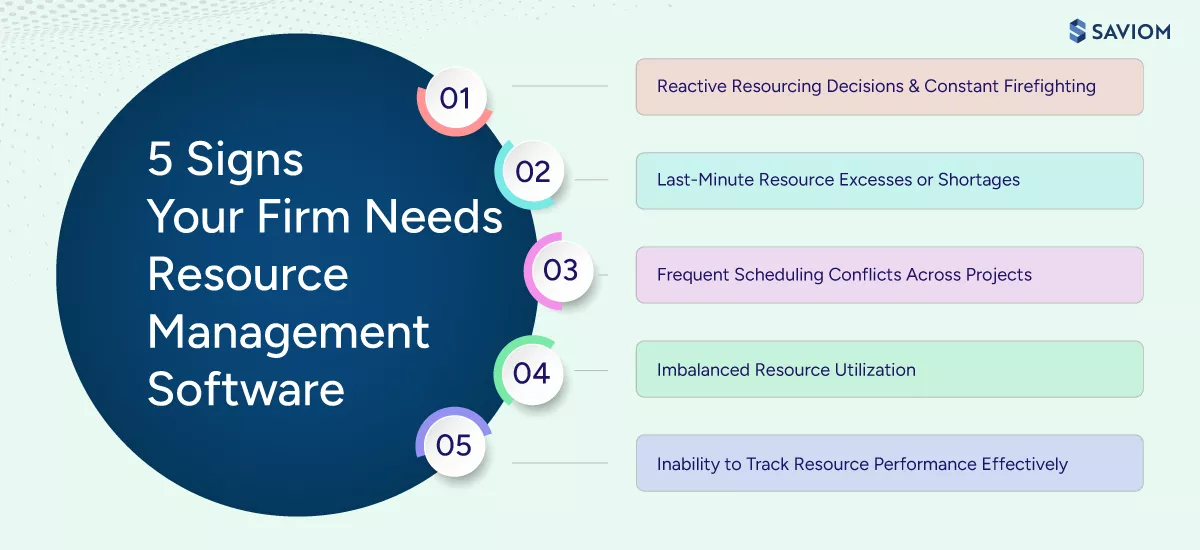
Reactive Resourcing Decisions and Constant Firefighting
Resource allocation decisions are largely reactive, driven by urgent project demands. Managers spend significant time reshuffling resources, reprioritizing work, and resolving allocation conflicts. As priorities shift frequently, delivery timelines become unpredictable, and teams operate in constant firefighting mode.
Read our blog on resource risks and how to mitigate them effectively.
Last-Minute Resource Excesses or Shortages
Resource gaps or excess capacity are often identified too late in the project lifecycle due to a lack of structured resource forecasting and capacity planning. Critical roles remain unfilled, causing delays, while some resources stay underutilized due to poor demand visibility. As a result, staffing decisions become rushed.
Frequent Scheduling Conflicts Across Projects
According to PMI’s survey, “Competition for limited resources is the primary reason for project scheduling conflicts.”
Shared resources are regularly assigned to multiple projects simultaneously due to limited cross-project visibility. Scheduling conflicts are typically discovered after allocations are made, leading to repeated rescheduling and shifting priorities. This creates confusion around ownership, impacts productivity, and reduces confidence in project timelines.
Understand what resource booking is and its key best practices.
Imbalanced Resource Utilization
Workloads are unevenly distributed across the workforce, with high-performing resources consistently overloaded while others remain underutilized. This imbalance increases the risk of burnout, reduces employee engagement, and limits overall workforce productivity.
Inability to Track Resource Performance Effectively
Organizations lack centralized visibility into billable utilization, productivity, and overall performance. Performance tracking relies heavily on manual effort or fragmented tools, making it difficult to identify high performers, detect skill gaps, or optimize allocations. As a result, workforce decisions around staffing, training, and hiring are often based on assumptions rather than data.
Check out our blog on billable utilization.
In the following section, we shall explore the key features that should be considered to select a resource management software and that will help overcome the above-mentioned challenges.
Core Features that a Resource Management Tool Must-Have
Selecting the right resource management tool requires a clear understanding of the core capabilities. They determine how effectively organizations can manage capacity, optimize utilization, and respond to changing business demands. Given below are a few core functionalities that a resource management tool must have:
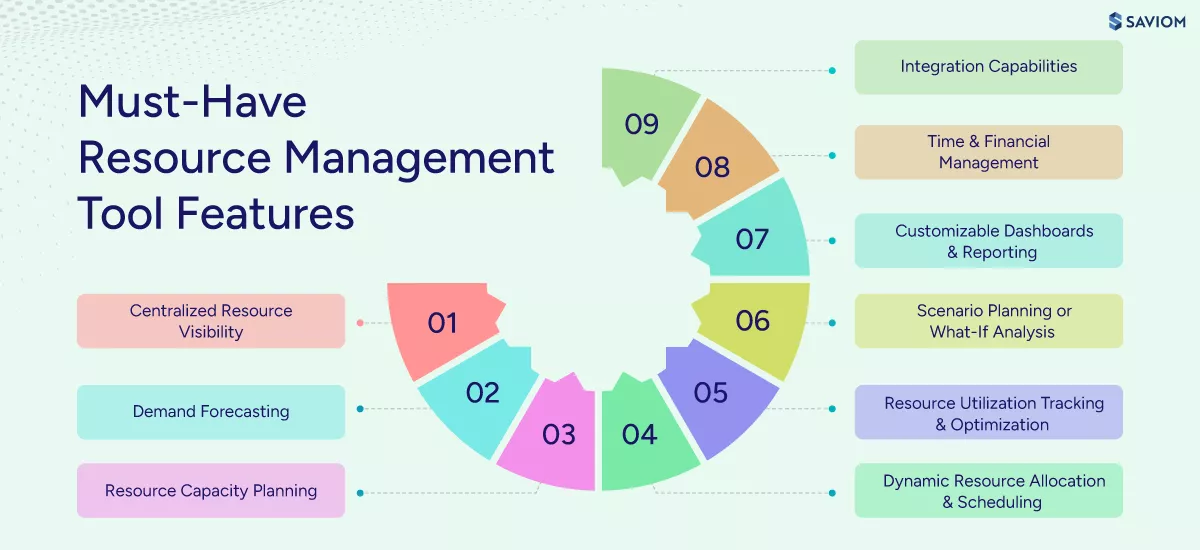
Centralized Resource Visibility
A resource management tool should provide a centralized view of all resources across projects, departments, and locations. This bird’s-eye view helps managers quickly understand who is available, who is overloaded, and where capacity gaps exist. This improves planning accuracy, prevents conflicts, and enables faster, data-driven decision-making across teams.
Demand Forecasting
A robust software should forecast future resource demand using historical data and project pipelines. By continuously updating projections based on real-time project changes, the tool improves forecast accuracy and helps organizations anticipate upcoming workloads. This creates a clear, forward-looking view of workload distribution, enabling leaders to make informed staffing decisions.
Read more on resource capacity requirement planning.
Resource Capacity Planning
Another critical feature is resource capacity planning, which helps identify shortages and excesses in advance by comparing available supply with projected demand. This includes calculating available capacity by analyzing availability, working hours, non-project commitments, etc. Moreover, it also highlights over-/underutilization risks, thereby supporting balanced resource planning.
Dynamic Resource Allocation and Scheduling
A resource management solution should support resource allocation and scheduling to accommodate changing priorities and project demands. It should match resources to projects based on skills, experience, availability, and role requirements. When timelines shift or priorities change, managers should be able to reallocate resources in real-time, improving project execution and delivery outcomes.
Learn more about resource scheduling and how it helps in successful project delivery.
Resource Utilization Tracking and Optimization
The tool should offer the ability to track utilization rates at individual, team, and role levels to gain clear insights into workforce productivity. It should highlight inefficiencies such as underutilized resources or employees at risk of burnout due to excessive workload. With these insights, managers can implement resource optimization strategies, improve workload balance, and maximize billable utilization.
Scenario Planning or What-If Analysis
As per Goodfirms’ survey, “33.6% of organizations use scenario planning to enhance decision-making.”
Scenario planning capability enables firms to simulate and evaluate multiple resource plans in a sandbox environment before making commitments. It involves modeling situations such as new project intake, resource shortages, budget constraints, etc., and assessing the impact of each scenario in advance. As a result, managers can plan for uncertainties and select the most feasible resource plan.
Explore more about the project intake process.
Customizable Dashboards and Reporting
A resource management tool should provide real-time visibility into KPIs such as capacity, utilization, and forecast vs. actuals. It should also offer role-based, customizable dashboards so executives can access strategic insights while managers track operational metrics relevant to their responsibilities. These reporting capabilities support data-driven decision-making and help organizations monitor performance against business goals.
Time and Financial Management
Time and financial management capabilities help organizations track billable and non-billable work and understand how resource time impacts project costs and profitability. These features also enable teams to monitor budgets, compare planned vs. actual effort, and calculate resource costs based on roles. With these insights, managers can make informed allocation decisions that maximize billable utilization, improve estimation accuracy, and boost overall profitability.
Learn key steps to develop an effective project budget.
Integration Capabilities
A resource management tool should integrate seamlessly with existing business systems such as project management, HR, finance, and collaboration tools. These integrations ensure consistent data flow across platforms and eliminate information silos. With unified data, organizations gain a holistic view of workforce, financial, and project information. Consequently, this improves overall operational efficiency.
To understand how 5th gen resource management is critical for firms, read our comprehensive eBook.
Not all resource management tools are built for the same purpose; understanding their differences is critical to avoid capability gaps as your business grows.
Enterprise vs. Basic Resource Management Tools: Key Differences
While enterprise resource management solutions are designed for dynamic, large-scale environments, basic tools are suited for simpler, less demanding use cases. This distinction plays a critical role in ensuring operational efficiency and long-term scalability. Given below is a table highlighting the critical differences between the two:
| Aspects | Enterprise Resource Management Tools | Basic Resource Management Tools |
|---|---|---|
| Scalability | Supports large teams, multiple projects, and global operations | Limited to small teams and simple project environments |
| Feature Depth & Capabilities | Comprehensive capabilities including capacity planning, forecasting, skill-based allocation, scenario planning, and automation | Limited to static planning, basic scheduling, allocation, and visibility features |
| Integration Ecosystem | Seamlessly integrates with ERP, PPM, HR, and financial systems | Limited or no integration with enterprise systems |
| Customization & Flexibility | Highly configurable to support complex workflows and business rules | Minimal customization with rigid workflows |
| Reporting & Analytics | Advanced dashboards with real-time insights and executive-level reporting | Basic reporting with limited actionable insights |
| User Access & Governance | Role-based access control with strong governance and audit capabilities | Limited user roles and access control features |
| Cost vs Long-Term Value | Higher investment with strong long-term ROI and scalability | Lower cost but limited long-term value and scalability |
| Best Fit For | Enterprises, PMOs, and complex, resource-intensive environments | Small teams or organizations with simple resource planning needs |
Discover more on enterprise resource management.
Now that you understand the difference between basic and enterprise resource management tools, let us understand the key steps to evaluate and select the best-fit resource management software.
How to Evaluate Resource Management Software? (Step-by-Step)
A systematic evaluation process to select resource management software helps organizations move beyond surface-level comparisons and assess how well it supports business objectives, real-world workflows, decision-making needs, and future growth. Here are the key steps involved:
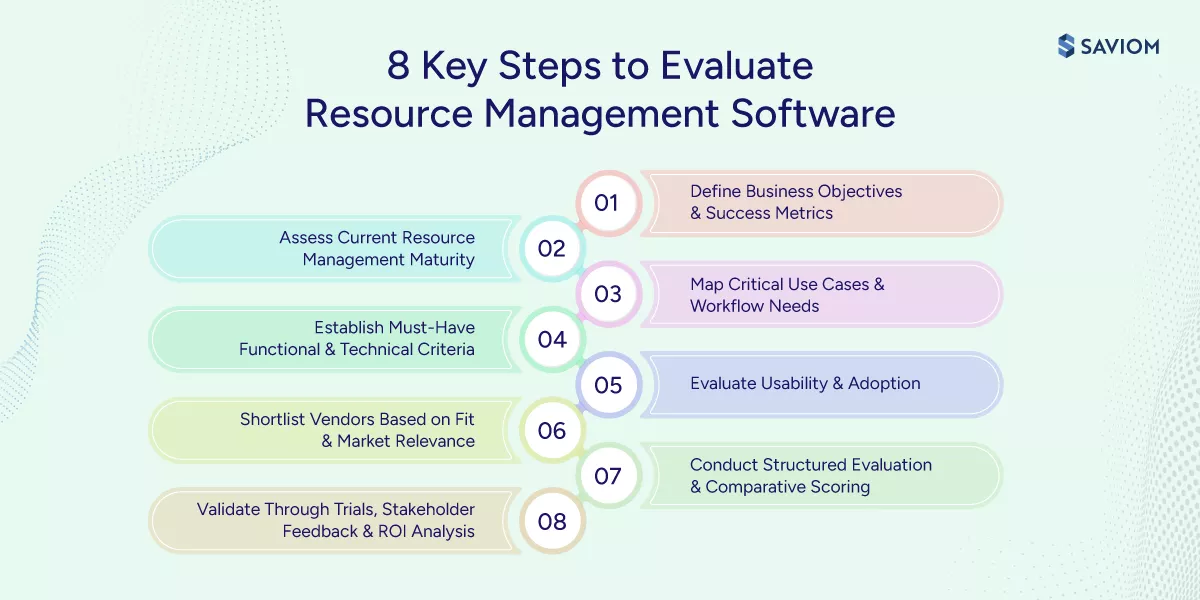
Define Business Objectives and Success Metrics
This first step ensures the evaluation stays anchored in measurable business outcomes rather than generic feature comparisons. When these objectives are aligned with broader priorities such as growth, cost control, or scalability, the selection process becomes more purposeful and strategic. Also, establishing relevant KPIs helps track and assess post-implementation performance.
Learn key operational metrics that firms should track.
Assess Current Resource Management Maturity
In this second step, firms must assess the current resource management maturity model level by evaluating tools, processes, and planning accuracy. This helps identify gaps in elements such as visibility, resource forecasting, allocation efficiency, etc. Moreover, it also clarifies whether the requirement is primarily operational, tactical, or strategic, ensuring that the selected solution addresses the right level of complexity.
Map Critical Use Cases and Workflow Requirements
The third step involves mapping critical workflows to ensure that the solution aligns with how resource planning works within the organization. Additionally, by capturing role-specific requirements across managers, teams, and leadership, the evaluation reflects real-world usage. Moreover, factoring in complexities, such as multi-project environments and skill dependencies, ensures the tool can handle operational realities without creating additional friction.
Understand what operational planning is and its key benefits.
Establish Must-Have Functional and Technical Criteria
In this step, managers must define must-have functional and technical criteria to keep the evaluation focused on business-critical needs. This includes essential capabilities, such as capacity planning and unified resource visibility, along with requirements such as integrations, scalability, and data architecture. Assessing solutions against these parameters enables a more informed and effective selection.
Evaluate Usability and Adoption
Here, firms must evaluate the tool to ensure it can be effectively used by resource managers, project managers, and leadership without friction. A solution with a steep learning curve and high change management effort can slow adoption and reduce overall value. By prioritizing intuitive workflows and role-based access, firms can enable seamless adoption across teams, ensuring consistent usage and long-term success.
Shortlist Vendors Based on Fit and Market Relevance
Now, firms should shortlist vendors by focusing on solutions that align closely with their industry, organizational scale, and operational complexity. By filtering out tools that fail to meet critical requirements, firms can place great attention on vendors with proven expertise in resource management, ensuring a more reliable and contextually relevant selection.
Conduct Structured Evaluation and Comparative Scoring
Here, firms must use standardized scoring models to compare tools on consistent parameters. This makes it easier to assess trade-offs between usability, flexibility, and feature depth based on actual business needs. By grounding decisions in quantifiable criteria rather than marketing influence, organizations can ensure a more reliable and outcome-driven selection.
Validate Through Trials, Stakeholder Feedback, and ROI Analysis
Finally, test the shortlisted tools through real-world scenarios to ensure they perform effectively within actual workflows rather than controlled demos. Incorporating feedback from cross-functional stakeholders helps confirm alignment with diverse operational needs and improves adoption readiness. Also, assessing the total cost of ownership along with expected ROI further ensures the final decision is financially sound.
Check out our blog on project stakeholders and ways to manage them.
Having established the steps to select resource management software, let us shift our focus to common mistakes that firms often make while choosing it.
Common Mistakes to Avoid When Choosing a Resource Management Tool
Even with a structured evaluation approach, organizations often encounter common pitfalls that can undermine the effectiveness of their resource management software selection and limit long-term value realization. Here are a few common mistakes to avoid while choosing:
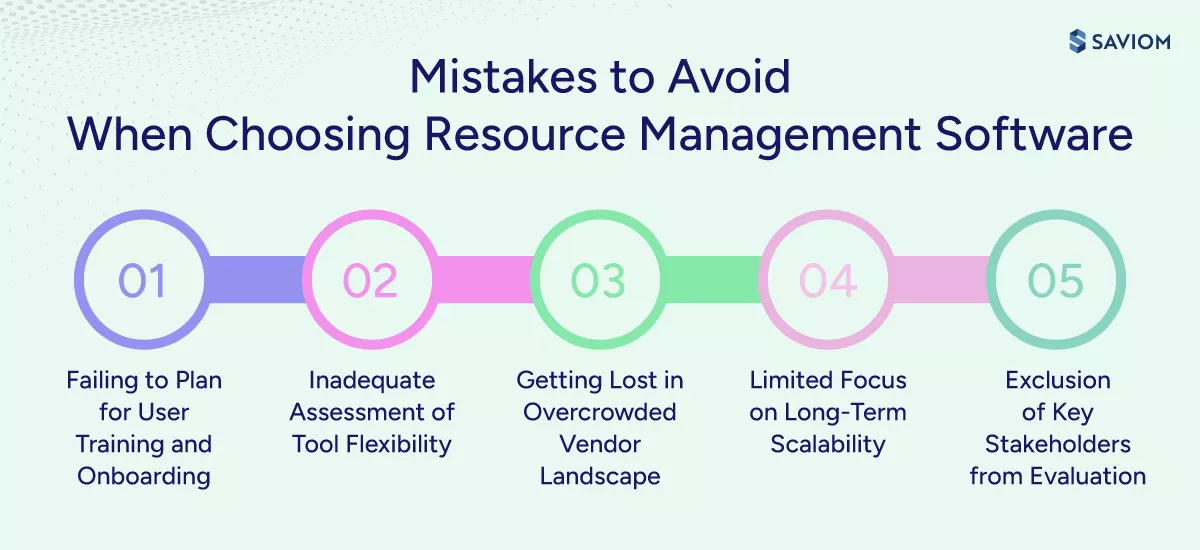
Failing to Plan for User Training and Onboarding
Underestimating the effort required for effective adoption often leads to gaps in how the tool is used across teams. Without structured training, usage becomes inconsistent, resulting in reduced confidence in the system. This ultimately delays the realization of expected benefits.
Discover our blog on effective onboarding process for employee satisfaction.
Inadequate Assessment of Tool Flexibility
Many organizations fail to evaluate how well a tool adapts to changing priorities, shifting timelines, and evolving resource demands. Rigid systems struggle to accommodate dynamic project environments, forcing teams to rely on manual workarounds. These flexibility limitations often become evident only after implementation, impacting long-term usability.
Difficulty in Navigating an Overcrowded Vendor Landscape
With numerous vendors offering similar capabilities, organizations often struggle to differentiate between solutions. Marketing-heavy messaging can obscure actual product strengths, while the lack of standardized evaluation benchmarks complicates comparisons. This makes it difficult to objectively identify the best-fit solution.
Limited Focus on Long-Term Strategic Fit and Future Scalability
Organizations frequently prioritize immediate needs without assessing whether the tool can support future growth. Limited evaluation of scalability, evolving use cases, and product roadmap creates uncertainty over long-term value. As business complexity increases, the tool may struggle to meet expanding requirements.
Exclusion of Key Stakeholders from Evaluation
The lack of input from key stakeholders like resource managers, project managers, and leadership often results in a solution that does not align with actual operational needs. This also increases resistance during implementation, introduces unnecessary risks, and slows down overall success.
In the following section, we shall understand why SAVIOM’s next-gen resource management software is the ultimate solution for these challenges.
What Makes SAVIOM Ideal for Enterprise Resource Management?
Here is why SAVIOM stands out as the ultimate choice for enterprises seeking to improve resource management processes and enhance financial performance.
5th Gen Resource Management Capabilities
SAVIOM’s 5th-generation resource management software offers advanced functionalities such as KPI forecaster, embedded capacity planner, intelligent matchmaking, early warning system, real-time BI reporting, and scenario modeling. These capabilities help organizations accelerate maturity, maximize billable utilization, and stay competitive in complex project environments.
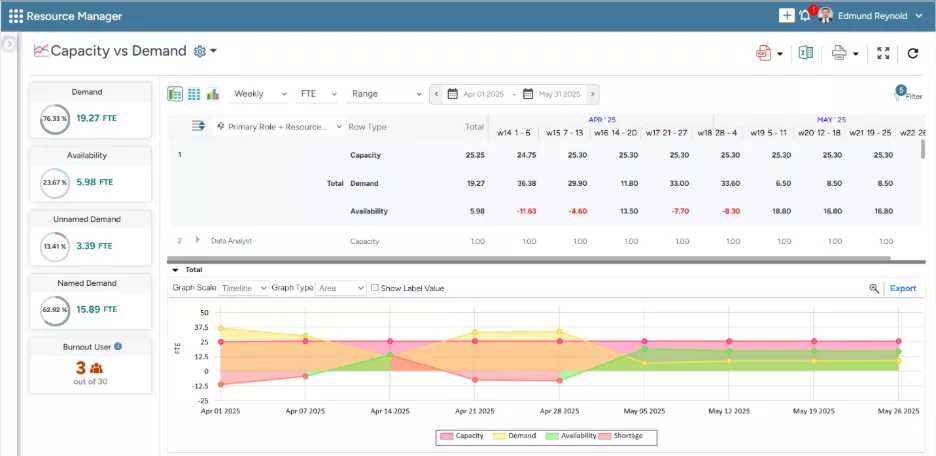
SAVIOM’s Capacity vs. Demand dashboard helps managers identify demand gaps, enabling quick, data-driven decisions.
Highly Configurable and Adaptable Solution
SAVIOM offers role-based customized reports and configurable dashboards for different stakeholders based on their preferences, ensuring executives gain strategic insights while managers and team leads access operational metrics relevant to their responsibilities. This tailored visibility improves decision-making, enhances transparency, and enables each stakeholder to focus on the data that matters most.
Pioneer and Market Leader of Resource Management
As a recognized market leader in enterprise resource management, SAVIOM has earned the trust of many Fortune 500 companies and market leaders, including Verizon, Fujitsu, ABB, Siemens, Alix Partners, and Grant Thornton. Our solutions are deployed across diverse industries in 50+ countries, enabling global businesses to maximize billable utilization and streamline project delivery.
Enterprise-Grade Scalability for Growing Business Needs
SAVIOM supports deployment across multiple teams, departments, and geographies without operational friction. It is designed to manage large resource pools and complex project structures while maintaining performance as data volumes grow. This allows organizations to expand seamlessly, without the need to replace or reconfigure systems as business demands evolve.
Seamless Integration with Existing Enterprise Systems
SAVIOM integrates seamlessly with enterprise systems such as ERP, PSA, HRMS, and project management platforms, creating a unified planning environment across the organization. This ensures consistent data flow between systems and provides a single source of truth for resource, project, and financial information. By eliminating manual data transfers and reducing information silos, the integration improves data accuracy and enhances cross-functional collaboration.
Comprehensive Training and Ongoing Support Services
Structured onboarding and training programs are provided by SAVIOM to accelerate user adoption. Backed by dedicated support throughout implementation and transition, it minimizes disruption and ensures a smooth rollout. Additionally, they offer ongoing expert guidance and best practices, enabling organizations to continuously optimize their resource management processes.
Faster Time-to-Value and High Return on Investment
SAVIOM’s advanced forecasting and capacity planning capabilities enable firms to address resource gaps and avoid costly last-minute staffing decisions proactively. It enables teams to assign the right expertise to projects, while keeping resource deployment within budget. The automated resource requesting process further reduces administrative overhead, contributing to higher ROI.
Read the blog on ways to select the best software using cost-benefit analysis.
After evaluating features, capabilities, and vendor fit, organizations need a practical way to consolidate their decision criteria. This checklist helps translate evaluation insights into a structured, actionable process to select resource management solution.
Resource Management Software Selection Checklist
Use this checklist to systematically evaluate tools against business needs, ensuring the selection is driven by measurable outcomes, scalability, and long-term value rather than surface-level features.
| Category | Checkpoints | |
|---|---|---|
| Business Alignment | Does the tool align with your core business objectives? | |
| Does it support your key resource management use cases? | ||
| Are success metrics (KPIs) clearly defined and supported? | ||
| Feature & Capability Validation | Does it include all must-have features? | |
| Are advanced capabilities available if needed? | ||
| Usability & Adoption | Is the interface intuitive for all user roles? | |
| Can teams adopt the tool with minimal training? | ||
| Does it fit into existing workflows without disruption? | ||
| Integration & Technical Fit | Does it integrate with your ERP, HR, and project management systems? | |
| Are APIs available for customization and automation? | ||
| Is data migration feasible and low-risk? | ||
| Scalability & Future Readiness | Can the tool scale with increasing users, projects, and complexity? | |
| Does it support multi-project and cross-functional environments? | ||
| Is the product roadmap aligned with future business needs? | ||
| Cost & ROI Evaluation | Is the total cost of ownership (license + implementation + support) clear? | |
| Does the expected ROI justify the investment? | ||
| Are there hidden or long-term costs involved? | ||
| Vendor Reliability & Support | Does the vendor have proven industry experience? | |
| Are support, onboarding, and SLAs clearly defined? | ||
| Is there evidence of successful implementations (case studies, clients)? | ||
| Security & Compliance | Does the tool meet your organization’s security standards? | |
| Are data privacy and access controls well-defined? | ||
| Final Validation | Has the tool been tested through demos or trials using real scenarios? | |
| Have all key stakeholders approved the selection? | ||
| Does it score highest based on your evaluation criteria? | ||
| Final Decision | Go / No-Go Decision Confirmed |
Conclusion
To select resource management software is rarely a one-time decision—it’s a commitment to how your organization plans, allocates, and scales its most critical asset: its people.
When decisions are driven by clear business outcomes rather than features alone, the tool becomes a strategic enabler of predictable delivery, optimized utilization, and sustained performance. Thus, as complexity grows and demand becomes more dynamic, organizations that invest in the right solution position themselves to respond with agility and confidence.
Frequently Asked Questions
Resource management software is a tool used to plan, allocate, and monitor resources across projects. It helps organizations track availability and utilization, enabling efficient scheduling, better capacity planning, and improved project execution.
Some of the key advantages of implementing a resource management tool include:
1. Drives better decision-making with real-time visibility
2. Enables accurate demand forecasting & capacity planning
3. Improves workforce planning & talent management
4. Maximizes resource utilization & reduces bench time
5. Enhances project delivery timelines
6. Increases cost efficiency & project profitability
Given below are the must-have features firms should consider to select resource management software:
1. Centralized resource visibility
2. Demand forecasting
3. Resource capacity planning
4. Dynamic resource allocation and scheduling
5. Resource utilization tracking and optimization
6. Scenario planning or what-if analysis
7. Customizable dashboards and reporting
8. Time and financial management
9. Integration capabilities
Recurring signs that indicate the need for a resource management tool are:
1. Reactive resourcing decisions & constant firefighting
2. Last-minute resource excesses or shortages
3. Frequent scheduling conflicts across projects
4. Imbalanced resource utilization
5. Inability to track resource performance effectively
The steps to select resource management software are as follows:
1. Define business objectives & success metrics
2. Assess current resource management maturity
3. Map critical use cases & workflow requirements
4. Establish must-have functional & technical criteria
5. Evaluate usability & adoption
6. Shortlist vendors based on fit and market relevance
7. Conduct a structured evaluation & comparative scoring
8. Validate through trials, stakeholder feedback & ROI analysis
Some common mistakes to avoid when firms select resource management software:
1. Failing to plan for user training and onboarding
2. Inadequate assessment of tool flexibility
3. Difficulty in navigating an overcrowded vendor landscape
4. Limited focus on long-term strategic fit & future scalability
5. Exclusion of key stakeholders from evaluation
Industries that need resource management tools the most include IT services, accounting & audit, engineering & construction, and professional services. These industries rely heavily on shared resources across multiple projects, making it essential to manage capacity, ensure the right skills are allocated efficiently, and optimize utilization to meet project demands.