


Introduction
Resource scheduling is only one piece of effective project delivery. As organizations grow, they need deeper visibility into resource capacity, skill availability, workload distribution, and future demand to ensure projects stay on track and teams remain productive.
While Float offers a clean and practical way to schedule resources, organizations managing multiple projects, distributed teams, or evolving resource needs require broader capabilities. They often look for solutions with stronger capacity planning, intelligent resource allocation, workload balancing, forecasting, and reporting.
This article compares six top Float alternatives, highlighting where each tool fits, its key strengths & use cases, and how it can support smarter resourcing decisions.
Top Float Alternatives: A Quick Comparison
Each Float alternative brings a different approach to resource capacity planning, demand forecasting, scheduling, workload management, and reporting. The comparison below gives you a concise overview of the leading options, their core strengths, and where each tool fits best.
 Medium to enterprise-level organizationsForecasting, capacity planning, skills-based allocation, utilization tracking, scenario planning, and real-time dashboards60-day free trial and demo available
 Small to mid-sized organizationsResource calendar, clash management, leave tracking, reports, and equipment management30-day free trial
 Small to medium-sized organizationsReal-time resource planning, capacity forecasting, reports & analytics, and project budgeting30-day free trial
 Startups and small to mid-sized businessesWorkload scheduling, capacity views, time tracking, and custom dashboardsFree plan and demo available
 Small to large organizationsWorkload tracking, capacity planning, dashboards, automation, and reports30-day free trial and demo available
 Small, mid- and large organizationsAI- based workload alerts, capacity forecasting, executive reporting, and team collaborationFree plan and 14-day free trial available
Now that we have summarized the leading options at a glance, let us explore the evaluation criteria on which these resource management tools were chosen.
How Did We Evaluate These Float Alternatives?
A strong Float alternative should do more than show who is available and when. It should help managers plan future capacity, quickly adjust allocations, track resource utilization, and make confident staffing decisions across projects, departments, and locations.
To compare these Float alternatives, we looked at the capabilities that matter most for growing project resource teams:
Enterprise Scalability
The software should support expanding teams, multiple departments, distributed locations, complex project portfolios, user permissions, and governance requirements.
Resource Forecasting & Predictive Planning
A reliable Float alternative should help managers forecast future demand, identify upcoming resource gaps, plan hiring needs, and prepare for changes to the project pipeline.
Resource Capacity Planning
The platform should help identify capacity vs. demand gaps, resource shortages, excess capacity, and future workforce requirements.
Check out our blog on capacity planning and meet project demands effectively.
Flexible Resource Scheduling & Allocation
Teams should be able to assign, reassign, and adjust resources based on availability, workload, skills, project priority, and changing demand.
Resource Utilization Optimization
The tool should provide insights into different utilization types and, accordingly, help managers take necessary actions to improve resource utilization.
Reporting & Analytics
The platform should offer useful dashboards and reports for resource managers, PMOs, delivery leaders, executives, and finance teams.
Scenario Modeling
The software should support what-if planning for hiring, outsourcing, project delays, timeline changes, demand shifts, and priority changes.
Customization & Integrations
The tool should enable teams to tailor fields, workflows, dashboards, reports, resource attributes, and views to match their operating model. It should also integrate seamlessly with project management, HR, and other business systems.
Pricing & Trial Access
The vendor should provide clear pricing information and give buyers a practical way to evaluate the software through a demo, free trial, or guided product walkthrough.
Dive into our resource management buyer's guide to make informed selections.
Having understood the checklist, let's move on to explore some Float alternatives.
Best Float Alternatives for Efficient Resource Management
SAVIOM
Excellent for Enterprise Resource Management
Best for: Medium to enterprise-level organizations.
Pricing: Custom pricing.
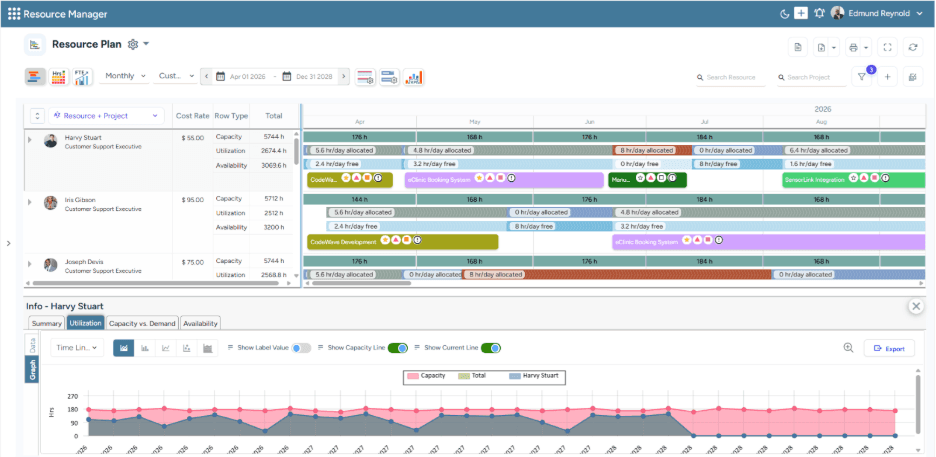
SAVIOM's All-in-One Resource Plan dashboard helps visualize current capacity, utilization, and availability in a centralized view.
SAVIOM is a strong Float alternative for organizations that have outgrown simple resource planning and need a more strategic approach to enterprise resource management. While Float works well for visual scheduling, SAVIOM is built for teams that require demand forecasting, governance, utilization optimization, skills-based allocation, scenario planning, and advanced capacity planning across large project portfolios.
Key Features:
- Resource forecasting and predictive planning
- Resource capacity planning
- Intelligent matchmaking
- Resource utilization optimization
- Scenario modeling
- Resource financial planning
- Bench management
- Real-time BI reports and analytics
Why Choose SAVIOM Over Float?
Choose SAVIOM if your organization is managing multiple departments, global teams, or complex delivery pipelines. This Float alternative is especially useful when leadership needs visibility into demand, capacity, availability, utilization, financial performance, and future staffing gaps. It enables managers to move beyond day-to-day schedules and become future-ready to beat market volatility.
For an in-depth understanding of benefits, types, key metrics, challenges, and best practices, read our resource management guide.
Resource Guru
Best for Visual Resource Scheduling
Best for: Small to medium-level organizations.
Pricing: The annual billing starts with the Grasshopper plan at $4.16 per person/month. The Blackbelt plan costs $6.65 per person/month, and the Master Plan costs $10 per person/month.
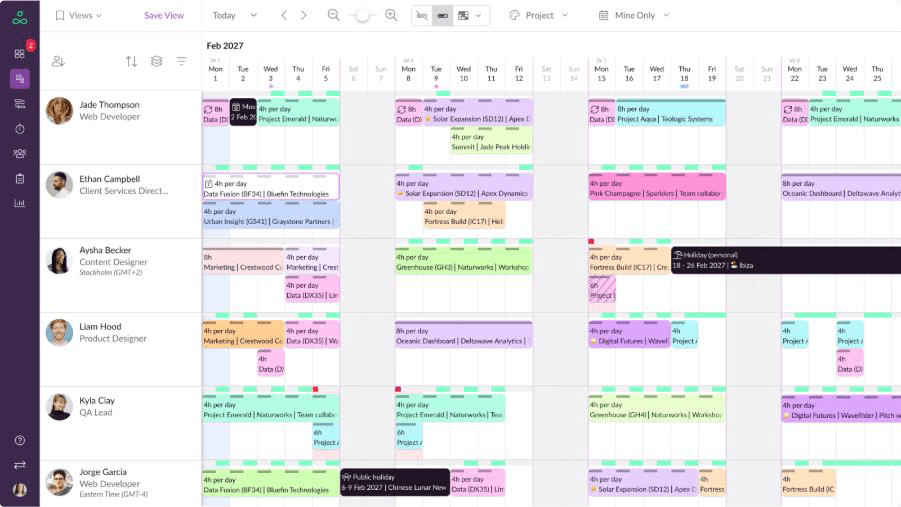
Resource Guru's Resource Scheduling dashboard to visualize and manage clashes faster.
Resource Guru is a practical Float alternative for teams that want simple resource booking with clear visibility into availability. Its strengths lie in resource calendars, scheduling conflicts, leave tracking, and shared schedules, making it a good fit for businesses that want an easy way to manage people, rooms, equipment, or other resources without adding unnecessary complexity.
Key Features:
- Resource calendar
- Multi-resource bookings
- Tentative and repeat bookings
- Clash management
- Leave management
- Timesheets
- Equipment management
- Project forecasting reports
Why Choose Resource Guru Over Float?
Choose Resource Guru if your team wants an easy-to-use scheduling platform with minimal setup complexity. Its clash management feature is particularly helpful for teams that frequently deal with competing resource requests. Beyond people scheduling, it can manage equipment, meeting rooms, and other non-human resources.
Explore our blog on Resource Guru alternatives for a deeper comparison of similar resource management tools.
Runn
Perfect for Forecasting and Financial Planning
Best for: Small to medium-sized organizations.
Pricing: The annual billing starts with Lite at $7 per resource seat/month and Standard at $11. The Advanced plan is available at custom quote-based rates.
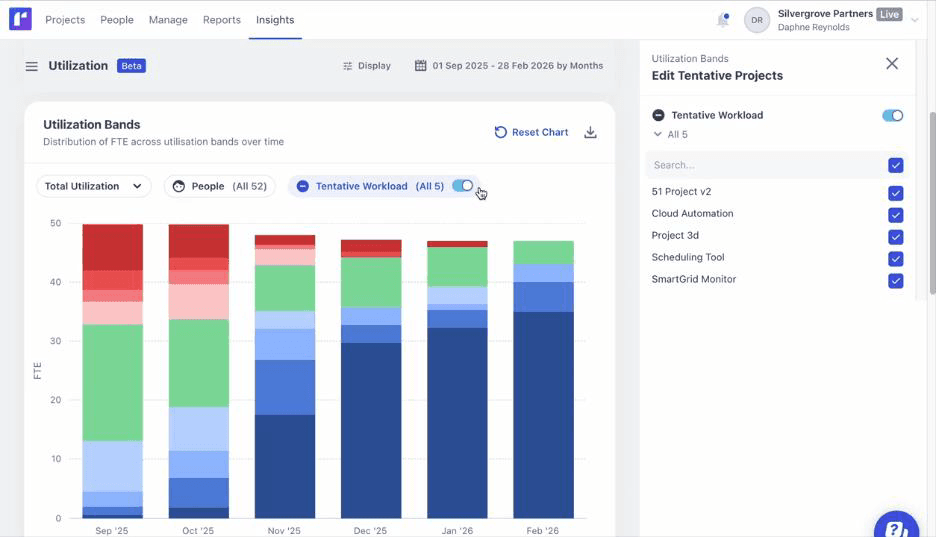
Runn's utilization forecasting dashboard helps forecast current and future workload based on project demands.
Runn is a strong Float alternative for teams that need resource planning with deeper forecasting and project financial visibility. It is especially useful for service-based businesses that want to connect people planning with project budgets, revenue, workload, and future demand. With features such as timesheets, utilization insights, and what-if planning, Runn helps teams adjust allocations quickly, evaluate resourcing scenarios, and make better staffing decisions as project priorities change.
Key Features:
- Capacity management
- Resource demand forecasting
- Project planning
- Resource scheduling
- Placeholder planning
- Utilization heatmaps
- Timesheets
Why Choose Runn Over Float?
Choose Runn if your team needs stronger forecasting, better utilization visibility, and more robust project financial planning. It helps managers forecast project demand, plan assignments, and track resource utilization in a single connected workspace.
ClickUp
Ideal for Project and Workload Management
Best for: Startups and small to large-sized businesses.
Pricing: The annual billing starts with Basics at $9.99 per user/month, Accelerate at $24.99, and Optimize & Enterprise plans at custom rates.
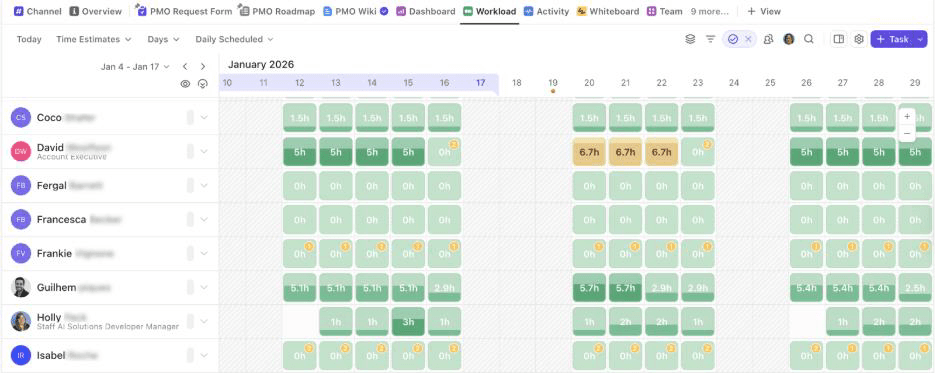
ClickUp's workload view helps visualize the team's work and capacity over time to ensure optimal employee engagement.
ClickUp is a versatile Float alternative for teams that need workload visibility alongside task management, documents, goals, dashboards, and collaboration. Unlike Float, which is primarily focused on resource scheduling, ClickUp works as a broader work management platform. Moreover, its custom dashboards and reporting features allow managers to track project performance, priorities, and team progress across different workstreams.
Key Features:
- Task management
- Custom project views
- Workflow automation
- Native time tracking
- Portfolio management
- Collaboration docs
- API integrations
Why Choose ClickUp Over Float?
ClickUp is better suited for teams that need a flexible work management platform rather than a dedicated resource management system. The tool offers workload views, task priorities, time estimates, dashboards, Gantt charts, dependencies, and time tracking, helping teams connect capacity visibility with actual project work.
Smartsheet
Great for Project and Portfolio Planning
Best for: Small to mid-sized and large organizations.
Pricing: The annual billing starts at $9 per member/month for the Pro plan and $19 for the Business plan. The Enterprise and Advanced Work Management plans are available at custom quote-based rates.
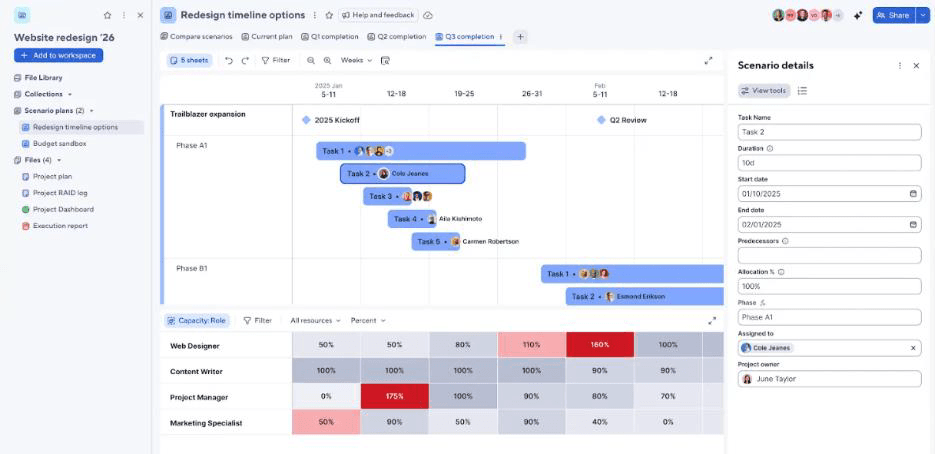
Smartsheet's scenario planning features help create and compare multiple resource plans and explore their outcomes before commitment.
Smartsheet is a strong Float alternative for organizations that need resource planning integrated with broader project and portfolio management workflows. It is often useful for teams that already rely on spreadsheets but need more control, automation, reporting, and visibility. Instead of focusing only on resource calendars, Smartsheet helps organizations manage project plans, approvals, timelines, budgets, reports, dashboards, and cross-team workflows.
Key Features:
- Project planning
- Capacity planning
- Resource allocation
- Workload tracking
- Scenario planning
- Workflow automation
- API integrations
Why Choose Smartsheet Over Float?
Smartsheet is a strong option for organizations that need more visibility across projects, resources, and delivery progress. Its workload tracking, automation, reporting, and portfolio-level views help teams improve coordination, monitor capacity, and make resource planning a more connected part of project execution.
Explore our SAVIOM vs. Smartsheet comparison to choose the right tool for resource management and capacity planning.
Monday.com
Best for Flexible Workflow and Workforce Planning
Best for: Small, medium, and large organizations.
Pricing: Public pricing that varies by region, team size, and plan. The annual pricing starts with the free plan, then the Basic plan at $9 per seat/month, Standard at $12, Pro at $19, and Enterprise at a quote-based price.
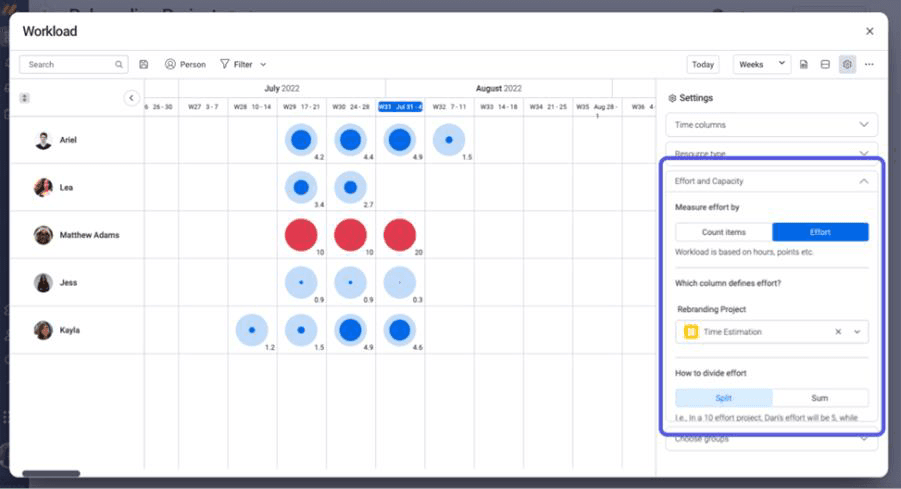
Monday.com's Workload Management dashboard helps track booked hours, assigned tasks, and available capacity.
Monday.com is a flexible Float alternative for teams that want resource planning to work alongside project tracking and workflow management. With visual views such as Timeline, Gantt, Kanban, Calendar, and Workload, teams can plan tasks, assign owners, monitor workloads, and track project progress in one place. Its dashboards, automations, no-code customization, and integrations help managers improve visibility, reduce manual coordination, and keep resource planning connected with everyday execution.
Key Features:
- Workload widgets and views
- Gantt charts and kanban boards
- AI-assisted risk insights
- AI-assisted resource allocations
- Workflow automation
- Capacity manager
- Portfolio dashboards
Why Choose Monday.com Over Float?
Choose Monday.com over Float if your team needs a more adaptable way to organize resource-related work across different departments, projects, and approval flows. It gives teams the flexibility to build workflows around how work actually moves, from requests and assignments to updates, dependencies, and delivery tracking, thereby supporting wider team coordination.
Read our blog to learn the structured process of resource management implementation.
Final Verdict
Choosing the right Float alternative starts with understanding your team's planning maturity. Smaller teams may only need resource scheduling and availability tracking, while larger organizations may require forecasting, scenario planning, utilization optimization, and governance.
SAVIOM remains a strong fit for enterprise resource management, while Resource Guru works well for simple booking. Runn supports forecasting and project financials; ClickUp connects workload planning with task execution; Smartsheet helps with portfolio planning; and Monday.com supports flexible workflow management.
Looking for resource management software that manages the entire resource lifecycle for successful project execution? Book a free demo today!
Float Alternatives FAQs
What are the best Float Alternatives for resource management?
The best Float alternatives for resource management software include SAVIOM, Resource Guru, Runn, ClickUp, Smartsheet, and monday.com. These tools help teams manage resource scheduling, capacity planning, workload visibility, forecasting, reporting, and utilization tracking.