


Introduction
The debate between resource management software vs. workforce planning software is a common one in boardrooms, and the confusion is completely understandable. Both solutions help organizations plan more effectively, but they solve very different problems.
Resource management software takes a broad view, covering human talent alongside non-human business resources like equipment, budgets, and physical assets. Workforce planning software, by contrast, focuses exclusively on people, from headcount and hiring pipelines to skill gaps and workforce capacity. Understanding where each tool fits is the first step toward making the right choice for your organization.
This blog breaks down the key differences between resource management software and workforce planning software, along with their definitions, features, and use cases.
Resource Management Software vs. Workforce Planning Software: Critical Differences
Although resource management software and workforce planning software are often compared, they are not interchangeable. Each supports a different layer of planning, from managing current project capacity to forecasting long-term workforce needs. Understanding these critical differences can help firms choose the right solution, avoid planning gaps, and align capacity and skills more effectively with project demands.
Now that we have understood the key differences, let us learn the definition of resource management.
What is Resource Management Software?
Resource management software is a centralized tool that helps organizations plan, allocate, schedule, and optimize resources such as people, skills, time, equipment, and budgets across projects. It provides real-time visibility into resource availability, capacity, and utilization, enabling managers to assign the right resources to the right work and ensure timely project delivery.
Key Features Offered
Common features that resource management software offers are:
- Resource forecasting and predictive planning
- Resource capacity planning
- Intelligent matchmaking
- Flexible resource scheduling and allocation
- Resource requisition
- Resource utilization optimization
- Bench management
- Scenario modeling
- Reporting and analytics
Benefits of Using a Resource Management Tool
Some of the critical advantages of a resource management platform are:
- Enhances real-time visibility into resource availability, workload, and project assignments by creating a single source of truth.
- Supports better resource forecasting and helps close capacity gaps for upcoming project demands.
- Reduces resource conflicts caused by double-booking or poor scheduling.
- Enables skill-based resource allocation, ensuring that the right person is assigned to the right task at the right time.
- Tracks and improves resource utilization across teams, departments, and projects by reducing bench time and boosting billable hours.
- Helps make faster and cost-effective staffing decisions with real-time data and enables timely project delivery.
For an in-depth look at the concept, benefits, frameworks, and best practices, explore our resource management guide.
Having learned what resource management is and how it helps businesses unleash the complete potential, we shall now learn the definition of workforce planning software and its importance.
What is Workforce Planning Software?
Workforce planning software is an integrated solution that helps organizations plan, manage, and optimize their workforce in line with business needs. It enables HR teams and business leaders to forecast future talent requirements, identify workforce gaps, manage headcount, assess skills availability, and align talent acquisition strategies with long-term organizational goals.
Key Features Offered
Common workforce planning tool features include:
- Headcount forecasting and management
- Skill gap analysis
- Scenario modeling
- Employee engagement insights
- Capacity management
- Talent planning
- Labor cost planning
- Time tracking and timesheets
- Compliance and data security
Benefits of Using a Workforce Planning Tool
A few crucial benefits of a workforce planning tool are:
- Forecasts future headcount needs based on business goals and workforce demand across departments, roles, and locations.
- Helps identify and mitigate skills gaps before they affect employee performance, project delivery, and business growth.
- Enables more effective talent management through upskilling/training, internal mobility, succession planning, and hiring.
- Improves workforce cost planning by connecting staffing needs with budgets and financial goals.
- Supports scenario planning by allowing firms to assess the impact of scenarios such as downsizing, restructuring, expansion, or market changes.
- Offers real-time insights into workforce risks, helping businesses prepare for employee turnover, retirement, and future leadership gaps.
Dive into our detailed workforce planning guide and future-proof your business.
Next, we will do a feature-based comparison of both tools to understand where they excel and where they do not.
Resource Management Software vs. Workforce Planning Software: A Feature-Based Comparison
The right feature set depends on whether your firm is trying to improve project execution today or shape workforce readiness for the future. This comparison shows how each platform performs across the capabilities that matter most to planning, staffing, cost control, and decision-making.
In the following section, we will discuss situations where firms must choose resource management software.
When Should Firms Select Resource Management Software?
When managing resources through spreadsheets, emails, or disconnected systems becomes difficult, resource management software offers a more reliable way to plan and optimize the existing capacity. Here are some key situations where resource management software becomes the right choice:
When There is Limited Visibility into the Resource Pool
Firms often struggle to gain real-time visibility into key resource attributes such as availability, capacity, and utilization. This results in managers making resourcing decisions based on half-cooked data and guesstimates. Resource management software creates a single source of truth, providing a centralized view of resource data across multiple projects and enabling more accurate decision-making.
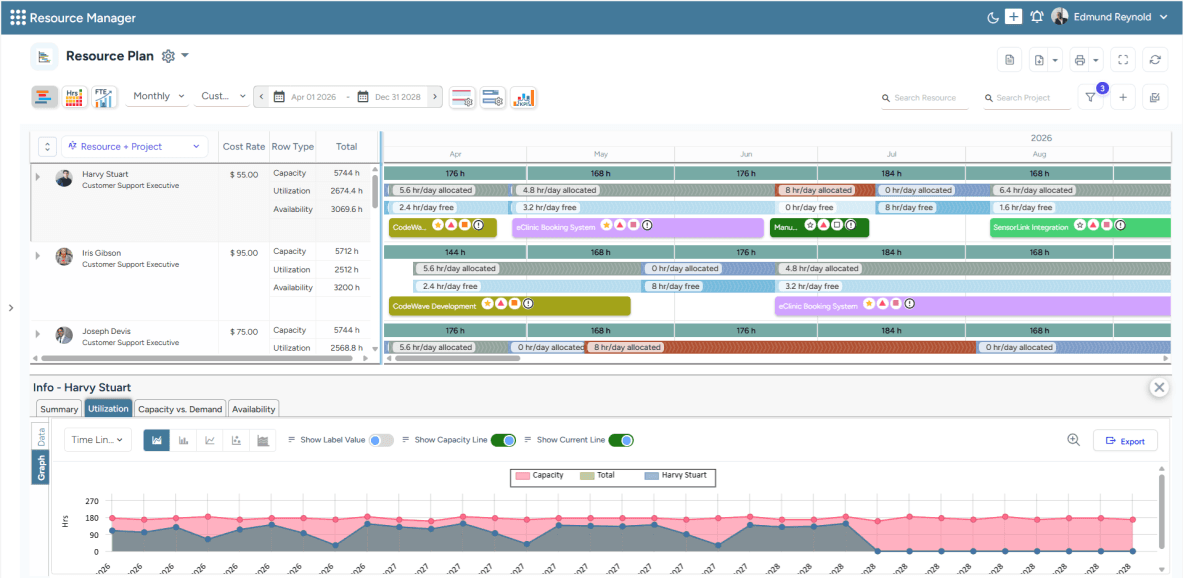
SAVIOM's All-in-One Resource Planner helps track current capacity, utilization, and availability for accurate staffing decisions.
When Aligning Resource Capacity with Demand Becomes Difficult
When firms lack resource forecasting capabilities, they struggle to align existing capacity with future demand, resulting in overcommitment and overallocation. However, with robust resource management software, firms can compare resource capacity and demand to identify potential shortages/excesses, thereby implementing corrective measures to effectively mitigate the gaps.
Read our blog on resource capacity and demand to learn ways to measure it.
When Resource Costs are Shrinking Project Margins
Manual planning often leads to assigning expensive senior resources to low-value tasks, overstaffing projects, or discovering capacity gaps too late. With a resource management tool, managers can enable effective resource allocation by tracking skills, availability, and utilization. They can also create a judicious mix of senior, junior, full-time, and part-time resources to deliver profitably.
When Resource Conflicts are Affecting Project Timelines
Resource conflicts are common when multiple project managers compete for the same employees simultaneously. A resource management software reduces these conflicts by showing real-time availability, current assignments, upcoming bookings, and project priorities. This improves coordination across teams and ensures that critical resources are allocated based on business value and project urgency.
Learn more about resource scheduling and avoid project delays effectively.
When Teams Struggle with Overbooking or Underutilization
When teams are constantly overbooked or underutilized, it becomes difficult for firms to maintain employee productivity, morale, and project profitability. Resource management software helps managers detect workload imbalances early, enabling better redeployment to prevent disengagement and burnout. This minimizes bench time, improves resource utilization, and keeps project delivery on track.
Given the scenarios for using a resource management platform, let us now explore areas where workforce planning is deemed useful for firms.
When Should Firms Choose Workforce Planning Software?
Workforce planning software is the right choice when organizations need to align talent management processes with long-term business goals. Let us look into some scenarios where workforce planning software becomes helpful:
When Long-Term Headcount Planning Becomes Complex
Without accurate headcount visibility, businesses risk hiring too late, overstaffing low-demand roles, or leaving critical positions vacant during growth periods. Workforce planning software helps leaders forecast staffing needs based on business goals, demand trends, budgets, and capacity data. This enables proactive hiring, better budget control, and a more stable workforce structure.
Explore more on resource capacity forecasting and meet future demands effectively.
When Skills Gaps are Affecting Business Growth Plans
Unaddressed skill shortages can slow expansion, weaken service delivery, and make teams dependent on external hiring at higher costs. Workforce planning software maps current capabilities against future business needs to highlight missing, outdated, or high-demand skills. This helps firms plan targeted hiring, upskilling/training, and internal mobility before capability gaps affect performance.
When Scenario Planning is Too Manual or Inaccurate
Spreadsheet-based planning often leads to delayed decisions, inconsistent assumptions, and limited visibility into the impact of workforce changes. An advanced tool enables firms to model scenarios, such as capacity constraints, skill shortages, and budget shifts, to assess their effects on costs and headcount. This improves workforce planning accuracy and reduces decision-making risk.
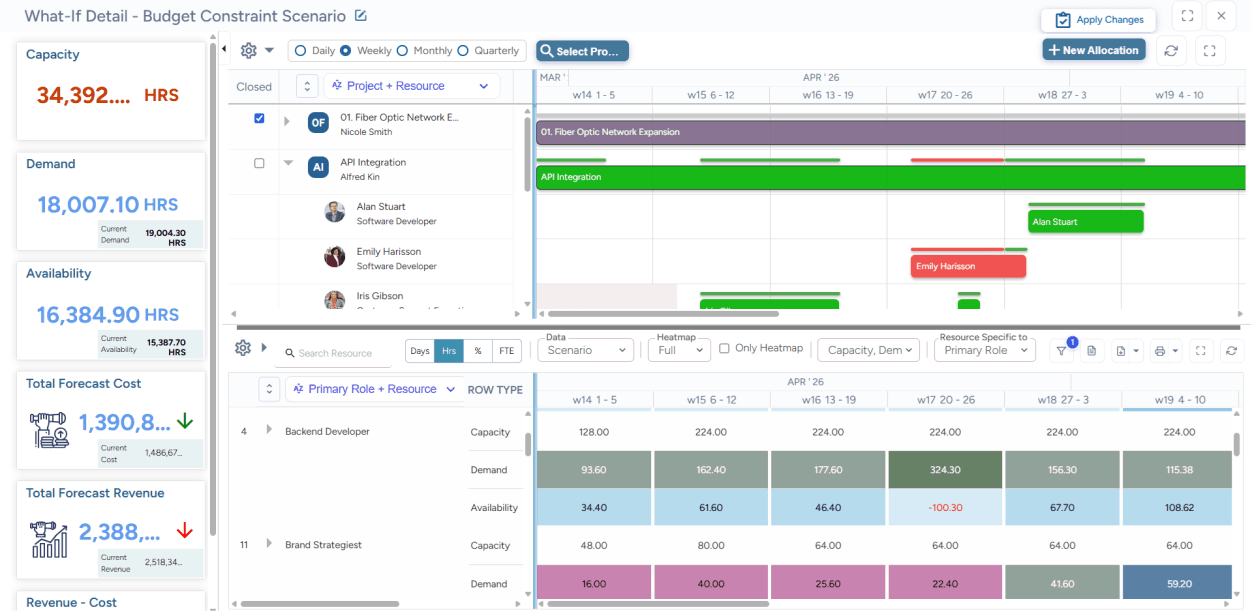
SAVIOM's Scenario Planning feature help managers simulate and compare multiple workforce scenarios in a sand-box environment.
When Workforce Analytics is Needed for Strategic Decisions
Scattered workforce data makes it difficult for managers to connect staffing decisions with business priorities, financial goals, and future demand. Workforce planning software consolidates critical data, such as headcount, skills, attrition rates, productivity, and labor costs, into a unified view. This gives managers the evidence needed to make faster, more confident, and future-ready talent decisions.
When Employee Turnover is Disrupting Workforce Stability
Frequent resignations, retirements, or internal movements can create delivery gaps, knowledge loss, and pressure on remaining employees. Workforce planning software helps identify critical roles, vulnerable teams, replacement gaps, and succession risks before they escalate. With this insight, businesses can build talent pipelines, prepare backup plans, and maintain continuity across essential functions.
Check out our blog on effective ways to reduce employee turnover.
Conclusion
Selecting resource management software and workforce planning software should begin with a clear understanding of your firm's immediate priorities. If the challenge lies in project staffing, resource planning, allocation utilization tracking, workload distribution, etc., resource management software offers the operational control needed to keep projects on schedule and teams productive.
Workforce planning software is the stronger choice when the focus shifts to long-term talent strategy, headcount forecasting, skills gap management, workforce costs, and future organizational readiness. Ultimately, the right decision depends on whether your firm needs to optimize today's resources, plan tomorrow's workforce, or strengthen both areas simultaneously.
Explore how SAVIOM's advanced resource management software helps enterprises plan, allocate, and optimize resources effectively. Book a demo now!
Resource Management Software vs. Workforce Planning Software FAQs
What is resource management software?
Resource management software is a centralized platform for planning and managing resources across projects, teams, and departments. It helps firms see who is available, what skills they have, how much capacity they can take on, and where they are currently assigned. This makes it easier to avoid scheduling conflicts, improve resource utilization, and ensure projects are staffed with the right people at the right time.