


Introduction
Teamwork has long been a go-to platform for managing projects and keeping teams aligned. With its intuitive task management, time tracking, and collaboration features, it has earned its place in the toolkit of IT organizations and professional services firms. But as organizations scale, juggling more projects and tighter delivery timelines, resource management becomes significantly more complex.
Resource capacity planning, demand forecasting, and utilization tracking become less of a nice-to-have and more of an operational necessity. That's where exploring alternatives becomes worthwhile, not because Teamwork falls short, but because different tools are built with different resource management priorities in mind.
This article walks you through the top Teamwork alternatives for resource management worth considering in 2026.
Quick Comparison: Best Alternatives for Teamwork
The right Teamwork alternative depends on how a team plans, assigns, and tracks work across projects. Some platforms help teams manage resource scheduling and workload visibility, while others support structured workforce planning, demand forecasting, capacity management, utilization tracking, and scenario modeling. Here is a brief overview of the leading options:
 Medium to large enterprise-level organizationsEnterprise resource planning, demand forecasting, capacity planning, resource scheduling & allocation, utilization optimization, scenario modelingPersonalized demo and 60-day free trial available
 Small to mid-sized organizationsResource scheduling, capacity management, project planning, project forecasting, utilization insights, what-if scenariosStarts at $7/resource seat/month and 30-day free trial available
 Small to mid-sized organizationsResource scheduling, capacity planning, project planning, time tracking, time-off managementStarts at $7/scheduled person/month and 30-day free trial available
 Small and mid-sized project-based organizationsResource scheduling, capacity planning, leave management, equipment management, meeting room booking, project planningStarts at $4.16/person/month and 30-day free trial available
 Small to large organizationsWorkload heatmaps, resource allocation, capacity planning, workload tracking, time tracking, skill-based assignments, workflow automationStarts at $9/member/month and 30-day free trial available
 Small to mid-sized organizationsWorkload view, custom workflows, task management, custom project views, workflow automation, time trackingFree Forever plan available and paid plans start at $7/user/month
Having reviewed the leading options, let’s now understand the criteria used to evaluate each Teamwork alternative.
How We Evaluated These Teamwork Alternatives?
As project delivery becomes more resource-intensive, teams need more than task, timeline, and client work management. They need tools that connect resource decisions with capacity, demand, utilization, financial performance, and long-term delivery needs. Therefore, we evaluated each Teamwork alternative based on how well it supports these priorities.
To keep the Teamwork alternatives comparison practical, we assessed each platform across the following factors:
- Resource forecasting & predictive planning to anticipate future demand, identify capacity gaps, and plan hiring or upskilling needs in advance.
- Resource capacity planning to understand team availability, workload limits, and whether current resources can support upcoming project demand.
- Flexible resource scheduling & allocation based on skills, availability, roles, project requirements, and shifting business priorities.
- Scenario modeling to test and evaluate different staff deployment scenarios before committing resources.
- Resource utilization optimization to reduce bench time, prevent burnout, and ensure people are neither overbooked nor underused.
- Resource financial planning across costs, bill rates, budgets, margins, revenue impact, and project profitability.
- Reporting & analytics for real-time insights into utilization, capacity, availability, workload distribution, and project performance.
- Early warnings and risk indicators for capacity gaps, overbooking, delivery delays, scheduling conflicts, and resource constraints.
- Enterprise scalability to support growing teams, expanding project portfolios, and increasingly complex resource pools.
- Customization and flexibility to adapt to different workflows, roles, approval structures, and planning needs.",
- Automation and workflow support to reduce manual planning effort, streamline approvals, and improve operational efficiency.
- Security and governance for role-based permissions, access control, compliance, and enterprise-grade data protection.
Read our blog to understand how an enterprise resource management software checklist can guide better tool selection.
With these criteria in mind, let's look at the Teamwork alternatives that best support different resource management needs.
SAVIOM
Best Teamwork Alternative for Enterprise Resource Management
Best for: Mid-sized to enterprise organizations.
Pricing: Offers customized pricing based on each organization’s resource management needs.
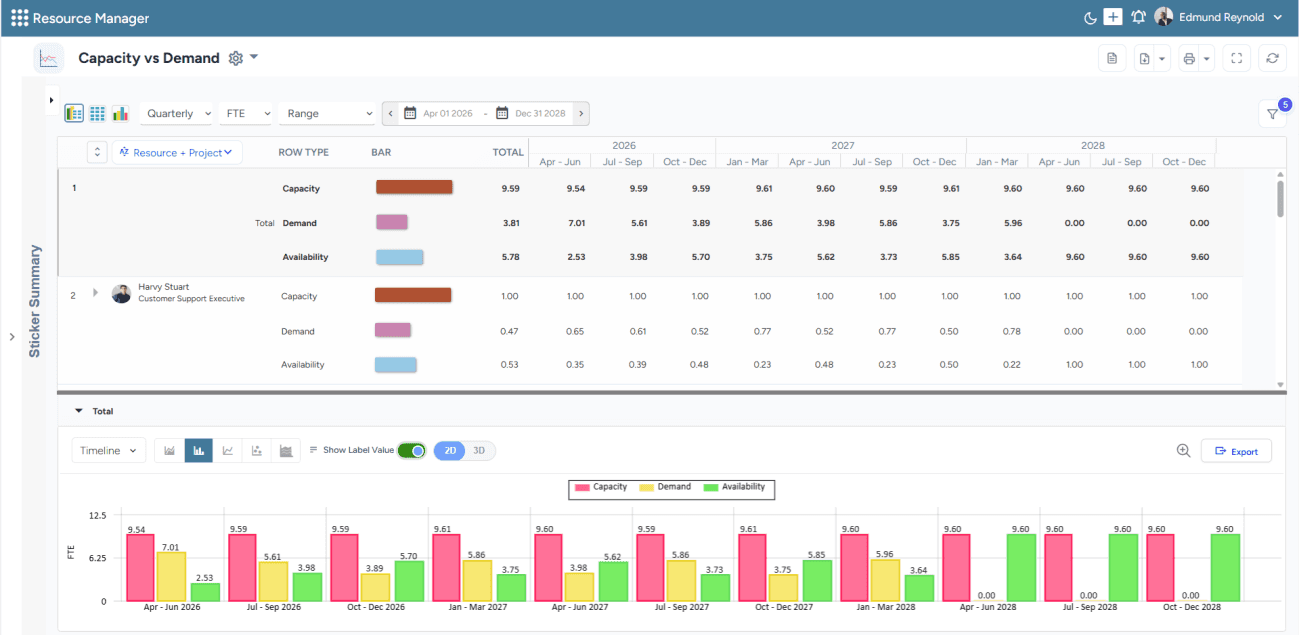
SAVIOM’s capacity vs. demand dashboard helps visualize resource shortages or excesses for multiple roles across projects.
SAVIOM is built for organizations that manage resources across multiple projects and locations. It helps teams forecast demand, plan capacity, allocate the right people to the right work, and track utilization from a centralized platform. Its scenario modeling capabilities allow decision-makers to compare different staffing plans, and real-time dashboards provide visibility into utilization, availability, capacity, and resource performance. This makes it useful for organizations that need better control across large and complex resource pools.
Key Features:
- Resource forecasting & predictive planning
- Resource capacity planning
- Intelligent match-making
- Resource utilization optimization
- Scenario modeling
- Reporting & analytics
- Resource financial planning
- Automation & workflow
Why Choose SAVIOM Over Teamwork?
SAVIOM may be a better fit than Teamwork when resource management needs to move from project-level coordination to full control over the resource lifecycle. It is positioned to support demand forecasting, resource capacity planning, scheduling, allocation, optimizing utilization, controlling operational costs, and delivering projects effectively.
For a detailed understanding of benefits, components, key metrics, and best practices, read our resource management guide.
Runn
Best for Real-Time Resource Forecasting
Best for: Small and mid-sized organizations.
Pricing: Starts at $7 per resource seat/month for the Lite plan. The Standard plan costs $11 per resource seat/month, and the Advanced plan is available with custom pricing.
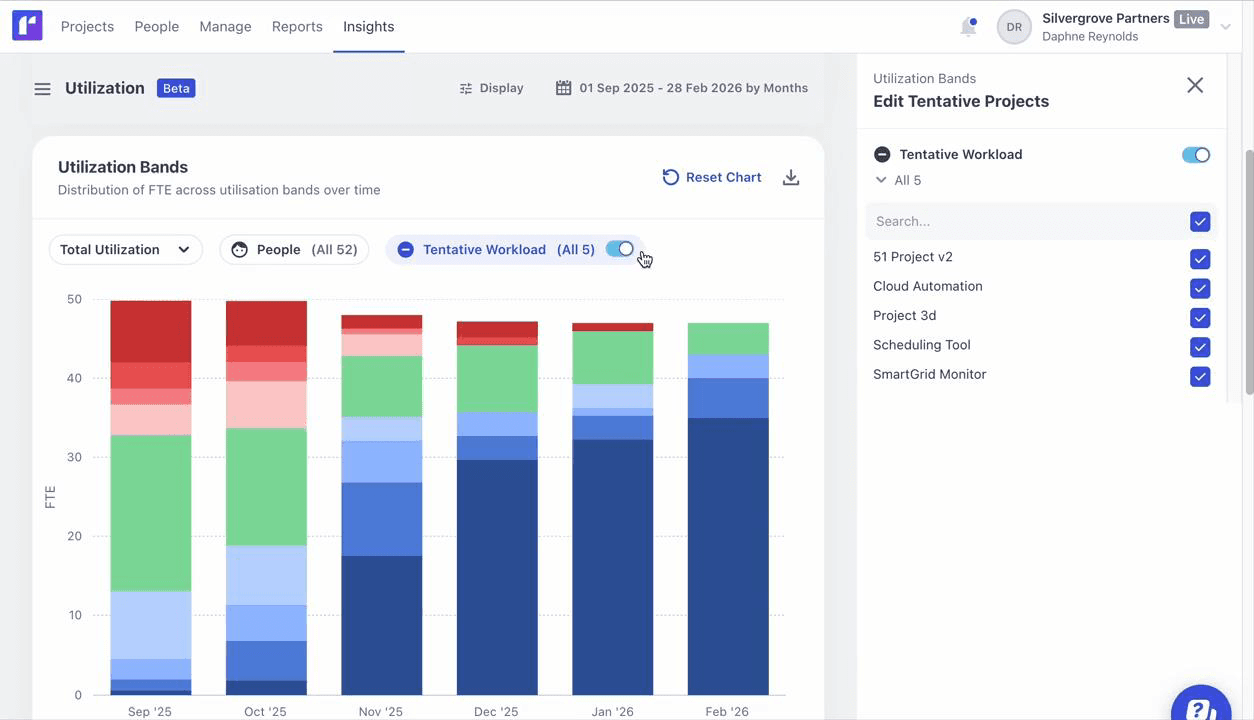
Runn's utilization forecasting dashboard helps forecast current and future workload based on project demands.
Runn is a resource planning and forecasting platform built for project-based teams that need real-time visibility into people, projects, and financial performance. It helps managers plan assignments, track availability, monitor resource utilization, and review project forecasts in one connected workspace. Teams can also use timesheets and what-if planning to adjust resourcing decisions as priorities change.
Key Features:
- Resource scheduling
- Project planning
- Capacity management
- Project forecasting
- Reporting
- API & integrations
- Utilization insights
- What-if planning
Why Choose Runn Over Teamwork?
Runn may be a better fit than Teamwork when a team needs to connect resource plans with future project demand and financial outcomes. Its planning views can help managers assess when new work can start and whether current capacity can support upcoming projects. They can also show how staffing choices may affect project budgets and profitability.
Float
Best for Visual Resource Scheduling
Best for: Small and mid-sized organizations.
Pricing: Starts at $7 per scheduled person/month for the Starter plan and $12 per scheduled person/month for the Pro plan. Enterprise pricing is available on request.
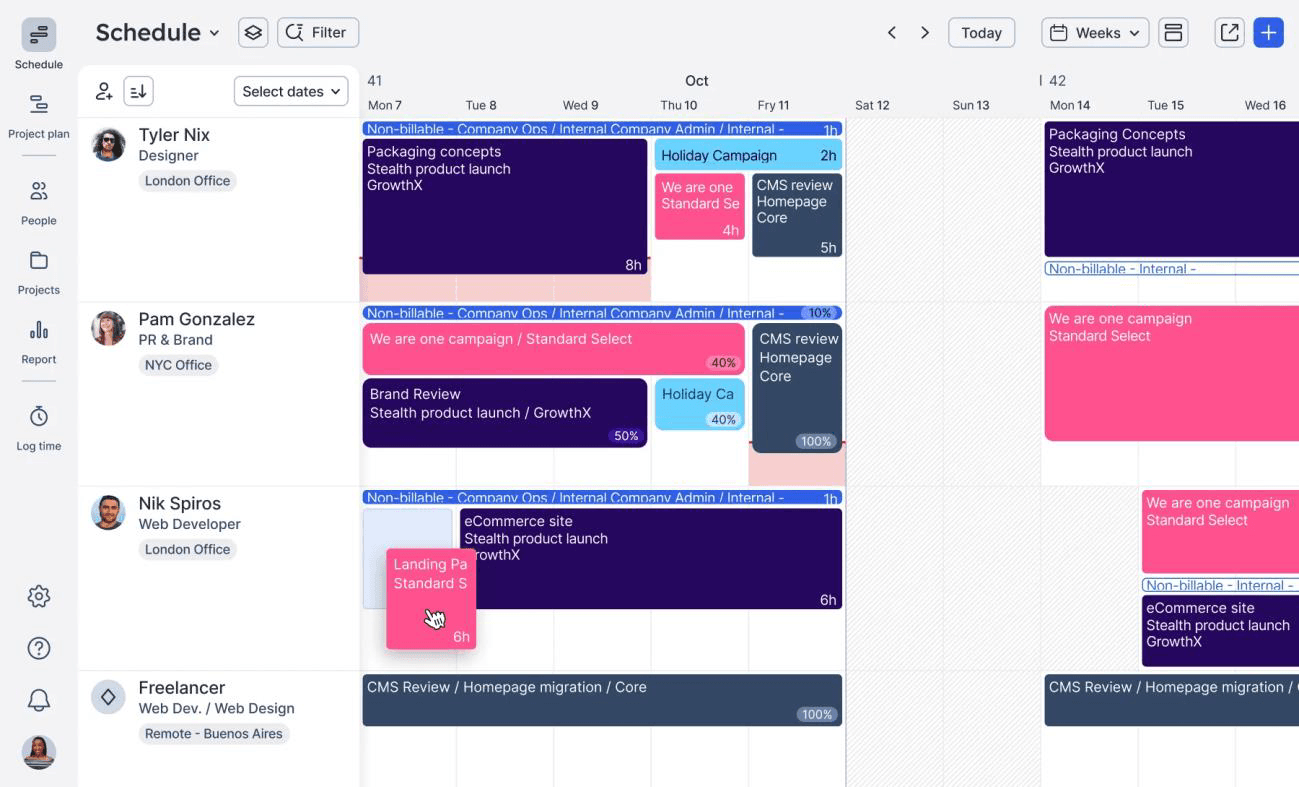
Float's resource scheduling dashboard helps display current project allocations, enabling quick reassignments.
Float is a resource scheduling and planning tool designed for teams that need a live view of people, projects, hours, and budgets. Its drag-and-drop schedule helps managers adjust allocations quickly, while time tracking, project estimates, and reporting help teams compare planned work with actual effort and keep project plans realistic.
Key Features:
- Resource scheduling
- Capacity planning
- Project planning
- Project estimates
- Time tracking
- Time-off management
- Reporting & dashboards
Why Choose Float Over Teamwork?
Float may be a better fit than Teamwork when a team wants a lighter, scheduling-first system for day-to-day resource coordination. It helps managers assign work based on resource availability, spot capacity gaps, and track time against estimates without managing a broader client project workflow.
Resource Guru
Best for Simple Resource Booking
Best for: Small to mid-sized organizations.
Pricing: Starts at $4.16 per person/month for the Grasshopper plan. The Blackbelt plan costs $6.65 per person/month, and the Master plan costs $10 per person/month.
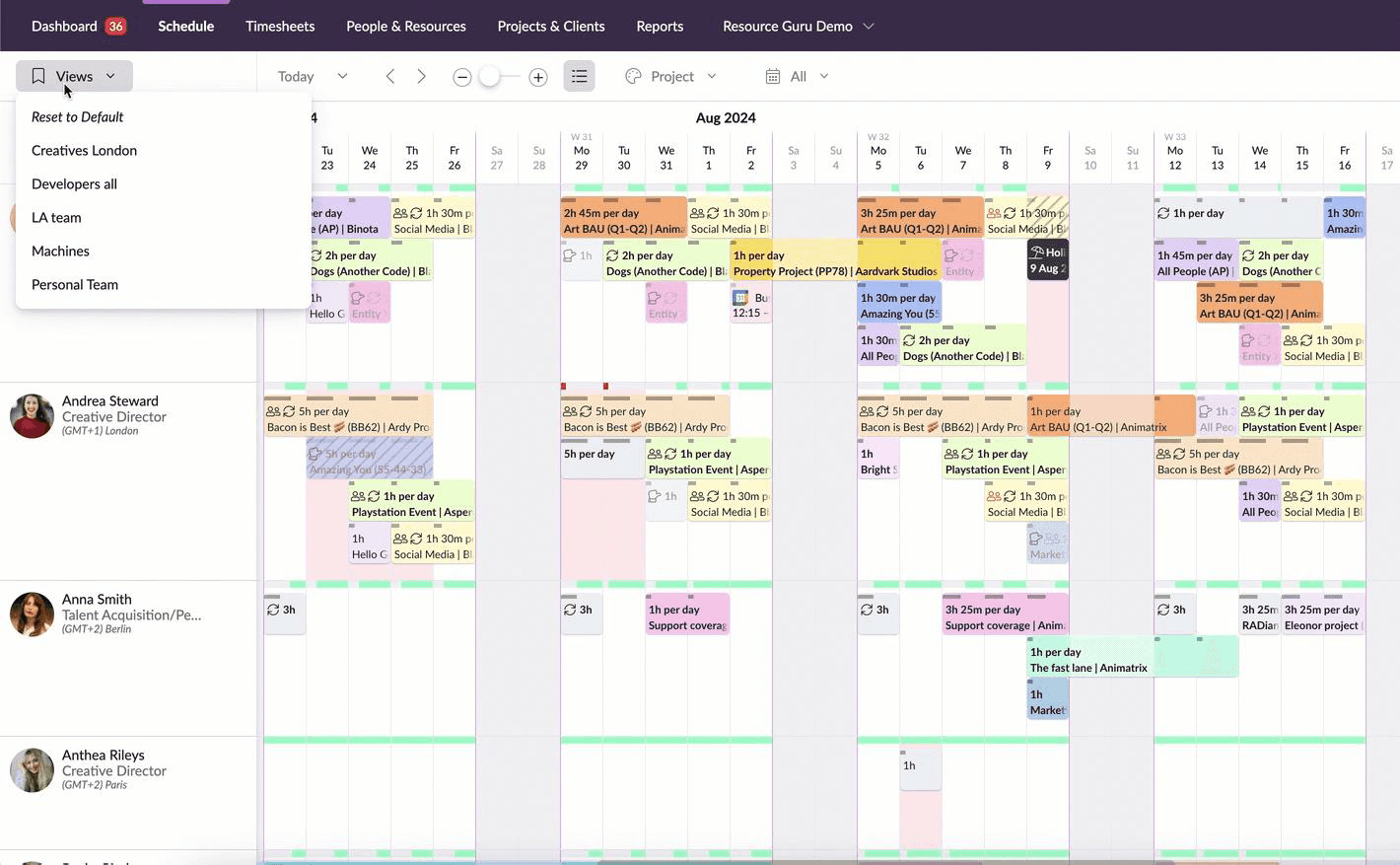
Resource Guru's resource booking dashboard displays multiple bookings in a centralized view.
Resource Guru helps teams plan people, equipment, meeting rooms, and projects through a shared scheduling calendar. Managers can map project work against actual availability, account for leave, resolve booking clashes, and adjust schedules quickly. Its reports and timesheets also help teams review utilization, billable hours, overtime, and scheduled versus actual work.
Key Features:
- Resource scheduling
- Capacity planning
- Leave management
- Equipment management
- Meeting room booking system
- Project planning
- Reports
- Timesheets
- Integrations
Why Choose Resource Guru Over Teamwork?
Resource Guru may be a better fit than Teamwork when teams need a focused booking system for shared resources. It supports practical scheduling decisions across people, spaces, and equipment. Its integrations with calendars, task managers, and financial tools also help teams connect resource planning with the systems they already use.
Check out our blog on Resource Guru alternatives for informed resource management tool selection.
Smartsheet Resource Management
Best for Portfolio-Level Resource Planning
Best for: Small, mid-sized, and large organizations.
Pricing: Starts at $9 per member/month for the Pro plan when billed yearly. Advanced Work Management pricing is available on request.
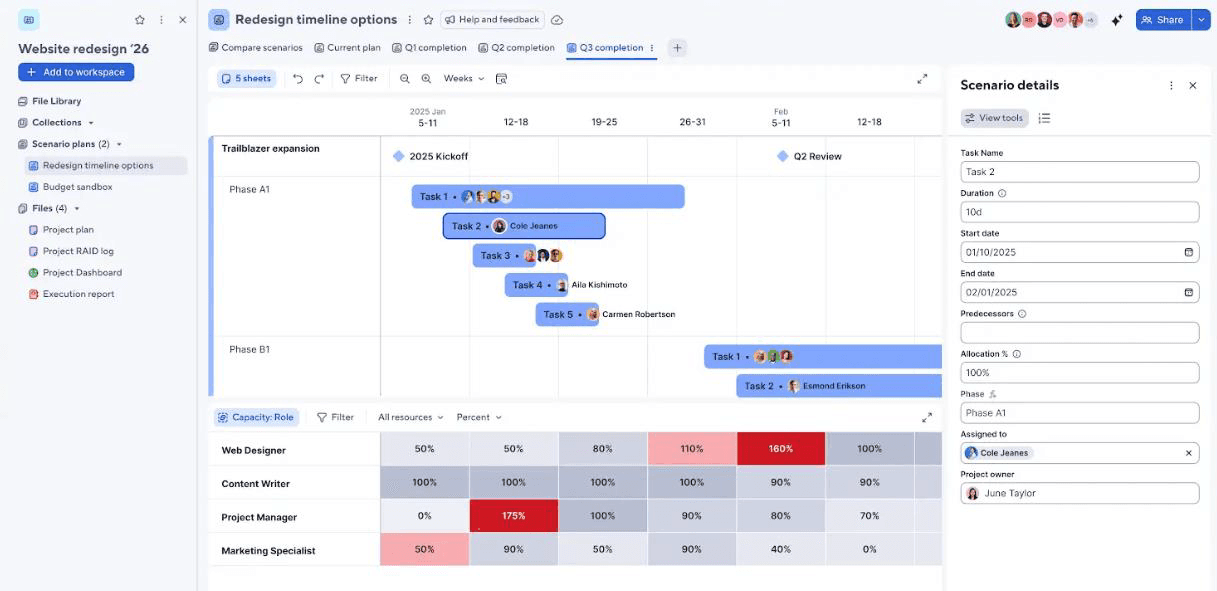
Smartsheet's scenario planning features help create and compare multiple resource plans and explore its outcomes before commitment.
Smartsheet connects resource planning with project portfolio management, reporting, and workflow automation. Teams can use workload heatmaps, capacity views, and time tracking to understand how work moves across projects. It also gives PMOs, project managers, and operations teams shared visibility into priorities, assignments, and delivery progress.
Key Features:
- Resource allocation
- Capacity planning
- Project and portfolio visibility
- Scenario planning
- Workload tracking
- Time tracking
- Skill-based assignments
- Workflow automation
Why Choose Smartsheet Over Teamwork?
Smartsheet may be a better fit than Teamwork when organizations need structured portfolio oversight across multiple projects and teams. It helps teams review committed work, monitor availability, track resource utilization, and report on project performance from a broader operational view. This makes it useful for PMOs that need stronger governance and scalable work execution.
ClickUp
Best for Project and Workload Management
Best for: Startups and small to mid-sized companies.
Pricing: Offers a Free Forever plan. Paid plans start at $7 per user/month for the Unlimited plan, while the Business plan costs $12 per user/month when billed yearly. Enterprise pricing is available on request.
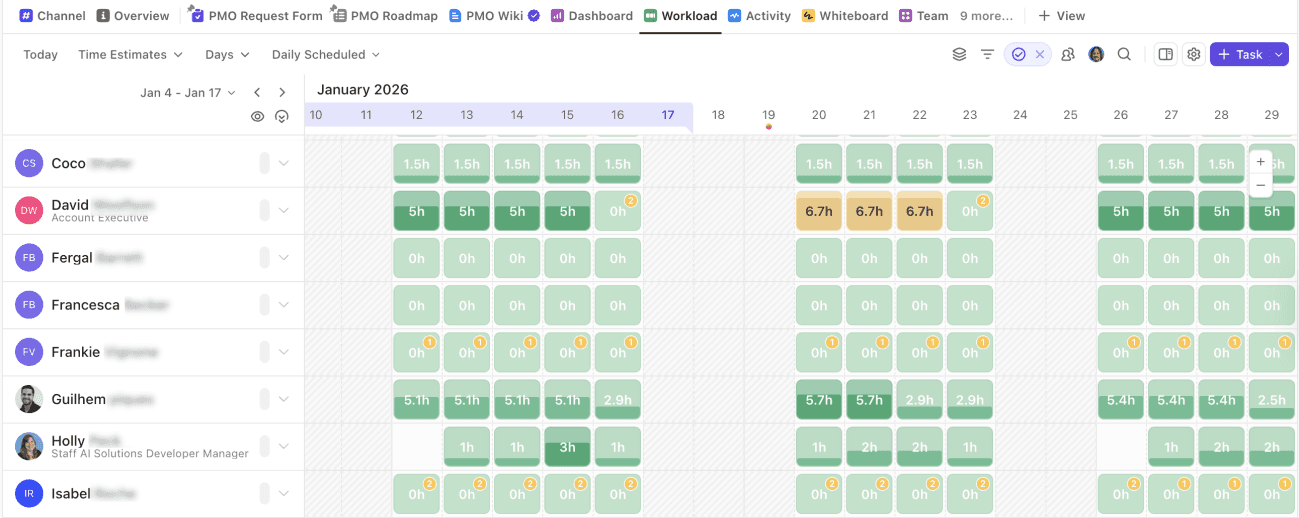
ClickUp's workload view helps visualize the team's work and capacity over time to ensure optimal employee engagement.
ClickUp brings tasks, Docs, goals, dashboards, automations, and workload tracking into one workspace. Teams can customize how they plan and review work using lists, boards, calendars, Gantt charts, and other project views. Its workload view also helps managers assess assigned work and capacity across days, weeks, or months.
Key Features:
- Task management
- Custom project views
- Workflow automation
- Time tracking and timesheets
- Gantt charts
- Dashboards
- Collaborative docs
- Goal tracking
- Integrations
Why Choose ClickUp Over Teamwork?
ClickUp may be a better fit than Teamwork when teams want a flexible work hub for different departments, not only client-facing delivery. It lets teams customize project views, automate recurring workflows, track time, and support cross-functional collaboration from the same platform. This makes it useful for growing teams that want fewer disconnected tools.
Read our blog to understand how to select resource management software.
Final Verdict
Each Teamwork alternative serves a different resource management need. SAVIOM suits enterprise resource management, demand forecasting, and capacity planning. Runn helps project-based teams track availability, utilization, and future workload in real time. Float fits visual scheduling needs, while Resource Guru supports simple booking. Smartsheet and ClickUp suit broader work management requirements.
The best choice depends on team size, planning maturity, project complexity, and the main gap the business wants to address. A small team may prioritize ease of use and scheduling visibility, while a larger organization may need a system that can support strategic planning, governance, and decisions across multiple projects.
Explore how SAVIOM's advanced resource management software helps enterprises plan, allocate, and optimize resources effectively. Book a demo now!
Frequently Asked Questions
What are the best Teamwork alternatives for resource management?
The best Teamwork alternatives for resource management include SAVIOM, Runn, Float, Resource Guru, Smartsheet, and ClickUp. The right choice depends on whether the buyer needs enterprise resource planning, real-time forecasting, visual scheduling, simple booking, portfolio visibility, or broader work management.