


Introduction
Project portfolio management is no longer limited to updating status or maintaining dashboards. It helps managers decide which initiatives deserve funding, which should be delayed, and whether approved work is realistically deliverable. However, disconnected spreadsheets make it difficult to assess portfolio feasibility in real-time.
The best project portfolio management software changes that. It helps firms identify initiatives that are both valuable and feasible. This helps minimize resource conflicts, project delivery bottlenecks, and cost overruns. However, with numerous vendors available, selecting the right platform can still be challenging.
This listicle reviews the top 10 project portfolio management software, comparing their features, pricing, free trials, benefits, and limitations to help you make the right choice for your business.
Top 10 Project Portfolio Management Software at a Glance
 Medium to enterprise-level organizationsDemand intake, weighted project prioritization, portfolio-led capacity planning, portfolio optimization, scenario modeling, early-warning intelligence, financial control, and portfolio analytics60-day free trial and demo available
 Medium-sized to large organizationsDemand management, budget prioritization, scenario optimization, portfolio-level capacity planning, project risk management, project cost, scheduling, BI, and integrationsOne-to-one demo and a 14-day free trial available
 Large enterprisesStrategic road mapping, portfolio optimization, investment management, capacity planning, budget planning, and ValueOps integrationsCustomized demo available
 Small to large-sized firmsDemand intake, Gantt charts, Control center blueprints, change management, and governance templatesFree 30-day trial and demo available
 Medium-sized to large businessesAI-powered predictive analytics, bottleneck detection, What-if analysis, competency management, budget monitoring, and risk buffers30-day free trial and customized demo available
 Small to large organizationsPortfolio prioritization, workload and capacity planning, budget planning, portfolio rollups, OKRs, time tracking, dashboards, and request forms14-day free trial and demo available
 Mid-sized to large-scale enterprisesPortfolio planning & prioritization, scenario modeling, strategic alignment, demand management, capacity planning, budget tracking, and risk intelligence30-day free trial and demo available
 Small to large organizationsPortfolio and project boards, synchronized rollups, project-health views, dashboards, Gantt charts, resource planning, capacity management, AI risk insights, and automations14-day free trial available
 Small to large organizationsProject intake, reporting dashboards, request forms, workflow rules, workload management, capacity planning, and time tracking14-day free trial and guided demo available
 Large, multi-business-unit enterprisesPortfolio planning, demand, financial planning, resource management, strategic planning, and enterprise agile planningOn-demand and live demo available
SAVIOM
Best for: Medium to enterprise-level organizations.
Pricing: Custom pricing.
Free Trial/Demo: Offers a customized demo and a 60-day free trial.
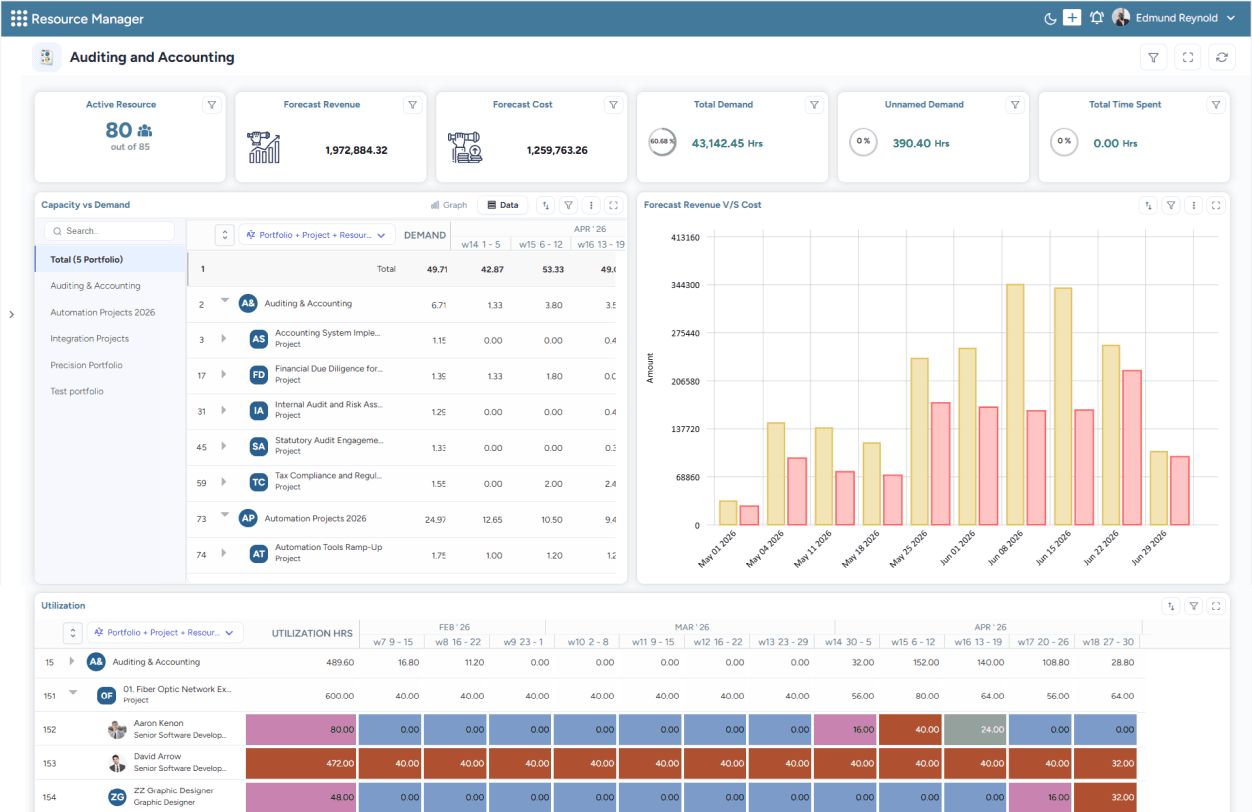
SAVIOM Portfolio Governance dashboard offers a holistic view of portfolio-level capacity, demand, utilization, and financial performance.
SAVIOM is an enterprise project portfolio management software trusted by 100+ global enterprises across more than 50 countries. It provides portfolio-wide visibility into project demand, resource capacity, financial performance, risks, and expected outcomes. Its demand intake and weighted prioritization capabilities evaluate competing initiatives by value, urgency, risk, ROI, and strategic fit, while capacity-aware planning validates feasibility against available resources.
The tool's strategic portfolio planning helps align initiatives with organizational goals, funding, sequencing, and execution readiness. Its scenario modeling further compares the impact of hiring, outsourcing, delays, and reprioritization on resource utilization and budgets. Moreover, the early-warning intelligence flags bench time, skill shortages, and financial risks early. Overall, SAVIOM helps organizations select the right initiatives, reduce portfolio risk, and maximize returns on investment.
Key Features:
- Project demand intake and pipeline management
- Weighted strategic project prioritization
- Capacity-led portfolio planning
- Portfolio optimization and sequencing
- Scenario modeling
- Early-warning and risk intelligence
- Benefits realization
Pros and Cons
 Prioritizes initiatives based on strategic value, expected returns, resource needs, and execution feasibility
- Provides portfolio-wide visibility into budgets, progress, risks, benefits, and overall performance
- Supports scenario-based decisions by comparing the impact of funding changes, hiring, and reprioritization
- Identifies capacity shortages, budget overruns, schedule delays, and delivery risks before they affect outcomes
 Pricing requires a buyer consultation
- Designed for complex enterprise planning requirements, which may exceed the needs of task-first teams
Read our project portfolio management guide for a detailed understanding of its benefits, lifecycle, and challenges.
Planisware Orchestra
Best for: Medium-sized to large organizations.
Pricing: Not publicly listed.
Free Trial/Demo: Offers an interactive demo library and one-to-one live demos.
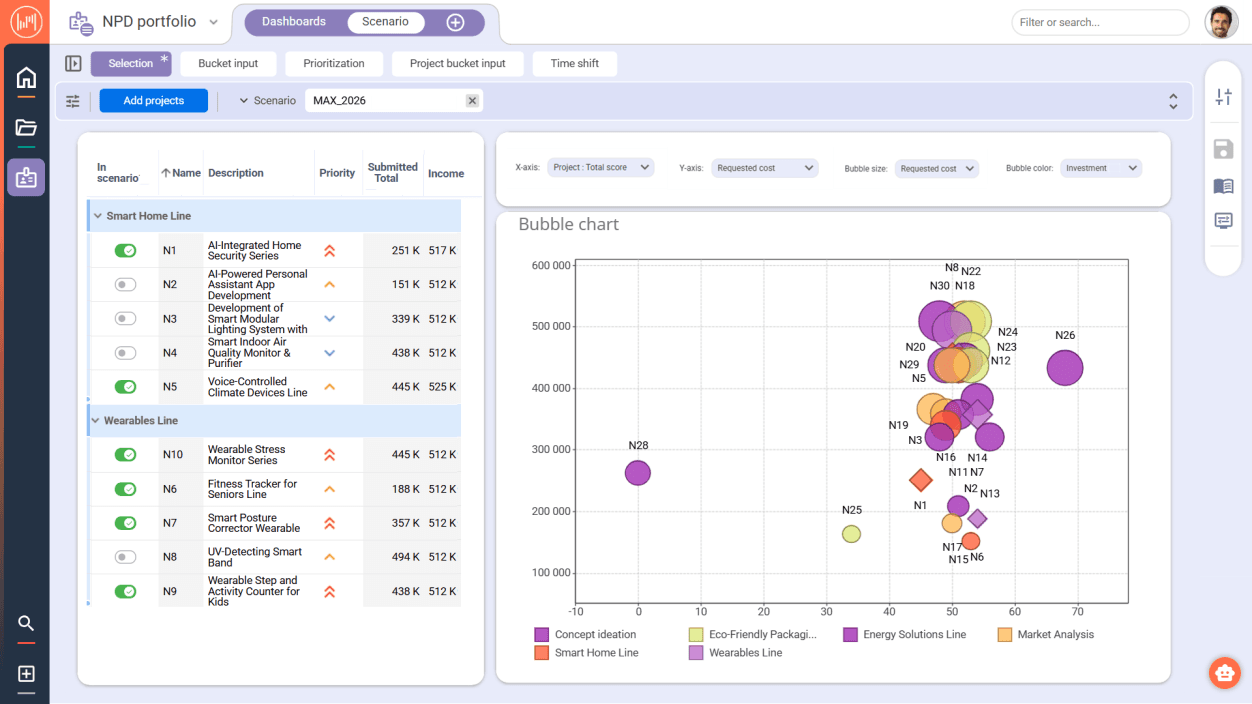
Planisware Orchestra's Scenario analysis helps evaluate and prioritize portfolios using a consistent scoring framework.
Planisware Orchestra is a turnkey project portfolio management platform for PMOs seeking fast results and scalability. It centralizes real-time visibility into projects, portfolios, and resources, while its demand management capabilities help teams capture requests, assess strategic value and costs, and prioritize initiatives using consistent scoring. Moreover, scenario analysis supports comparisons between project business cases, financial plans, and capacity constraints.
The platform also supports project templates, budgeting, and enterprise risk management, along with Waterfall, Agile, Hybrid, and phase-gate delivery methods. In addition, shared dashboards, collaboration tools, configurable workflows, and custom integrations help standardize execution and reporting across teams. Overall, Planisware Orchestra is a scalable platform that can grow with firms' project management maturity.
Key Features:
- Demand management
- Scenario analysis
- Portfolio prioritization
- Project planning and execution
- Issue and risk management
- Real-time portfolio reporting
- Workflows and integrations
Pros and Cons
- Covers the project lifecycle and provides strong transparency across projects and portfolios
- Offers considerable flexibility, including customizable reports, workflows, and modules.
- Integrates portfolio management with resource planning, budgeting, time tracking, collaboration, and risk evaluation
- The interface's visual design and some reports could be more streamlined and user-friendly
- Organizations may need specialist expertise to configure and maintain the platform effectively
Dive into our project management guide and deliver initiatives more predictably.
Clarity by Broadcom
Best for: Large organizations.
Pricing: Not publicly listed.
Free Trial/Demo: Offers a customized demo.
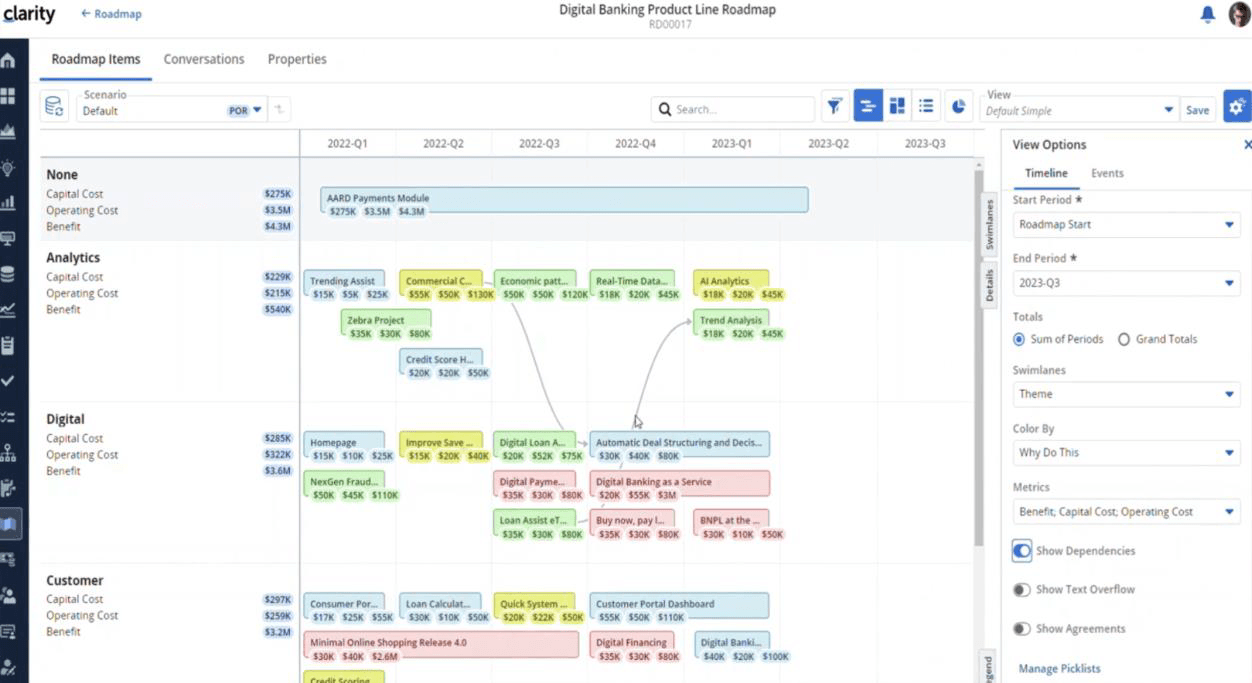
Clarity's Strategic Roadmapping dashboard visualizes portfolio timelines, dependencies, and agreements for optimal operations.
Clarity by Broadcom is an enterprise strategic portfolio management platform that unifies strategy, funding, and execution. The tool maps relationships among people, work, financials, objectives, and investments, giving leaders a connected view of enterprise priorities. Its strategic roadmaps help communicate plans and operational direction, while flexible investment management supports different investment types and delivery methodologies.
With its capacity planning capabilities, firms can compare talent supply and demand, identify gaps, and model alternative scenarios to determine the most effective resource plan. Its financial planning tools connect budgets, forecasts, and investment performance with business objectives. Additionally, real-time reporting, portfolio analysis, and AI-driven insights support more informed decision-making. Overall, Clarity is for enterprises seeking structured portfolio governance.
Key Features:
- Strategic roadmaps and objective alignment
- Investment and portfolio management
- Financial planning, budgeting, and forecasting
- Resource capacity planning
- Portfolio scenario modeling
- Dashboards, reporting, and performance analysis
- AI-assisted insights and ValueOps connectivity
Pros and Cons
- Highly configurable and extensible, allowing firms to adapt fields, metrics, reports, workflows, and portfolio structures
- Provides strong financial governance
- Offers comprehensive visibility across projects, programs, portfolios, resources, capacity, and financial performance
- Advanced functionality can involve a steep learning curve and require additional training or implementation guidance
- Interface is less intuitive
- Integrations with certain external systems, including Jira and Microsoft Project, may be cumbersome or require consultancy
Smartsheet
Best for: Small to large-scale businesses.
Pricing: Pro starts at $9 per member/month annually; Business starts at $19 per member/month annually; Enterprise and Advanced Work Management use custom pricing.
Free Trial/Demo: Provides a 30-day free trial and demo.
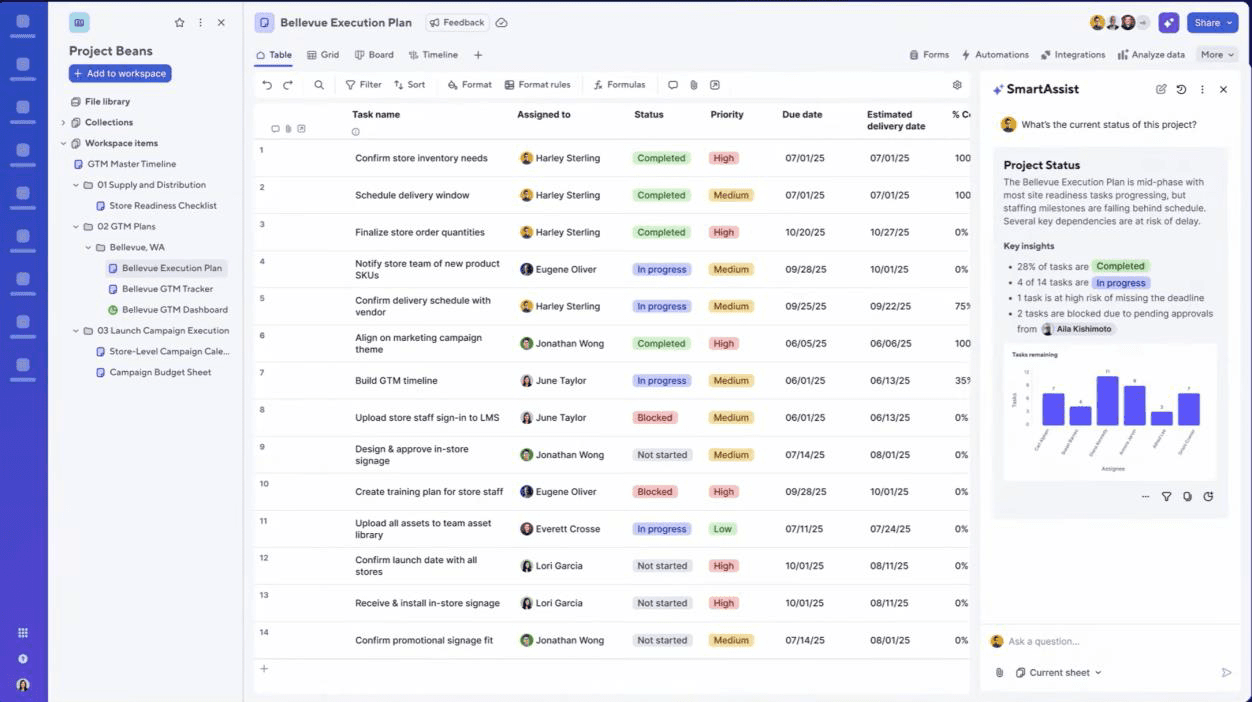
Smartsheet's Portfolio Overview dashboard offers real-time visibility into project task updates, along with AI summary.
Smartsheet is a cloud-based project portfolio management platform that helps organizations plan, execute, and track projects in one place. Its portfolio dashboards and roll-up reports give leaders real-time visibility into project status, risks, resource allocation, and overall health. The platform's multi-tier demand intake processes help teams collect project requests, while weighted prioritization matrices allow decision-makers to assess initiatives against business objectives and selection criteria.
At the execution level, Gantt charts, dependencies, dashboards, risk indicators, and automated alerts help teams identify blockers and at-risk projects. Further, reusable templates, Control Center blueprints, approval workflows, and automated project creation further support consistent portfolio governance. Enterprise plan customers can also use Portfolios and Scenario Planning features to compare timelines, allocations, capacity, and workloads without altering live plans.
Key Features:
- Strategic planning
- Demand intake
- Portfolio prioritization
- Resource capacity planning
- Reporting and analytics
- AI-supported portfolio intelligence
- Governance and standardization
Pros and Cons
- Configurable dashboards and roll-up reports can consolidate data from numerous project sheets into a single portfolio view
- Strong governance capabilities through reusable templates, automated workflows, project provisioning, and Control Center blueprints
- Gantt charts, dependencies, automation, collaboration, and integrations support coordinated cross-functional delivery
- Comprehensive portfolio management may depend on higher-priced plans, premium add-ons, or bundled products
- Advanced features and complex automations may require additional training and configuration
Explore our SAVIOM vs. Smartsheet blog for a detailed comparison of resource management software.
Epicflow
Best for: Medium to large teams.
Pricing: Growth plan at €22.5 annually and Enterprise plan at custom quote-based rates.
Free Trial/Demo: Provides a 30-day free trial and demo.
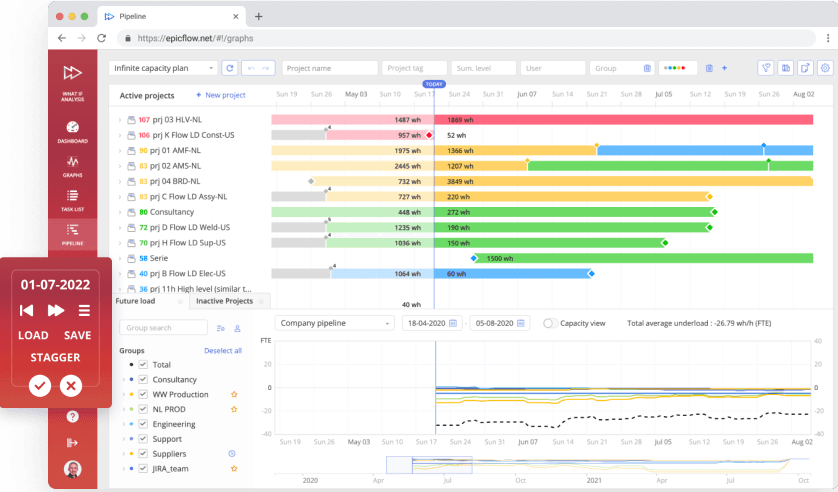
Epicflow's AI-Driven What-if Analysis dashboard helps try different scenarios in a simulated environment and choose the best one.
Epicflow is an AI-powered project portfolio and resource management platform designed to help organizations manage complex, interdependent project portfolios. The tool provides portfolio-wide visibility into project duration, deliverables, and statuses. Its prioritization capability ranks projects according to business value. The predictive analytics forecast project delivery dates by considering existing priorities, constraints, and available capacity, thereby identifying potential delays early.
With its What-if Analysis capability, firms can evaluate multiple portfolio scenarios and determine how proposed changes could affect delivery outcomes. Epicflow also supports portfolio risk management by helping managers forecast resource workloads and detect bottlenecks, while automated reporting keeps stakeholders informed without manually consolidating project data. Overall, Epicflow is particularly suited to organizations seeking to improve the predictability of multi-project delivery.
Key Features:
- Automatic cross-project prioritization
- Project due-date feasibility analysis
- AI-assisted what-if analysis
- Project staggering
- Competency management
- Project portfolio performance analysis
- Bottleneck detection
- Future and historical load graphs
Pros and Cons
- Dashboards and automated reporting provide clear portfolio visibility and can reduce manual reporting work
- Unique project staggering feature to delay or postpone some projects to deliver others on time
- Can complement systems such as Jira, Microsoft Project, Primavera, and SAP rather than requiring their immediate replacement
- The platform and its interface can initially feel complex, making training and onboarding important
- Forecast quality depends on users entering complete, accurate, and timely project information
Wrike
Best for: Small to large firms.
Pricing: Starts with Free plan, Team plan at $10 user/month, Business for $25 user/month, and Pinnacle & Apex for quote-based rates.
Free Trial/Demo: Provides a 14-day free trial and demo.
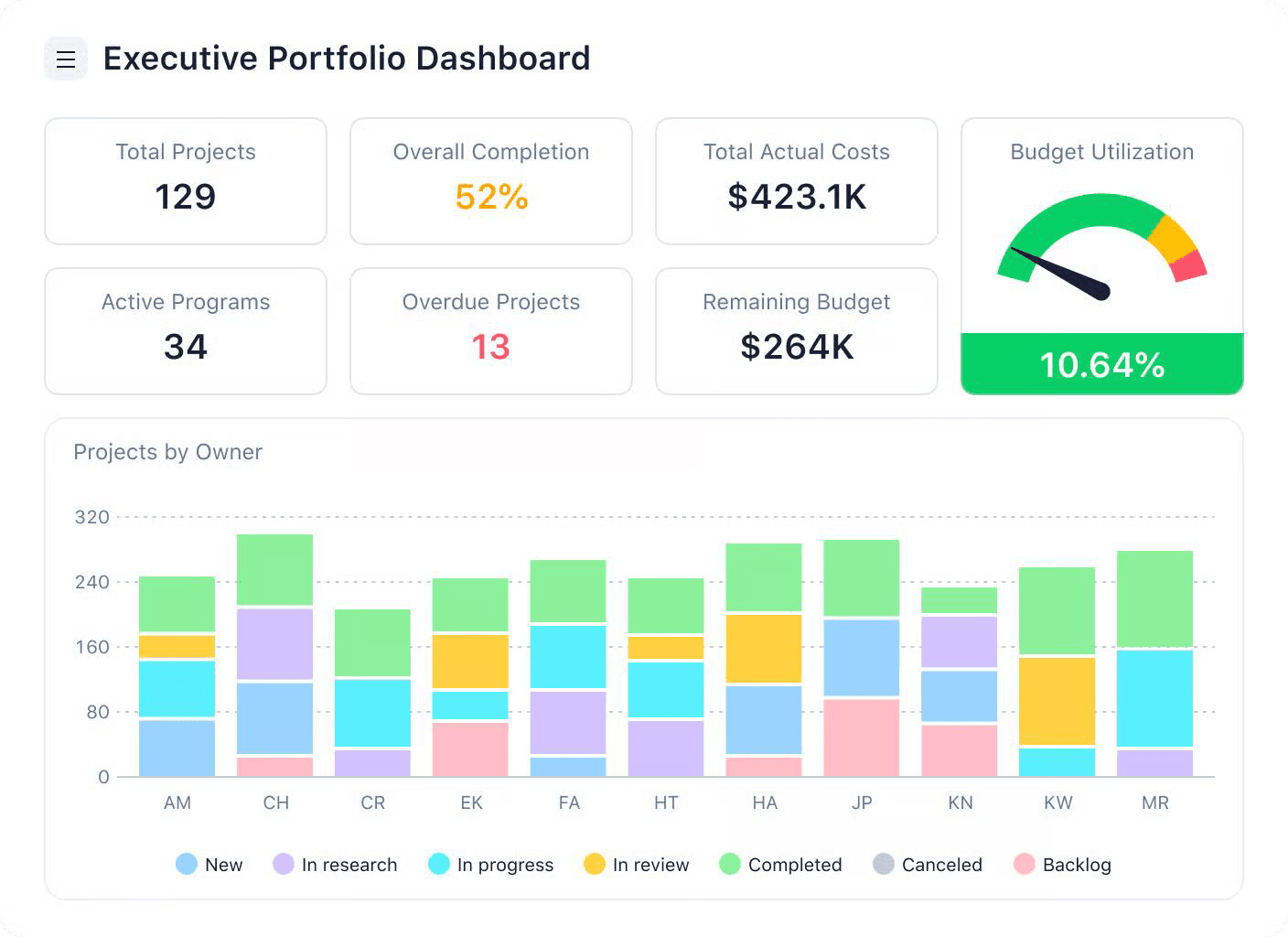
Wrike's Advanced Analytics dashboard helps track project portfolio status by offering real-time insights into key metrics.
Wrike is an AI-powered enterprise work management software with dedicated project portfolio management capabilities. Its customizable demand intake request forms help teams capture new requirements, guide them through stage gates, and track progress from concept to approval. Portfolio dashboards support project evaluation and prioritization, while real-time budgeting helps to estimate costs, monitor financial performance, and allocate funding to high-priority initiatives.
During project execution, Wrike rolls up tasks, projects, and program data to provide portfolio-wide visibility into progress and financial performance. Firms can track company OKRs, team goals, and portfolio-level KPIs, while workload views help determine whether sufficient capacity exists to execute approved initiatives. Together, these capabilities help organizations align projects with strategic objectives, simplify governance, and monitor portfolio performance.
Key Features:
- Project request forms and demand intake
- Stage-gate tracking and portfolio prioritization
- Project, program, and portfolio rollups
- Resource-capacity and workload management
- Real-time budgeting and financial tracking
- Company OKRs, team goals, and KPI tracking
- Dashboards, analytics, and portfolio reporting
Pros and Cons
- Centralizes projects, updates, files, and communication, improving visibility and coordination across teams
- Provides comprehensive project tracking, configurable dashboards, and visual reporting for monitoring multiple initiatives
- Highly customizable workflows and automation allow teams to adapt the platform to different processes
- Its extensive functionality can create a steep learning curve and make initial onboarding feel overwhelming
- The tool is navigation-dense or unintuitive, with routine actions requiring several clicks
- Its pricing is high or inflexible, particularly when advanced capabilities or add-ons are required
Check out our SAVIOM vs. Wrike blog to explore their key differences.
Planview
Best for: Mid-sized to large organizations.
Pricing: Not publicly listed.
Free Trial/Demo: On-demand PPM demos available; Planview also offers a 30-day free trial.
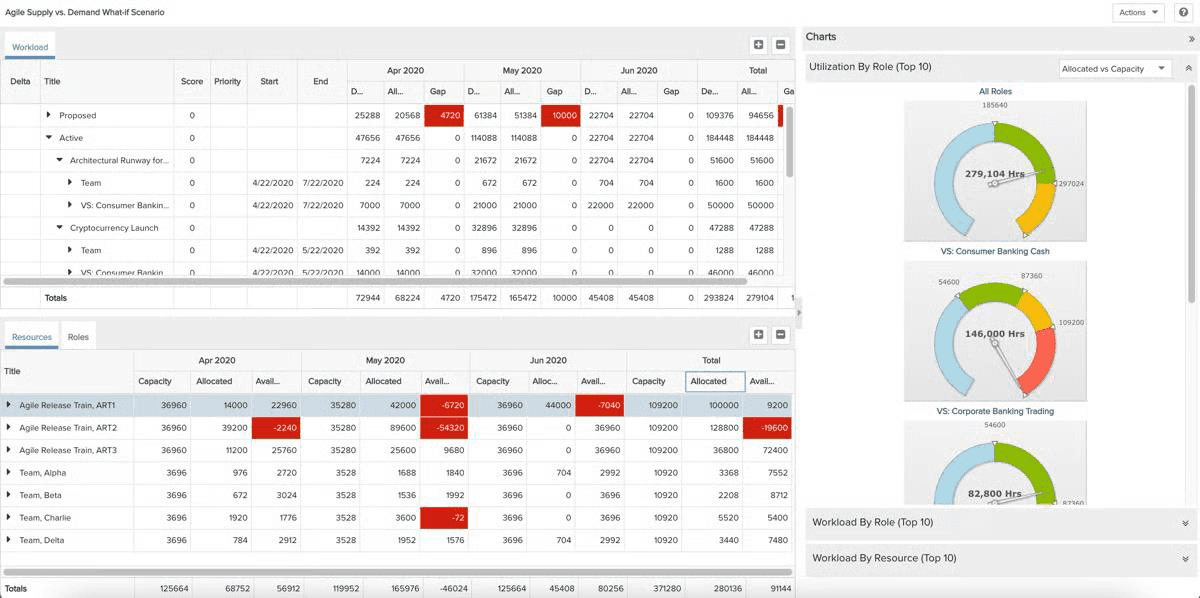
Planview's Scenario Planning dashboard visualizes resource constraints and compares project outcomes to improve execution.
Planview is an AI-powered project portfolio management solution that helps enterprises prioritize, centralize, and govern work across complex portfolios. It captures project requests and ideas through a centralized demand pipeline and uses quantitative and qualitative scoring criteria, including ROI, strategic fit, impact, and risk. Portfolio planning capability ranks initiatives against strategic objectives, financial targets, and resource capacity to identify the investments that will deliver the greatest value.
With scenario planning, firms can compare potential portfolio mixes and assess how new demand, funding shifts, or capacity changes may affect existing commitments. Roadmaps and dependency views further connect strategies, programs, projects, applications, and financials, while dashboards provide portfolio-wide insights into KPIs, OPEX, and CAPEX tracking. Overall, Planview supports rigorous portfolio governance, financial control, and strategy-to-execution alignment.
Key Features:
- Portfolio planning and prioritization
- Project intake and demand management
- Capacity-aware portfolio planning
- Roadmaps and dependency management
- Portfolio analytics and risk intelligence
- Waterfall, Agile, and hybrid execution
- More than 200 reports, embedded Power BI, AI, and integrations
Pros and Cons
- Provides strong investment planning, prioritization, capacity planning, and portfolio financial management capabilities
- Robust reporting and visualization support data-driven portfolio analysis and executive oversight
- Scales to support complex enterprise portfolios and different project, product, and hybrid operating models
- Offers customizable portfolio models, dashboards, reports, and data views for different governance requirements
- The interface can feel dated, cumbersome, and difficult for project managers to navigate
- Initial setup and configuration can be complex and time-consuming
- Common actions such as configuring columns, filters, and portfolio views may require several windows and clicks
Dive into our blog on the project intake process and streamline decision-making.
Monday.com
Best for: Small to large organizations.
Pricing: Not publicly listed.
Free Trial/Demo: Offers a 14-day free trial.
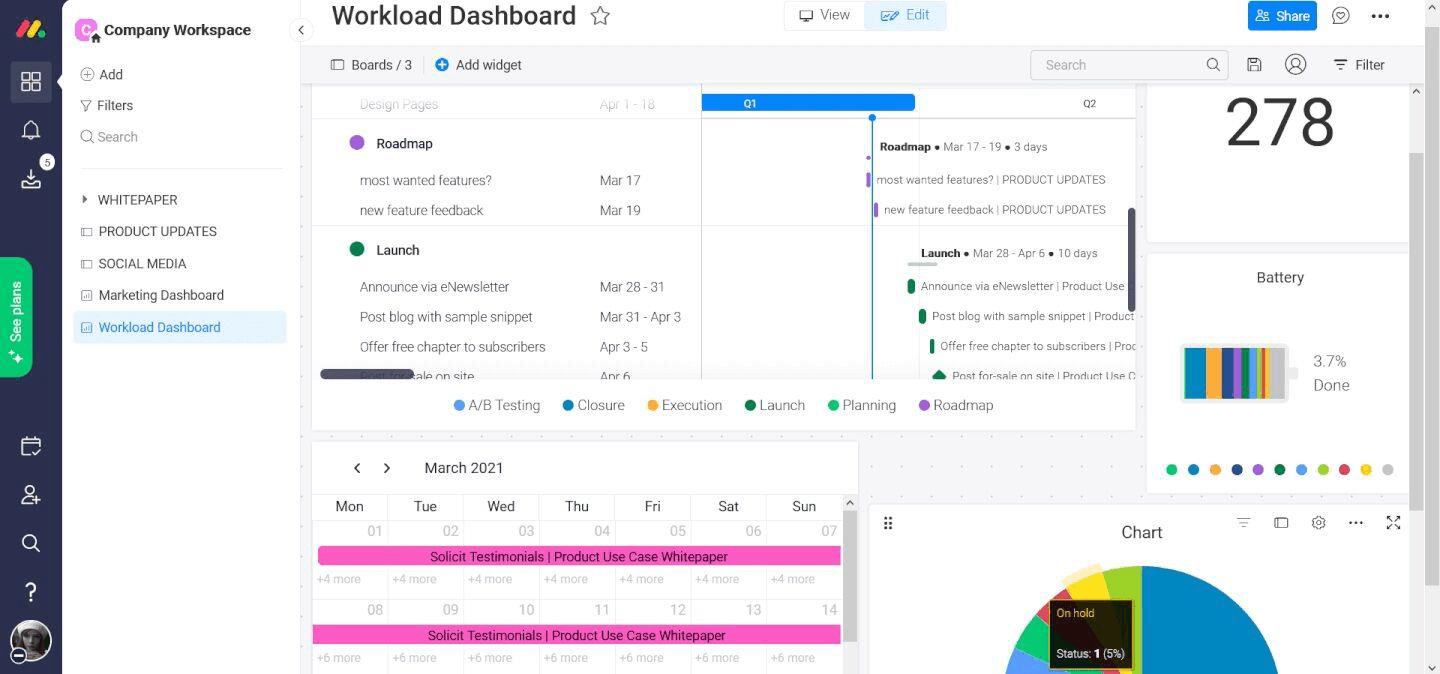
Monday.com's Portfolio dashboard helps track project health and key metrics.
Monday.com is an AI-powered work management platform that provides a visual environment for coordinating project portfolios across teams. Projects can be standardized through intake forms, routed through approval workflows, and consolidated into high-level portfolio boards. These views give PMOs and executives visibility into portfolio progress, risks, budgets, and dependencies. Gantt charts, critical-path analysis, and time tracking provide additional control over portfolio execution.
With Managed Templates, enterprises can establish common workspace structures and apply updates consistently across project instances. AI capabilities such as Risk Insights analyze connected project boards to identify potential risks, while Portfolio Reporting generates health summaries, trends, and executive-ready charts. Finally, the Project Analyzer can also monitor large project volumes, making the platform suitable for adaptable portfolio workflows and scalable governance.
Key Features:
- Portfolio boards and project roll-ups
- Project intake and approvals
- Portfolio dashboards and reporting
- AI-powered portfolio intelligence
- Templates and workflow automation
- Managed templates
- Integrations and open API
Pros and Cons
- Visual boards and drag-and-drop controls make project and portfolio information relatively easy to understand
- No-code forms, workflows, and automations allow business teams to configure processes without relying heavily on developers
- Offers numerous native integrations and an API for connecting portfolio workflows with other business applications
- Customizable dashboards provide clear roll-ups of project health, progress, and portfolio status
- The broad range of configuration options can create a learning curve for new users
- Performance may slow when organizations manage large numbers of projects and boards
- Recurring tasks and certain advanced automations are restricted to higher-tier plans
Learn more about enterprise PMO and maximize portfolio performance.
Asana
Best for: Small to large organizations.
Pricing: Not publicly listed.
Free Trial/Demo: Offers a 14-day free trial and guided demo.
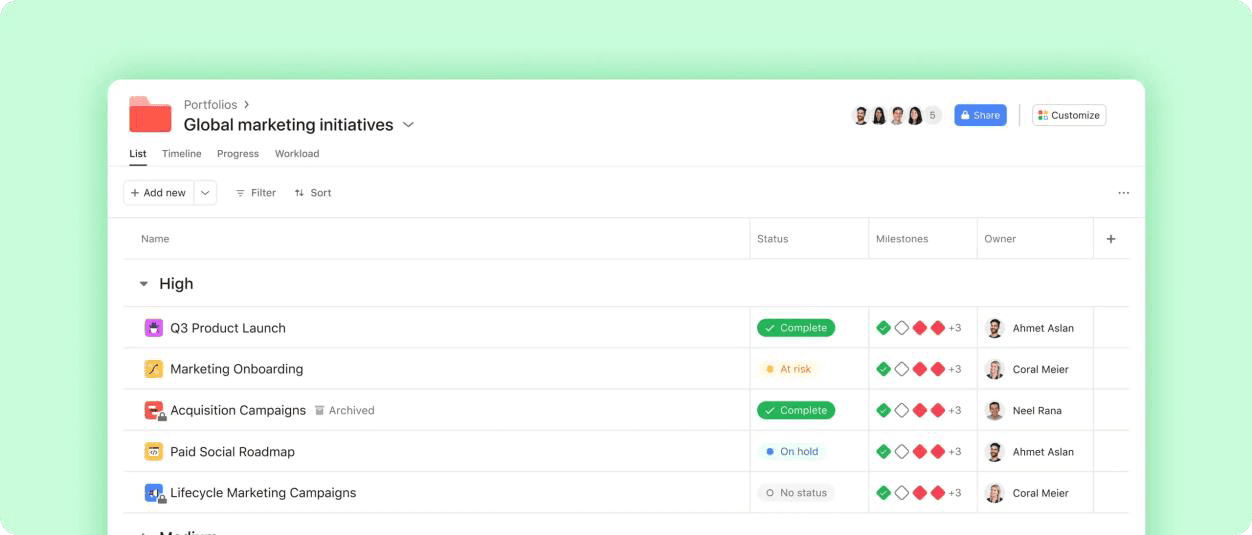
Asana's Portfolio dashboard offers comprehensive insight into multiple portfolios.
Asana is a work management platform that connects company goals with portfolios, projects, and individual work. Portfolios group related projects around company goals and provide a consolidated view of project owners, priorities, timelines, and health. Firms can identify which initiatives are on track or at risk, drill into individual projects, and organize complex programs through Nested portfolios without recreating existing project structures.
Portfolio Workload shows team bandwidth across projects and supports drag-and-drop rescheduling, while the timeline view displays project milestones and dates. Custom dashboards automatically summarize portfolio metrics such as budget, time spent, workloads, etc. Finally, the Status updates and AI-generated summaries help condense project information for stakeholders, making Asana suitable for firms to connect strategic objectives with day-to-day execution while maintaining portfolio governance.
Key Features:
- Nested portfolios
- Portfolio tracking and health views
- Workload management
- Timeline and dependency planning
- Dashboards and data roll-ups
- Custom workflows and integrations
Pros and Cons
- Provides an intuitive interface with straightforward navigation, visual project views, and customizable workflows
- Nested portfolios support hierarchical oversight across programs, departments, and multiple layers of initiatives
- Offers extensive workflow customization, integrations, collaboration features, and mobile support
- Portfolios feature is unavailable on the Personal and Starter plans and requires Advanced, Enterprise, or Enterprise+
- Smaller teams or organizations managing simple projects may find the breadth of functionality overwhelming
ServiceNow SPM
Best for: Large enterprises.
Pricing: Uses customized quote-based pricing.
Free Trial/Demo: Offers a customized demo.
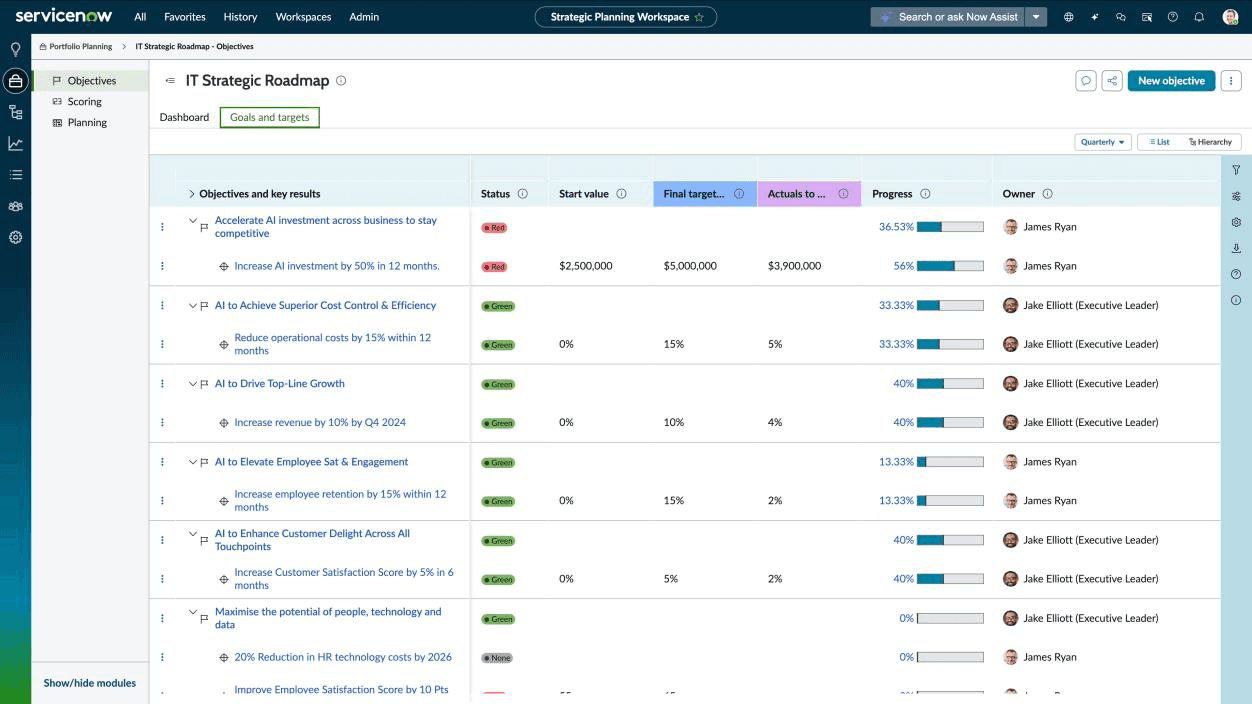
ServiceNow's Strategic Portfolio Planning dashboard visualizes key business objectives and their statuses.
ServiceNow Strategic Portfolio Management is an enterprise platform that connects business strategy with investment planning and work delivery. The strategic planning features help leaders define objectives, build roadmaps, and monitor expected outcomes. Its demand management captures and prioritizes requests, while portfolio planning guides funding decisions. The AI-driven roadmaps also highlight risks and enable reprioritization whenever business needs change.
ServiceNow SPM also supports financial planning, resource management, performance tracking, and visibility from strategy to execution. Additionally, its Enterprise Agile Planning supports traditional, Agile, and Hybrid planning approaches and integrations with Jira and Azure DevOps. Overall, the tool is for enterprises requiring end-to-end portfolio governance, particularly those already using the ServiceNow ecosystem.
Key Features:
- Strategic planning and enterprise roadmaps
- Portfolio planning and prioritization
- Demand and innovation management
- Investment funding
- Portfolio scenario planning
- Financial planning and cost visibility
- Analytics, AI, Agile, and hybrid-delivery support
Pros and Cons
- Portfolio and program reporting supports performance monitoring, risk assessment, and data-driven decisions
- Centralizes strategies, demands, projects, portfolios, and delivery information, improving visibility from planning through execution
- Integrates with other ServiceNow applications and external systems such as Slack, Microsoft Azure, Jira, Power BI, and Workday
- A steep learning curve and an interface that can initially feel complex
- Initial implementation and configuration can be demanding, particularly for large or highly customized environments
- Product is expensive, and its pricing model is unclear or inconsistent
Read our blog on the best resource management software and make informed tool selection.
Now that we have explored the 10 leading PPM software, we shall understand the basic criteria based on which these were assessed.
How We Evaluated the Best Project Portfolio Management Software?
A complete project portfolio management software must help organizations decide what work to approve, verify whether it is affordable and feasible, allocate scarce resources, govern execution, and measure portfolio value. That makes it essential to evaluate the available options to choose the best one. So, here are some of the criteria, based on which we have selected our top 10 PPM software:
- PPM depth and strategic alignment: Assess whether the platform connects organizational objectives, goals, OKRs, strategic themes, roadmaps, programs, and projects.
- Demand intake and business-case management: Review how teams capture ideas and project proposals, document requirements, develop business cases, assess feasibility, and maintain a centralized demand pipeline.
- Project evaluation and prioritization: Examine whether initiatives can be scored and ranked using factors such as strategic alignment, business value, risk, urgency, cost, expected benefits, and resource feasibility.
- Portfolio road mapping and dependency management: Evaluate whether the platform visualizes initiative timelines, milestones, sequencing, and project interdependencies to identify potential portfolio-wide impacts.
- Scenario modeling and portfolio optimization: Check whether the platform supports what-if analysis for project delays, funding changes, demand shifts, capacity constraints, and alternative portfolio choices.
- Resource capacity planning: Evaluate whether leaders can compare resource capacity and demand, skills, workloads, utilization, and staffing constraints across portfolios.
- Risk and benefits management: Review whether the platform helps identify portfolio risks, dependencies, financial exposure, and resource constraints while tracking whether investments deliver their expected benefits.
- Financial planning and investment visibility: Assess the ability to plan project budgets, track actuals, forecast costs, evaluate funding needs, and compare portfolio financial performance.
- Governance and workflow automation: Consider approval workflows, templates, stage gates, standardized intake, alerts, reminders, role-based permissions, and auditability.
- Reporting and portfolio analytics: Look for real-time dashboards, portfolio rollups, executive reporting, AI-assisted insights, configurable reports, and planned-versus-actual analysis.
- Integration, configurability and scalability: Evaluate connectivity with ERP, finance, HR, time-tracking, CRM, collaboration, agile, BI, and project management systems, along with the ability to configure and scale the platform across portfolios and business units.
- Pricing and trial access: Compare publicly listed pricing, quote-based models, feature availability by tier, free trials, demos, implementation needs, and total cost of ownership.
Make every portfolio investment count. Discover how SAVIOM helps enterprises select the right initiatives, balance capacity, mitigate portfolio risks, and improve business outcomes. Get your free demo now!
Conclusion
Each tool in the list addresses a distinct project portfolio management need. Planview, Planisware, Clarity, and ServiceNow SPM support mature enterprises with strategic planning, investment governance, and financial oversight. Smartsheet, Wrike, Monday.com, and Asana offer configurable intake, workflows, reporting, and cross-functional execution, while Epicflow emphasizes bottleneck detection, predictive delivery, and multi-project resource constraints.
Enterprises seeking a capacity-aware approach can consider SAVIOM for its ability to evaluate demand, prioritize investments, test alternative portfolio scenarios, optimize project sequencing, and monitor emerging risks. By connecting strategy, resources, financials, and execution readiness, it helps organizations build a portfolio that is both valuable and achievable.
Best Project Portfolio Management Software FAQs
How is project portfolio management software different from project management software?
Project management software helps teams execute individual projects by managing tasks, schedules, dependencies, and collaboration. Project portfolio management software provides oversight across multiple projects. It helps organizations evaluate demand, prioritize investments, balance budgets and capacity, monitor portfolio risks, and align initiatives with strategic objectives.