


Introduction
Resource management has evolved far beyond assigning people to tasks. In today's hypercompetitive marketplace, organizations must simultaneously balance workforce capacity, skills availability, utilization goals, project delivery, and cost pressures, all while adapting to changing priorities.
However, spreadsheets and homegrown systems often struggle to keep pace with dynamic workforce requirements. Teams need real-time visibility into resource availability, workloads, skill gaps, and pipeline demand to make smart resourcing decisions.
This is why organizations are making the shift to identify the best resource management software that goes beyond basic scheduling to deliver planning accuracy, smarter allocation, and strategic workforce foresight. This guide breaks down the leading resource management solutions, so you can cut through the noise and find the right fit for your business.
Best Resource Management Software: A Comparison
 Medium to enterprise-level organizationsForecasting, capacity planning, skills-based allocation, utilization tracking, scenario planning, and real-time dashboards60-day free trial and demo available
 Small to mid-sized organizationsLive capacity management, scenario planning, utilization reporting, and profitability planning30-day free trial
 Small to mid-sized organizationsResource calendar, clash management, leave tracking, reports, and custom fields30-day free trial
 Small to medium sized organizationsReal-time resource planning, reports & analytics, and project budgeting30-day free trial
 Small to large organizationsWorkload tracking, dashboards, automation, reports, and resource managementDemo available and trial upon contact only
 Small to large companiesAI-based workload alerts, capacity forecasting, executive reporting, and team collaborationFree plan and 14-day free trial available
 Small to mid-sized professional services firmsWorkload planning, capacity and utilization views, time tracking, project budgets, and profitability forecasting30-day free trial and demos available
 Startups and small to mid-sized businessesWorkload scheduling, capacity views, built-in time tracking, and custom dashboardsFree plan and demo available
 Small to mid-sized companiesCapacity planning, scheduling, utilization tracking, custom fields, and reporting analytics14-day free trial and demo available
 Mid to large-scale enterprisesGantt charts, cross-project visibility, task automation, and real-time analytics14-day free trial
SAVIOM
Best for: Medium to enterprise-level organizations.
Pricing: Custom pricing.
Free trial/demo: Offers a free customized demo and a 60-day free trial.
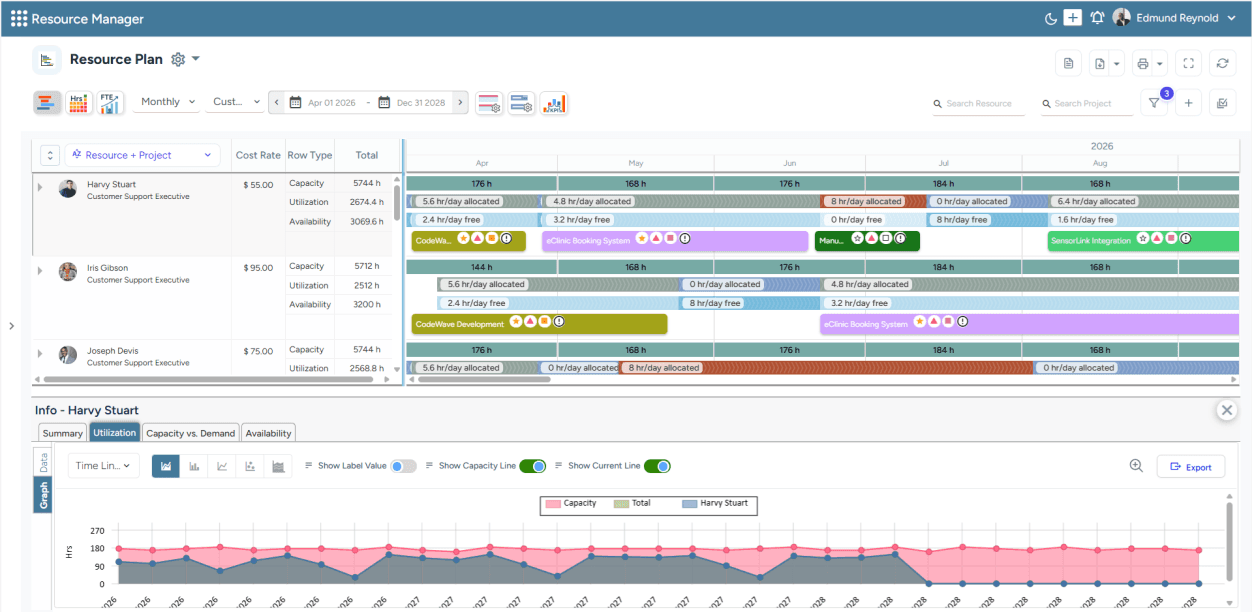
SAVIOM's All-in-One Resource Planner helps visualize current capacity, utilization, and availability in a centralized view.
SAVIOM is a pioneer in resource management, trusted by many Fortune 500 companies across 50+ nations. Its dedicated enterprise resource management software helps organizations manage large resource pools, multiple projects, distributed teams, and complex delivery pipelines. The platform offers an advanced suite of capabilities, including an all-in-one resource planner, an embedded capacity planner, a KPI forecaster, intelligent matchmaking, utilization optimization, and real-time BI reports and analytics.
Unlike basic scheduling tools, SAVIOM supports end-to-end resource management. It helps firms understand current and future capacity, identify skill shortages, reduce bench time, align resources with project demand, and improve billable utilization, thereby ensuring high ROI. Moreover, its Lego-like architecture makes it highly customizable, and its ability to handle increasing workloads and data volumes as businesses grow makes it scalable as well. This makes SAVIOM a strong option for long-term workforce planning and enterprise project resource management.
Key Features:
- Resource capacity planning
- Resource forecasting and predictive planning
- Flexible resource scheduling and allocation
- Resource utilization optimization
- Scenario modeling
- Bench management
- Intelligent match-making
- Real-time BI reports and analytics
- Multi-project and portfolio visibility
- Resource requesting
- Integration support for enterprise systems
Pros and Cons
 Easy to customize and highly scalable
- Drag-and-drop features make scheduling quick
- Provides early warning into key resource KPIs like overutilization, burnout, bench time, etc.
- Provides a sandbox environment for simulation
- Smooth integration with other existing business applications
 Initial set-up requires significant time
- Feature-rich design demands a learning curve
- More suitable for larger organizations
Book a demo with SAVIOM to see how it manages the resource management lifecycle efficiently.
Float
Best for: Small to mid-sized organizations.
Pricing: The annual billing for Float starts at $7 per scheduled person/month. The Pro plan starts at $12 per scheduled person/month. Enterprise pricing is custom.
Free trial/demo: Offers a 30-day free trial.
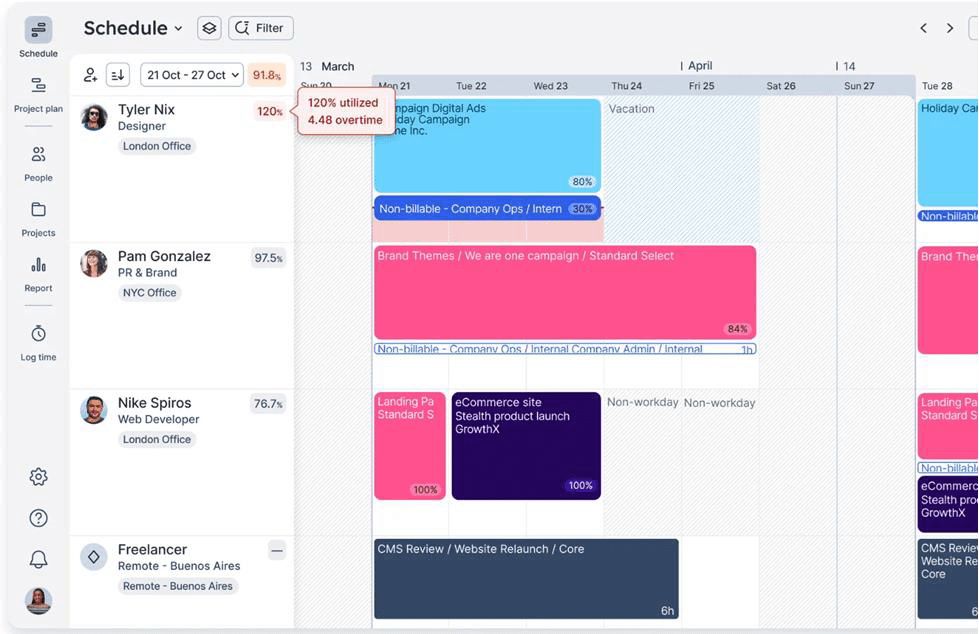
Float's Resource Scheduling dashboard to view real-time insights on project allocations.
Float takes center stage with its visual and drag-and-drop scheduling. It brings together resource allocation, capacity planning, workload visibility, time-off tracking, and availability management into a single shared view. Managers can quickly see who is working on what, adjust bookings, identify over-allocations, and track tentative work before it affects delivery.
Float also connects resource planning with project forecasting and financial visibility. Teams can assess upcoming work, estimate budgets, forecast capacity, compare planned versus actual effort, and track utilization trends in real-time. Its margin tracking and project budgeting features help surface profitability risks early, while time tracking and pre-filled timesheets make it easier to monitor actual work against schedules.
Key Features:
- Visual resource scheduling
- Drag-and-drop allocation
- Capacity and time-off management
- Project scoping
- Utilization trends
- Project margin tracking
- Project finance dashboard
- Integrations with tools
Pros and Cons
- Clean and intuitive scheduling interface
- Provides robust encryption as security and keeps daily backups
- Useful capacity and time-off visibility
- Helps teams move away from spreadsheet scheduling
- Less suited for complex enterprise scenario planning
- Skills management is lighter than enterprise RM tools
- Advanced reporting requires higher-tier plans
Resource Guru
Best for: Small to mid-sized organizations.
Pricing: The annual billing starts with the Grasshopper plan at $4.16 per person/month. The Blackbelt plan costs $6.65 per person/month, and the Master Plan costs $10 per person/month.
Free trial/demo: Offers a 30-day free trial.
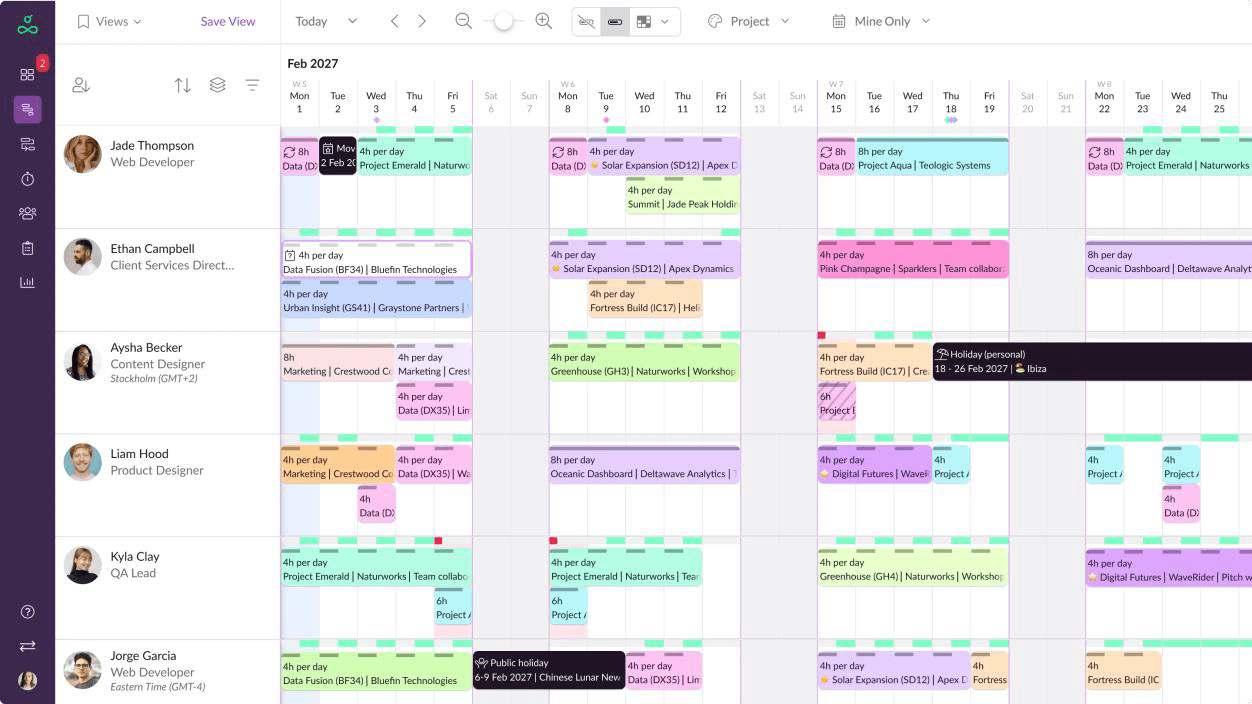
Resource Guru's Resource Scheduling dashboard to visualize and manage clashes faster.
Resource Guru is a resource scheduling tool built for clear availability, fast booking, and proactive clash management. Its drag-and-drop scheduler helps teams quickly adjust bookings, while the Waiting List and automatic conflict detection make it easier to manage overbookings before they disrupt work. The platform also accounts for leave, sick days, and availability changes, giving managers a more accurate view of real resource capacity.
Resource Guru also supports capacity planning through visual tools such as the Schedule Heatmap and Availability Bar, which help teams spot workload pressure, underutilization, and booking gaps at a glance. Beyond people scheduling, it can manage equipment, meeting rooms, and other non-human resources. It also includes timesheets, auto-suggestions based on scheduled work, project scheduling, and project forecasting reports for monitoring planned work more effectively.
Key Features:
- Resource calendar
- Multi-resource bookings
- Tentative and repeat bookings
- Clash management
- Leave management
- Timesheets
- Equipment management
- Project forecasting reports
Pros and Cons
- Simple, booking-first interface that is easy to understand
- Supports both human and non-human resource bookings
- SSO-only mode helps strengthen access control
- Zapier support allows connections with tools like Slack and Salesforce
- Useful for monitoring scheduled, billable, non-billable, and unscheduled hours
- Full in-app reporting and deeper insights are reserved for higher plans
- Less emphasis on skills, rates, and outcome-based planning
- Not ideal for advanced scenario planning or complex budget tracking
- Department-level hierarchy may rely on custom tags, which can become limiting
Start a Resource Guru trial if your team needs a simple resource booking system with availability tracking and clash prevention.
Runn
Best for: Small to medium-sized organizations.
Pricing: Annual billing starts with Lite at $7 per resource seat/month, Standard plan at $11, and Advanced at custom quote-based rates.
Free trial/demo: Offers a 30-day free trial.
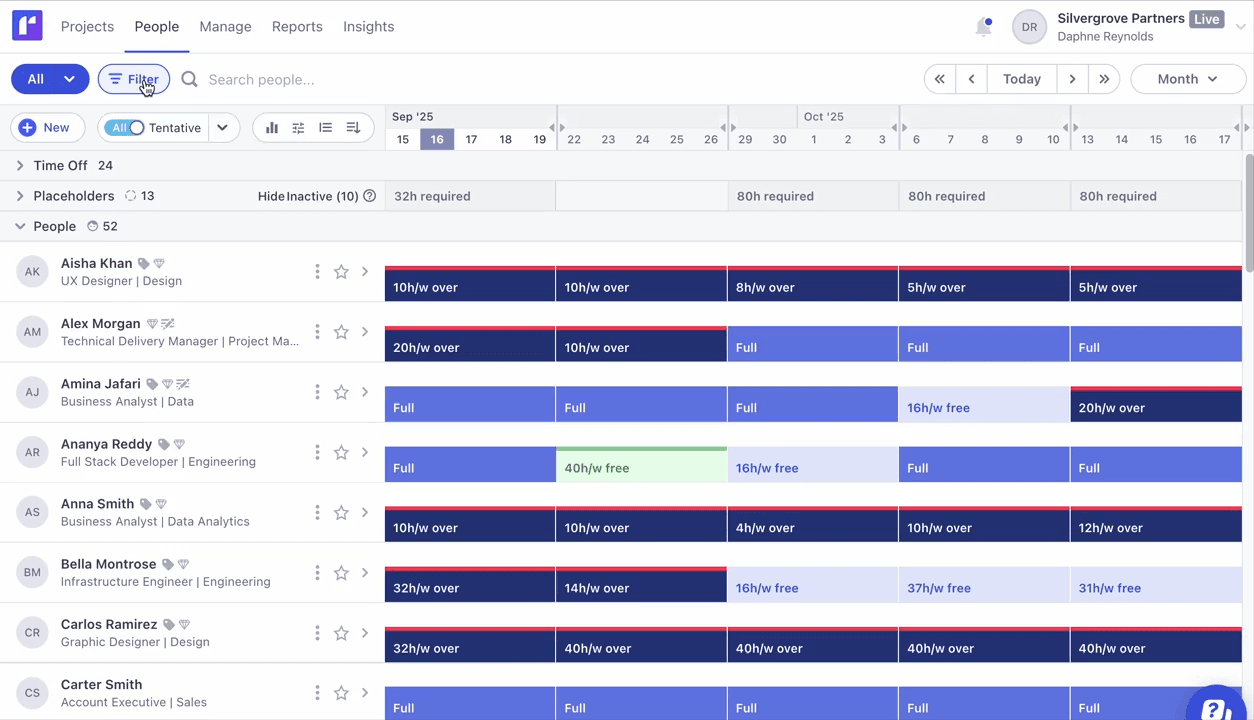
Runn's Capacity Management dashboard helps align capacity vs. demand effectively.
Runn is a resource planning tool that helps teams plan, allocate, and manage project resources from a single forward-looking schedule. Managers can create assignments quickly, view everyone's availability in one place, and use drag-and-drop scheduling to adjust workloads as priorities change. Its capacity heatmaps, role- and skill-based search, and placeholders make it easier to identify staffing gaps and model tentative or unconfirmed work.
Its placeholder functionality is useful for planning future hiring needs or unfilled roles, helping teams understand whether upcoming work can be delivered with current capacity. Runn also supports project forecasting, capacity management, time management, reporting, and financial planning. Teams can use it to forecast capacity, project demand, utilization, and financial outcomes while keeping resource data transparent across planning workflows.
Key Features:
- Capacity management
- Demand forecasting
- Resource scheduling
- Placeholder workflow
- Utilization heatmaps
- Timesheets
Pros and Cons
- Supports standard company roles and rate cards for more structured planning
- Integrates with tools such as AlexisHR, BambooHR, CharlieHR, Clockify, and Harvest
- Project data is transmitted through HTTPS encryption
- Scenario planning is limited
- May be less suitable when there are multiple project leads or managers involved during planning
Smartsheet
Best for: Small to large organizations.
Pricing: Annual billing starts at $9 per member/month for the Pro plan and $19 for the Business plan. The Enterprise and Advanced Work Management plans are available at custom quote-based rates.
Free trial/demo: Offers a demo and trial upon contact with the sales team.
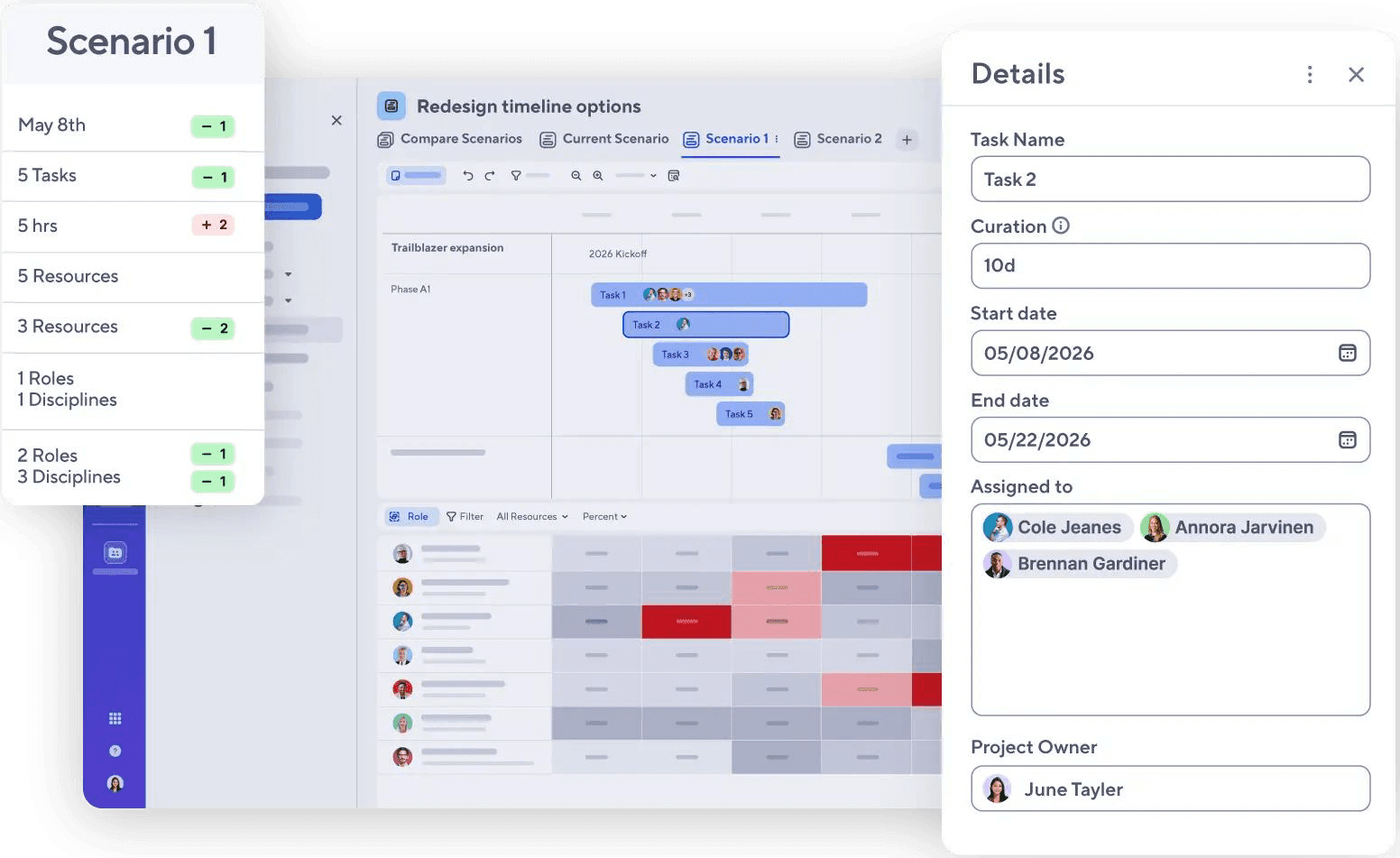
Smartsheet's Scenario Planning dashboard helps explore multiple resourcing options before commitments.
Smartsheet extends familiar spreadsheet-style planning into a more structured resource management environment. Teams can manage resource data, project plans, schedules, and allocation details through grid-based tracking while also switching to views like Gantt, calendar, card, and workload heatmaps. Its dedicated resource management application supports capacity visibility, placeholders, percentage-based planning, scenario planning, and utilization forecasting.
The platform also helps teams connect planning, reporting, and workflow automation. Managers can track planned versus actual time, review budget and expense reports, monitor projects in the pipeline, and forecast resource utilization. Its automation, approval workflows, and integrations with tools like Slack, Microsoft Teams, Facebook Ads, Zapier, and API-based systems help reduce manual coordination and keep project data connected.
Key Features:
- Workload tracking
- Demand forecasting
- Automation workflows
- Reports and dashboards
- AI capabilities
- Extensive tool integrations
Pros and Cons
- No-code app development helps teams create custom process apps without coding
- Account administration supports access control and permission management
- AI capabilities can provide personalized insights and intelligent analysis
- Skills database can support more informed resource allocation
- Timesheet workflows are intuitive for assigning hours and approvals
- Resource management features are available as an add-on to base plans
- Initial setup can be complex and may require training
- Making allocation changes can feel slow for teams that need fast schedule updates
Explore Smartsheet, if your team needs workload visibility, project reporting, dashboards, and workflow automation on one platform.
Monday.com
Best for: Small, medium, and large organizations.
Pricing: Public pricing that varies by region, team size, and plan. The annual pricing starts with the free plan, then the Basic plan at $9 per seat/month, Standard at $12, Pro at $19, and Enterprise at a quote-based price.
Free trial/demo: Offers a 14-day free trial.
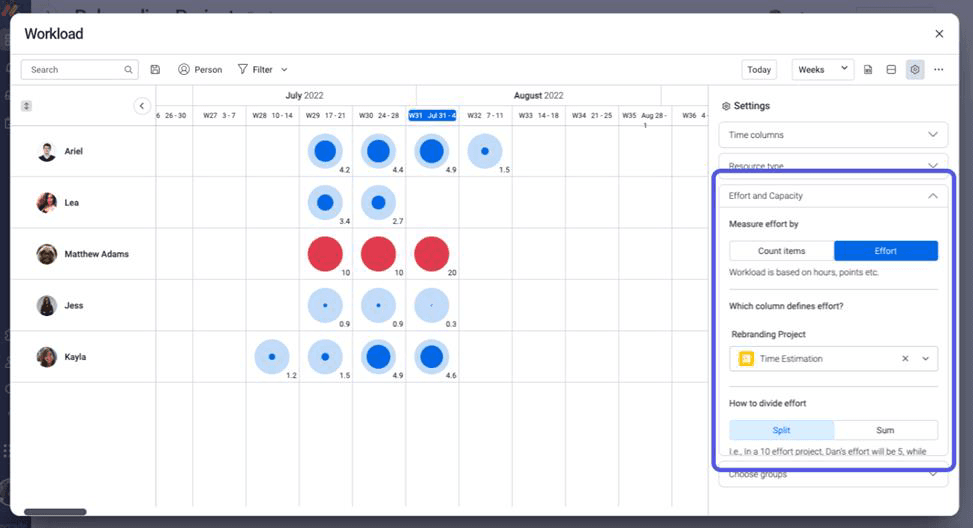
Monday.com's Workload Management dashboard helps track booked hours, assigned tasks, and available capacity.
Monday.com is a flexible work management platform that connects projects, timelines, owners, and workloads in one visual workspace. Teams can plan work using views such as Timeline, Gantt, Kanban, Calendar, and Workload, making it easier to understand task ownership and resource distribution. Its dashboards provide a consolidated view of project progress, workload pressure, delivery risks, and portfolio-level updates without requiring manual report rebuilding.
The platform also supports no-code customization, workflow automations, and AI-assisted planning features that help teams reduce repetitive coordination. Managers can automate approvals, reminders, status updates, handoffs, and reassignment triggers when priorities or capacity change. With integrations for tools like Slack, Microsoft Teams, Jira, Zoom, Excel, and Zapier, Monday.com helps keep project data, communication, and reporting connected across workflows.
Key Features:
- Workload widgets and views
- Gantt charts and kanban boards
- AI-assisted risk insights
- Workflow automation
- AI-assisted resource allocations
- Resource planner
- Capacity manager
- Portfolio dashboards
- JIRA integration
Pros and Cons
- Highly customizable dashboards for resource allocation
- Color-coded statuses make workload and project tracking easier to scan
- Open API supports broader enterprise connectivity
- Enterprise security includes two-factor authentication, IP restrictions, BYOK, SSO, and tenant-level encryption
- Strong templates support standardized project planning and execution
- Task filtering can be restrictive and confusing
- Gantt charts are locked to a mid-level plan
- Some functions, such as timesheets or leave tracking, may require external tools
- High-level capacity dashboards may require manual configuration
Teamwork.com
Best for: Small to mid-sized firms.
Pricing: The annual billing starts with Basics at $9.99 per user/month, Accelerate at $24.99, Optimize, and Enterprise at custom rates.
Free trial/demo: Offers a 30-day free trial and demo.
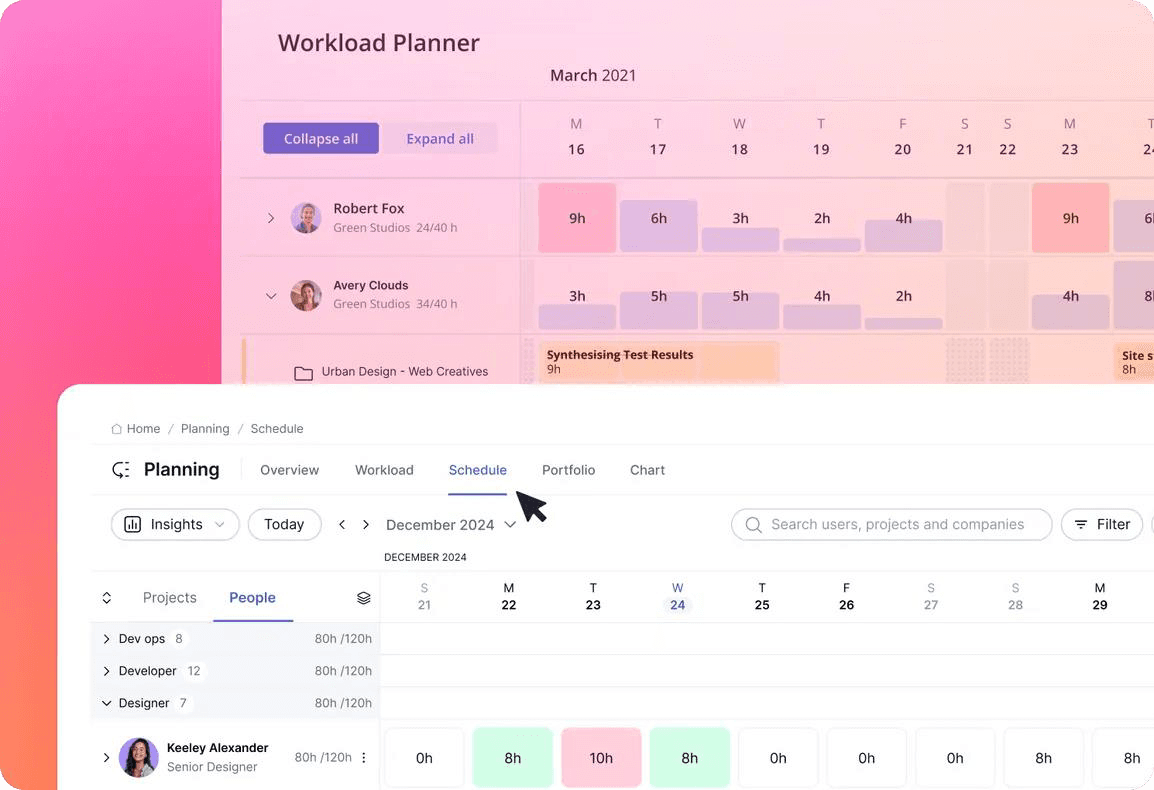
Teamwork's Workload Planner dashboard to track current work distribution among resources.
Teamwork.com helps teams manage project resources while keeping work, schedules, and delivery details organized in one place. Its Workload Planner gives visibility into day-to-day task distribution, making it easier to identify when someone is overloaded and rebalance work before delays happen. The Resource Scheduler supports forward planning with placeholders, availability-based assignments, and visual overbooking warnings.
It also includes utilization reporting, estimated versus actual workload tracking, visibility into billable hours, and available-hours reporting. The Planning Overview gives a quick snapshot of team tasks, deadlines, and estimated hours, while project templates help standardize recurring work with preconfigured tasks, milestones, and timelines. This makes it easier to plan resources early and keep projects moving without having to start from scratch each time.
Key Features:
- Workload planner
- Resource scheduler
- Utilization reporting
- Time tracking
- Task dependencies
- Project templates
Pros and Cons
- Easy-to-use dashboards let clients clearly see the update, while secure access keeps their information protected
- Built-in invoicing supports project billing workflows
- Integrates with billing systems and productivity apps
- Gantt chart customization is limited
- Time tracking might not connect easily with billing, making it harder to turn tracked hours into invoices
- New users may need time to get familiar with the platform
Use Teamwork.com to connect resource planning, project delivery, time tracking, and client visibility on one platform.
ClickUp
Best for: Startups and small to large sized businesses.
Pricing: The annual billing starts with Basics at $9.99 per user/month, Accelerate at $24.99, Optimize, and Enterprise at custom rates.
Free trial/demo: No free trial, but a 1:1 demo is available.
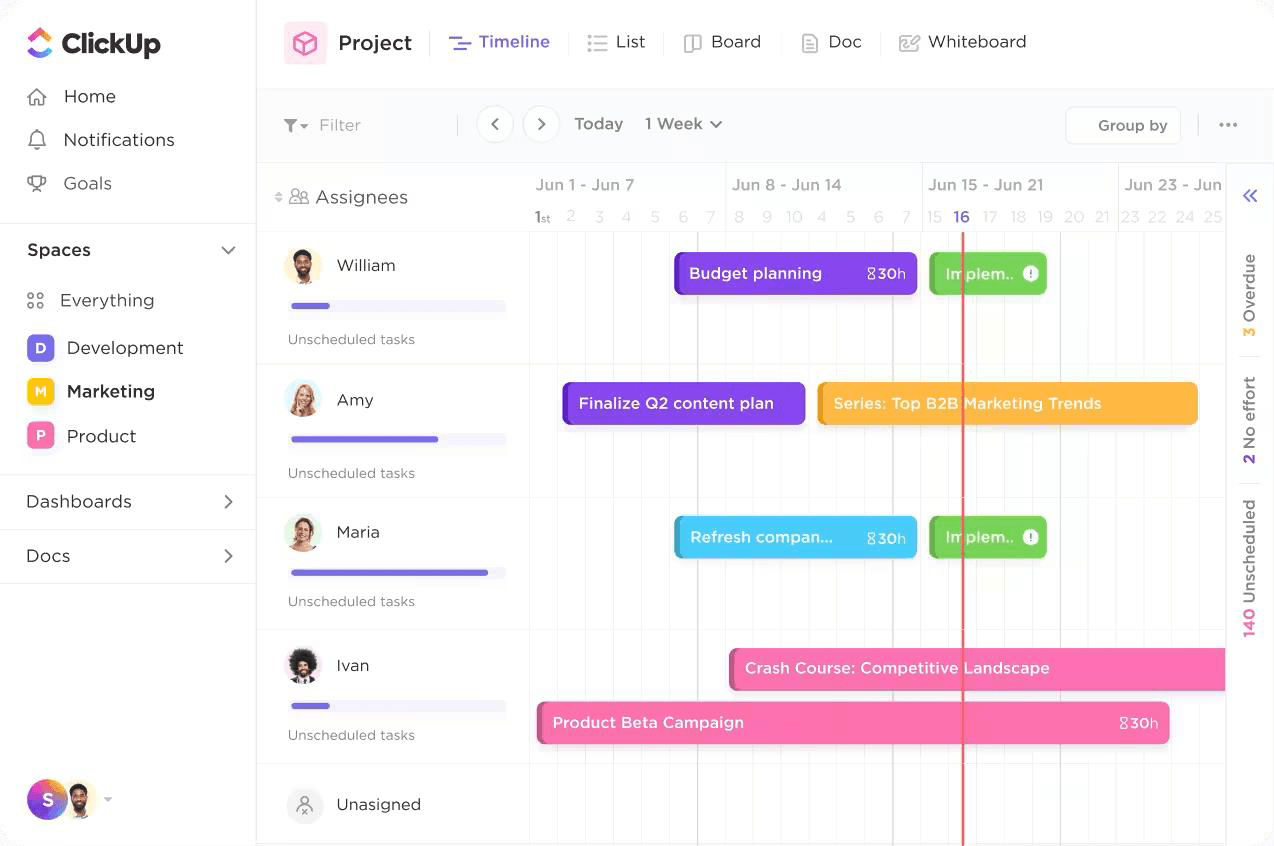
ClickUp's Workload view helps see daily resource capacity and adjust it using the drag-and-drop feature.
ClickUp combines project execution, workload planning, time tracking, and team collaboration in one workspace. Teams can manage tasks, schedules, documents, chat, whiteboards, dashboards, and resource visibility without switching between multiple tools. Its Workload, Box, Calendar, Timeline, and List views help managers understand how work is distributed and quickly identify overloaded or underutilized team members.
ClickUp also supports resource capacity planning through workload charts, task scheduling, custom dashboards, native time tracking, and automation. Its AI assistant, ClickUp Brain, can summarize work, answer availability-related questions, and support faster planning decisions. Teams can also automate status updates, task handoffs, reminders, and reporting workflows, making resource coordination easier across changing priorities.
Key Features:
- Custom dashboards
- Native time tracking
- Task scheduling
- AI-assisted automations
- Portfolio management
- Collaboration
- API integrations
- SSO enterprise security
Pros and Cons
- Highly customizable dashboards for tracking workload and utilization
- Free plan includes unlimited users with essential features
- Integrates with Slack, Google Workspace, GitHub, Google Calendar, and Outlook
- Multiple task views support different planning styles
- Built-in chat, docs, and whiteboards support collaboration
- Steep onboarding curve due to broad feature set
- Users may experience slow loading times and occasional glitches
- Advanced capacity controls are limited to higher-tier plans
- Leave approval workflows may need to be built manually
Ganttic
Best for: Small to mid-sized companies.
Pricing: Resource-based pricing model, starting at $250 yearly for up to 20 resources.
Free trial/demo: Offers a 14-day free trial.
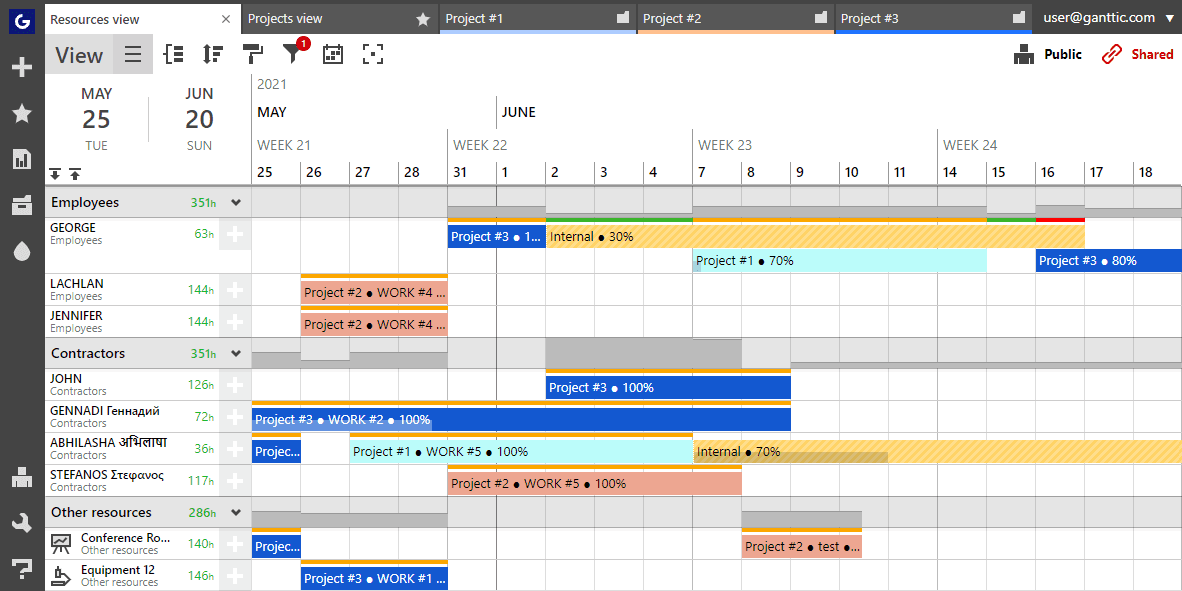
Ganttic's drag-and-drop planning interface helps visualize project schedules.
Ganttic is a resource management software that helps teams plan, schedule, and track multiple resources across projects through a flexible visual interface. Its drag-and-drop planning makes it easy to assign tasks, adjust timelines, and update schedules without overcomplicating the planning process. Teams can also create personalized views to focus on the most relevant resource, project, or timeline information.
The platform supports cloud-based access, helping teams stay aligned on schedules, tasks, and deadlines from a shared workspace. Ganttic also includes customizable reporting, allowing managers to review resource usage and project progress more clearly. Its flexibility makes it useful for resource scheduling, progress tracking, and high-level planning across different project needs.
Key Features:
- Gantt-based resource planning
- Customizable reports
- Resource tracking
- Project scheduling
- Timeline planning
- Human and non-human planning
- API integrations on paid plans
Pros and Cons
- Visual Gantt-based planning
- Useful for managing multiple resources across projects
- Flexible for operations and equipment planning
- Reporting may not support very advanced data analysis
- Integrations are limited compared to some other tools
Wrike
Best for: Mid to large-scale enterprises.
Pricing: Starts with a free plan, Team plan at $10 per user/month, Business plan at $25, Pinnacle, and Apex at custom rates.
Free trial/demo: Offers a 14-day free trial.
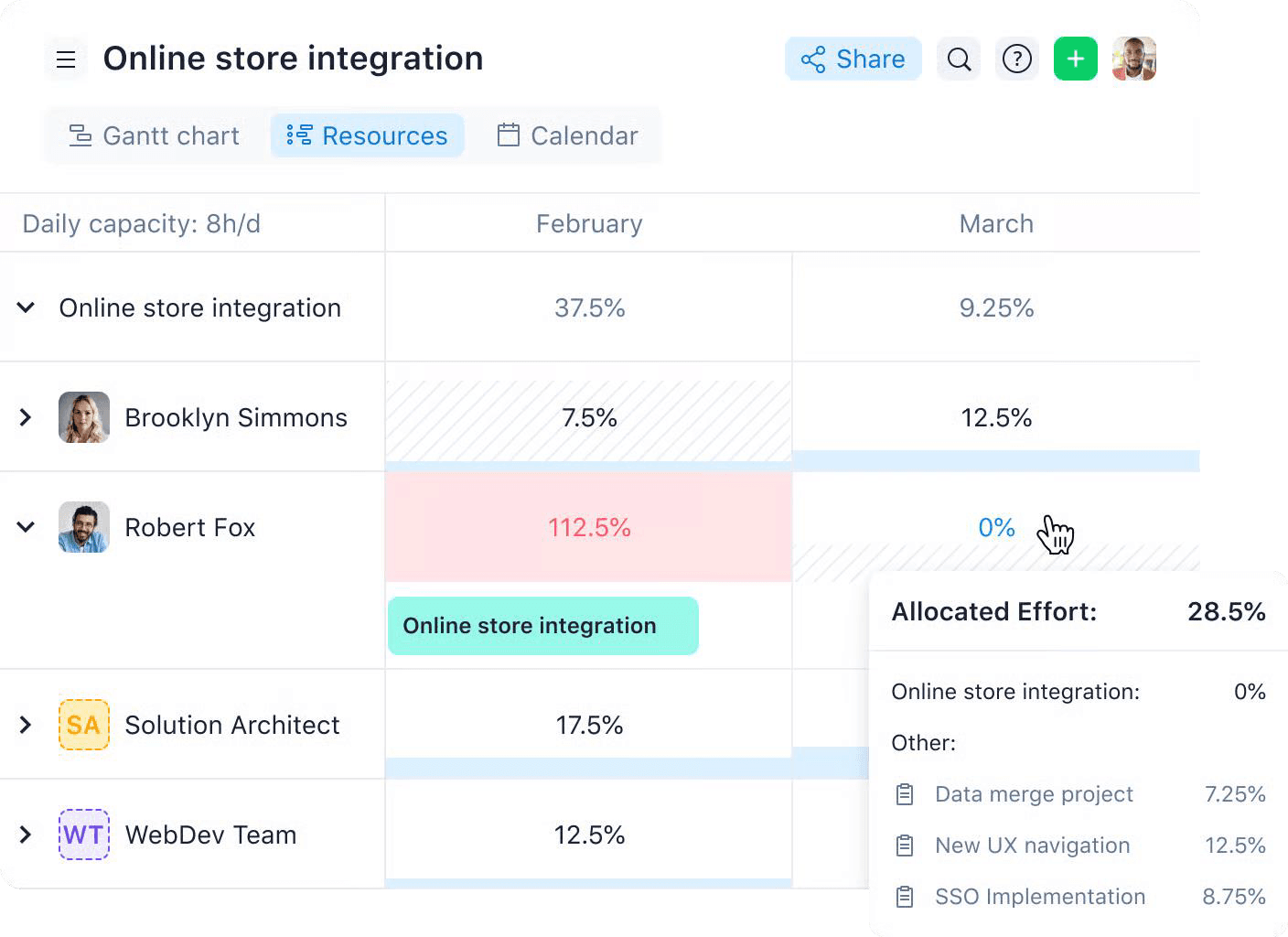
Wrike's Resource Planning dashboard helps estimate resource needs effectively.
Wrike brings resource planning and project execution into one connected workspace, helping teams manage workloads, deadlines, dependencies, and approvals with greater control. Its workload charts, effort-based planning, resource bookings, and timesheets give managers a clearer view of capacity across teams and projects. Teams can plan work using flexible, daily, or basic allocation models, spot overloads early, and adjust assignments before bottlenecks affect delivery.
The platform also supports real-time reporting, custom dashboards, request forms, approvals, and project templates to standardize how work enters and moves through the system. With features like Datahub, collaborative proofing, and integrations across productivity, file management, sales, and marketing tools, Wrike helps teams keep project data, resource planning, and execution workflows connected.
Key Features:
- Project and task management
- Workload views
- Capacity planning
- Interactive Gantt charts
- Time tracking
- Collaborative proofing
- Resource request forms
- Custom dashboards
Pros and Cons
- Highly configurable workflows, dashboards, reports, and request forms
- Strong request and approval flow for structured project intake
- 400+ pre-built native integrations
- Enterprise security includes ISO certifications, SOC 2 Type II, and Wrike Lock
- Financial planning on advanced tiers supports rate cards, budgeting, and profitability analysis
- Best resource management features are limited to higher-level plans
- Interface can feel complex and may require training
- Capacity settings and time-off controls can be admin-heavy
- No native leave management system
- Time-off approvals may require third-party apps or workarounds
Bring structure to complex projects by managing requests, approvals, timelines, and team capacity in Wrike.
Learn ways to select resource management software and improve resourcing decisions.
Having explored the top 10 resource management software in the market, let us explore the criteria based on which these tools were selected as the best.
How We Evaluated the Best Resource Management Tool?
To evaluate the best resource management software, we looked beyond basic scheduling and assessed how well each platform supports real-world planning decisions.
A strong resource management tool should help teams understand current capacity, forecast future demand, prevent overbooking, allocate resources based on skills and availability, and track utilization across projects.
We also considered how each solution supports collaboration, automation, reporting, financial visibility, and integrations. This helped us identify which tools are better suited for simple resource booking and large-scale enterprise resource planning.
The key evaluation criteria are as follows:
- Enterprise Scalability: Can the software support large teams, multiple locations, complex portfolios, role-based permissions, and governance?
- Customization & Flexibility: Can teams configure fields, views, workflows, reports, dashboards, and resource attributes?
- Automation & Workflow: Does the tool reduce manual work through notifications, approvals, workflow automation, and repeatable processes?
- Early Warnings: Can managers spot overbooking, underutilization, capacity shortages, skill gaps, and project delivery risks early?
- Security & Governance: Does the platform support enterprise permissions, access controls, auditability, and controlled data visibility?
- Resource Capacity Planning: Can teams see current and future capacity across people, roles, teams, projects, and locations?
- Scenario Modeling: Does the software support what-if planning for hiring, outsourcing, timeline changes, demand shifts, or project reprioritization?
- Reporting & Analytics: Are dashboards and reports useful for resource managers, PMOs, delivery leaders, executives, and finance teams?
- Resource Financial Planning: Can teams connect resource allocation with budgets, billable utilization, project margins, costs, and profitability?
- Collaboration: Do the tools help teams coordinate schedules, assignments, updates, approvals, and project communication?
- Vendor Support & Implementation: Is there enough support for onboarding, demos, enterprise rollout, training, and implementation?
- Integrations: Can the tool connect with project management, calendar, HR, finance, ERP, CRM, BI, and productivity systems?
- Pricing & Trial Access: Is pricing transparent, and can buyers evaluate the product through a trial or demo?
Looking for next-gen resource management software? Explore SAVIOM for their comprehensive suite of features that help manage resources effectively and boost business growth.

Conclusion
Choosing the right and the best resource management software depends on how deeply your organization needs to plan, forecast, and optimize resources. Tools like Float, Resource Guru, Runn, Smartsheet, Monday.com, Teamwork.com, ClickUp, Ganttic, and Wrike each offer valuable strengths. They support needs such as scheduling, workload visibility, collaboration, project tracking, and flexible team planning.
SAVIOM stands out for enterprises that need strategic control across complex portfolios, distributed teams, and long-term workforce planning. Its resource capacity planning, demand forecasting, skills-based allocation, scenario planning, utilization tracking, and BI analytics enable more precise decision-making. For project-driven organizations, SAVIOM helps align resources with business goals, maximize utilization, and improve delivery confidence.
Best Resource Management Software FAQs
What is resource management software?
Resource management software is a tool that helps organizations plan, allocate, track, and optimize their resources across projects. It gives managers visibility into resource availability, capacity, skills, workloads, and utilization so they can assign the right people to the right tasks at the right time. Advanced resource management software also supports demand forecasting, capacity planning, skills-based allocation, utilization tracking, scenario planning, and reporting.