


Introduction
If you've been searching for software to manage your team's workload and projects, you've probably come across the comparison: resource management software vs. PSA software.
While both help organizations improve efficiency, visibility, and planning, they are designed for different business needs. Resource management software focuses on planning, scheduling, utilization, and optimization of human and non-human resources, while PSA (Professional Services Automation) software covers the broader services lifecycle, including project management, time tracking, billing, and invoicing.
This article explains their key differences, areas of overlap, and how to decide which solution best fits your business.
Resource Management Software vs. PSA Software at a Glance
While resource management software and PSA software often overlap, they are built to solve different levels of operational complexity. The table below breaks down the key differences, so you can quickly see which solution fits your business needs.
Next, let us understand what resource management software is, its features, and the benefits it offers.
What is Resource Management Software?
Resource management software helps organizations forecast, plan, allocate, schedule, and optimize resources across projects and operational work. It gives managers visibility into employee availability, skills, workload, and utilization. This enables firms to assign the right people to the right tasks at the right time, avoid over-booking, and improve project delivery.
Key features of resource management software include:
- Resource forecasting and predictive planning
- Resource capacity planning
- Intelligent matchmaking
- Flexible resource scheduling and allocation
- Resource utilization optimization
- Bench management
- Scenario modeling
- Reporting and analytics
- Resource financial planning
Benefits of Resource Management Software
Here's a rundown of the key benefits of resource management software:
- Accurately forecasts future resource demand by helping managers identify upcoming skill and capacity requirements in advance.
- Aligns workforce capacity proactively so businesses can plan hiring, training, or reallocation before resource gaps affect project delivery.
- Ensures the right talent is assigned to the right projects by matching resources based on skills, availability, and project requirements.
- Minimizes project resource costs by ensuring people are assigned efficiently, and high-cost resources are used only where they add the most value.
- Improves productive resource utilization by reducing bench time, underutilization, and uneven allocation across teams and projects.
- Prevents employee burnout by identifying overbooked team members and balancing workloads before stress impacts performance.
- Simplifies matrix resource management by giving leaders visibility into shared resources across departments, functions, and locations.
- Improves collaboration and transparency by giving project managers, resource managers, and leadership a single view of resource plans, workflows, and allocation changes.
For an in-depth look at the concept, benefits, frameworks, and best practices, explore our resource management guide.
Now that we have explored what resource management software is and how it helps organizations optimize their workforce, let's move on to PSA software and examine its key benefits.
What is PSA Software?
PSA (Professional Services Automation) Software helps service-based organizations manage the full lifecycle of project delivery and client operations. PSA platforms combine project management, resource planning, time tracking, billing, invoicing, budgeting, collaboration, financial reporting, and service delivery workflows into one system. The main goal of PSA software is to improve operational efficiency, increase billable utilization, streamline service delivery, and boost business profitability.
Key components of professional services automation software include:
- Contract management
- Project management
- Resource management
- Project accounting and billing
- Sales and delivery alignment
- Knowledge management
- Team collaboration
- Automation and integration
Benefits of PSA Software
Below are the key benefits of PSA software:
- Provides real-time visibility into the project pipeline, enabling sales and delivery teams to prioritize the most viable opportunities.
- Enables faster project initiation by centralizing resource availability, skills, and workloads.
- Improves billable utilization and productivity by tracking real-time resource usage and shifting teams toward high-value, revenue-generating work.
- Enhances visibility into project financials by giving teams real-time insights into profitability, margins, budgets, and revenue.
- Speeds up billing and invoicing cycles by automatically capturing billable hours, expenses, and milestones to generate accurate invoices.
- Improves collaboration between sales and delivery teams by connecting project scope, timelines, resource requirements, and client commitments in one centralized platform.
- Supports better decision-making by centralizing operational, project, resource, and financial data into a single source of truth.
Read our comprehensive professional services automation guide.
Next, let's compare resource management software and PSA software features to understand how they differ in scope, functionality, and business value.
Resource Management Software vs. PSA Software: Feature-by-Feature Comparison
A feature-by-feature comparison makes it easier to understand the differences and similarities between resource management software and PSA software. The table below compares the core features side by side to help you evaluate which platform aligns better with your team's workflows.
Now, let us understand when businesses should consider choosing resource management software.
When Should You Choose Resource Management Software?
Choosing resource management software becomes important when teams can no longer manage people, workloads, and project demand through spreadsheets or scattered updates. As business grows, managers need a clearer way to plan capacity, prevent conflicts, improve resource utilization, and respond quickly when priorities change. Let us look at the key signs that show it may be time to invest in resource management software:
When Resource Visibility is a Challenge
Managers often struggle to see who is available, who is overloaded, and who still has unused capacity across multiple projects. As a result, they may assign work based on assumptions instead of real-time workload data. Resource management software solves this by providing teams with a centralized view of resource availability, allocations, and workloads, enabling managers to make faster, more accurate staffing decisions.
When Capacity Planning and Forecasting Are Becoming Complex
As project demand increases, it becomes harder to know whether the firm has enough capacity to support upcoming work. Without proper resource forecasting, organizations may take on more projects than their workforce can realistically deliver. In such scenarios, resource management software helps managers identify future demand, capacity shortages/excesses, and hiring or upskilling needs before they affect delivery.
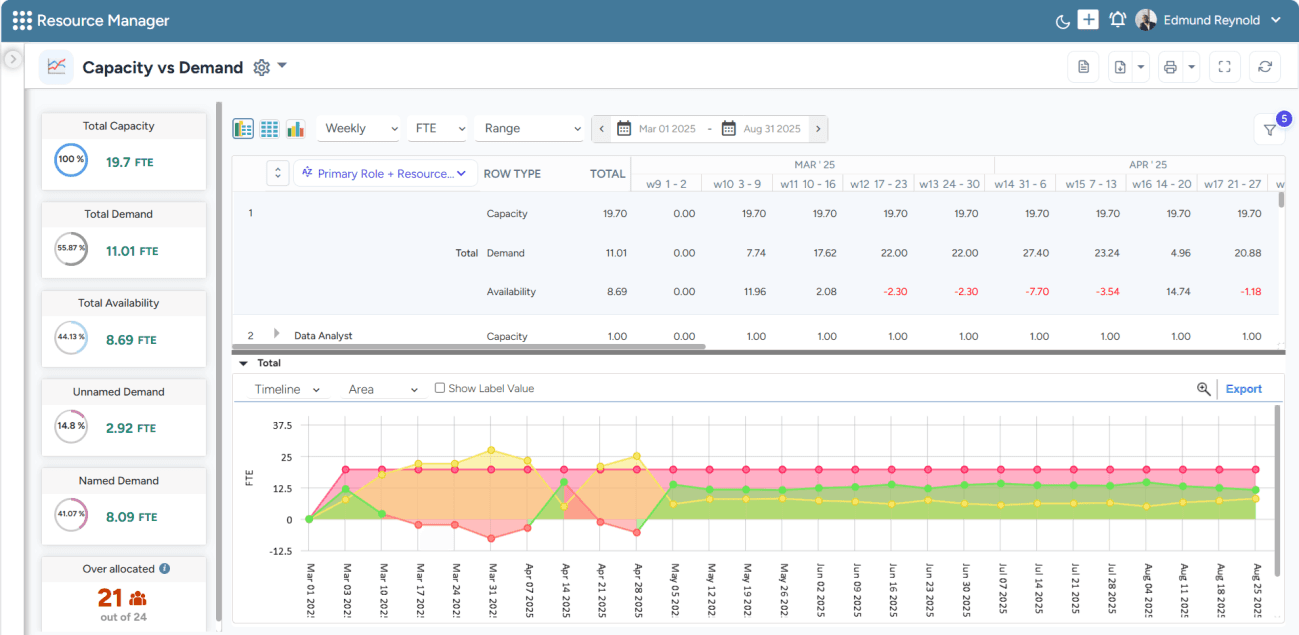
SAVIOM's Capacity vs. Demand dashboard helps managers quickly spot resource shortages/excesses and take timely action to balance supply and demand.
When Projects Face Frequent Scheduling Conflicts
Overlapping timelines, shifting deadlines, and unclear availability can quickly create resource clashes across projects. Consequently, teams may become stretched too thin, which can reduce work quality and delay delivery. Resource management software helps managers build more accurate resource schedules by factoring in availability, capacity, skills, and project priorities, while also making it easier to redeploy people when plans change.
Read our resource scheduling guide to learn how to allocate resources effectively and balance workloads.
When Utilization Needs Improvement
Low billable or productive utilization often happens when managers assign resources inefficiently or leave skilled people underused. At the same time, poor workload distribution can create burnout for some employees while others have spare capacity. Resource management software helps managers track utilization, balance assignments, and assign people to projects where they can create the most value.
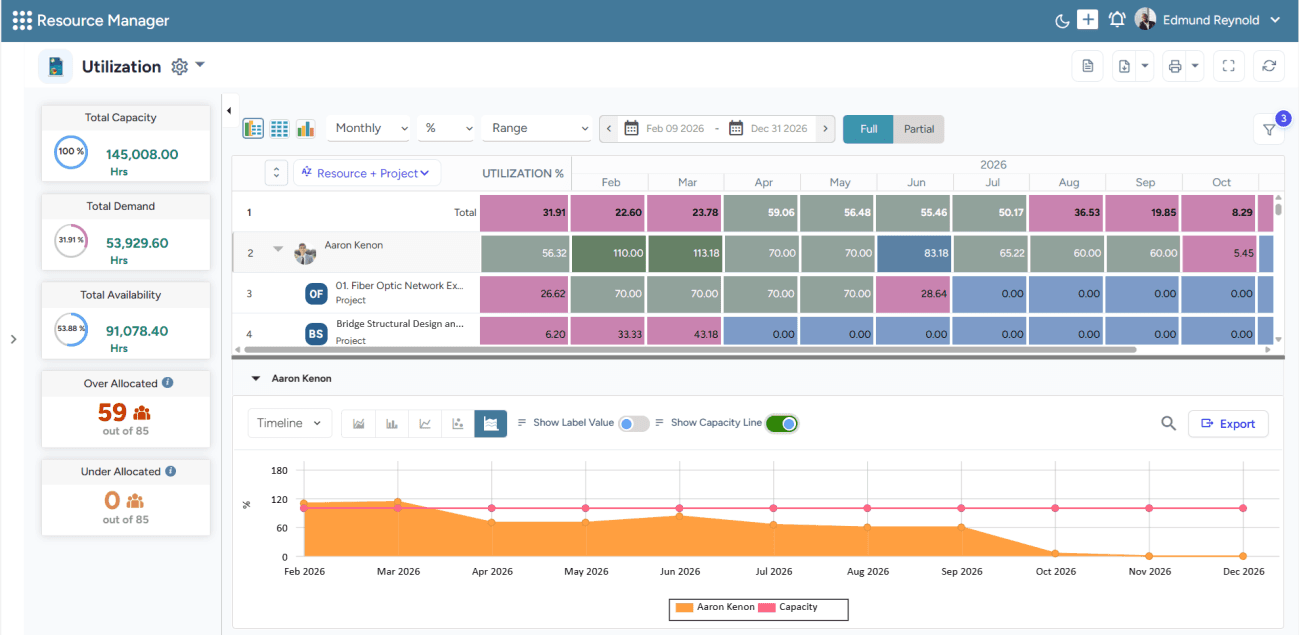
SAVIOM's Color-Coded Heatmap highlights the real-time resource utilization levels, helping managers identify imbalances and optimize productive utilization.
When Priorities Shift, and Project Scope Keeps Evolving
Changing priorities, scope expansion, and unexpected project demands can quickly disrupt even the best resource plans. Therefore, managers need a reliable way to test different staffing options before making changes. Resource management software offers scenario planning capabilities that help users model different resource allocation scenarios and choose the most feasible, cost-effective plan.
After this, let us understand why organizations should look for professional services automation software.
When Should You Choose PSA Software?
Choosing PSA software becomes important when professional services teams need more than basic project or resource planning. As client engagements grow, businesses need a connected system to manage projects, contracts, resources, time, expenses, billing, and profitability in one place. Let us look at the situations where PSA software becomes the right choice:
When You Need to Manage the Full Professional Services Lifecycle
Teams often struggle to manage the full-service workflow when sales, delivery, finance, and client information are spread across different systems. As a result, managers may lose visibility into handoffs, project progress, billing status, and overall service performance. PSA software provides a centralized view of the full professional services lifecycle, helping teams manage sales handoff, project planning, delivery, billing, reporting, and client management more efficiently.
When Contract Management Becomes Difficult to Handle
As client work grows, it becomes difficult to consistently manage contracts, service agreements, project scope, renewals, and commercial terms. Without a centralized system, teams may miss important commitments, approval steps, or scope changes that affect delivery and billing. PSA software connects contract management with project planning and billing by linking agreed scope, timelines, budgets, pricing terms, milestones, and billing rules to the actual delivery workflow.
When Projects Face Frequent Delivery and Coordination Gaps
Managing multiple client projects can create confusion around timelines, tasks, ownership, project milestones, and deliverables. Consequently, teams may rely on scattered updates, making it harder to track progress, identify risks, and keep work on schedule. PSA software helps managers bring together project plans, task assignments, collaboration, milestones, and delivery updates in one place, keeping projects organized and on track.
Read this blog to learn how to improve cross-departmental collaboration.
When Project Financials, Billing, and Invoicing Need Better Control
Project budgets, revenue, billing rules, invoices, and profitability become harder to manage as service models become more varied. This is especially true for fixed-fee, time-and-materials, retainer, milestone-based, or recurring billing projects. PSA software helps managers track budget usage, invoice readiness, margin risk, and revenue leakage, enabling them to identify financial issues earlier.
When Time and Expense Tracking Needs to be More Accurate
Teams often struggle to record work hours and expenses accurately when employees or consultants work across multiple clients, projects, tasks, or locations. Moreover, manual tracking can lead to errors, delayed approvals, missing billable hours, and unreliable operational records. PSA software helps standardize time entry, expense submission, approval workflows, activity categorization, and audit trails, so teams can maintain accurate records without relying on spreadsheets.
Explore effective time management strategies to boost business outcomes.
Conclusion
Resource management software is ideal for organizations that want to improve resource visibility, optimize utilization, and plan workforce capacity more strategically. It helps managers understand availability, balance workloads, reduce scheduling conflicts, and assign the right people to the right work at the right time.
On the other hand, PSA software is better suited for professional services businesses that need to manage the broader service delivery lifecycle. It connects projects, resources, contracts, time tracking, expenses, billing, invoicing, and reporting in one system, giving teams better control over delivery performance and profitability. Ultimately, the right choice depends on the core challenge your business wants to solve.
Use SAVIOM's resource management software to optimize resource utilization in real-time, improve productivity, and maximize business outcomes. Book a Demo Today.

Resource Management Software vs. PSA Software FAQs
What is resource management software?
Resource management software is a tool that helps organizations plan, schedule, allocate, and optimize resources across projects. It gives managers visibility into resource availability, skills, workloads, capacity, and utilization, enabling them to assign the right people or assets to the right work at the right time while avoiding conflicts, overbooking, and underutilization.