


Introduction
Does your team need more than task assignments and workload charts?
Would earlier visibility into resource demand, bench capacity, skills shortages, and project margins improve planning decisions?
Or do you need a simpler way to book people and equipment?
If the answer to all these questions is 'yes', then your team may need capabilities that align better with operational complexities.
Even though Wrike remains a capable platform for coordinating projects and cross-functional work, it does not support end-to-end resource planning.
This comparison examines six Wrike alternatives across their features, scalability, and price, helping businesses select a tool aligned with their most important requirements.
Best Wrike Alternatives: A Side-by-Side Comparison
A credible Wrike alternative does not need to replicate every feature. It should address the specific planning or execution gap affecting the organization. The following comparison offers an initial view of where each platform fits, helping teams narrow their options before examining them in detail.
 Medium to enterprise-level organizationsForecasting, capacity planning, skills-based allocation, utilization tracking, scenario planning, and real-time dashboards60-day free trial and demo available
 Small to mid-sized organizationsResource calendar, clash management, leave tracking, reports, and custom fields30-day free trial
 Small to mid-sized organizationsLive capacity management, scenario planning, utilization, reporting, and profitability planning30-day free trial
 Small to medium sized organizationsReal-time resource planning, reports & analytics, and project budgeting30-day free trial
 Startups and small to mid-sized businessesWorkload scheduling, capacity views, built-in time tracking, and custom dashboardsFree plan and demo available
 Small to large companiesAI- based workload alerts, capacity forecasting, executive reporting, and team collaborationFree plan and 14-day free trial available
Next, we will understand these six Wrike alternatives in detail.
Best Wrike Alternatives You Should Consider
SAVIOM
Excellent for End-to-End Resource Management
Best for: Medium-sized to enterprise-level organizations.
Pricing: Custom pricing is available based on business requirements and deployment needs.
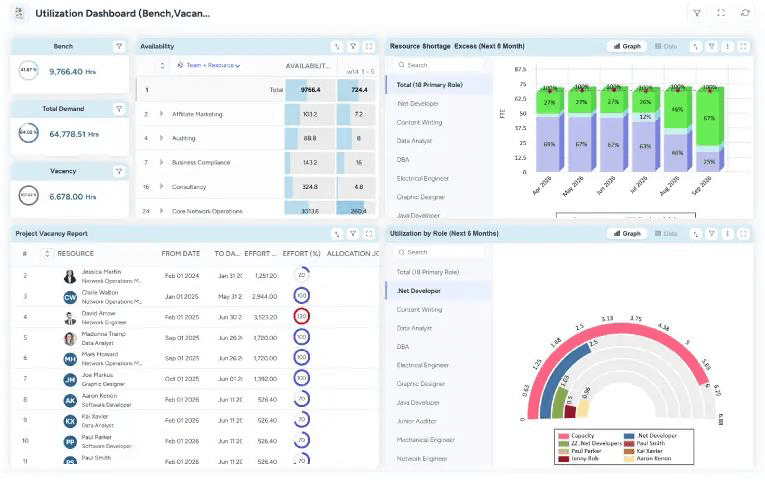
SAVIOM's Resource Reporting dashboard offers a comprehensive insight into capacity, demand, utilization, and project vacancy for multiple resources.
SAVIOM is a great alternative to Wrike, especially for organizations that treat resource management as an enterprise-wide discipline. It brings demand forecasting, resource capacity planning, skills-based allocation, utilization optimization, and scenario planning into one environment. Firms can also connect workforce decisions with project costs, revenue, and margins, creating a more complete view of how resource choices affect portfolio performance.
Key Features:
- Resource demand forecasting
- Resource capacity planning
- Flexible resource scheduling and allocation
- Intelligent matchmaking
- Resource utilization and optimization
- Scenario planning
- Bench management
- Resource financial planning
- Reporting and analytics
Why Choose SAVIOM Over Wrike?
Choose SAVIOM when the primary goal is to improve strategic resource decisions across complex portfolios, departments, and locations. Its resource capacity planning, skills-based allocation, what-if planning, bench control, and workforce financial planning support a deeper level of optimization than a general work management platform. It is particularly suitable when leadership needs forward-looking resource intelligence alongside operational scheduling.
Read our blog on SAVIOM vs. Wrike to understand how they differ in resource management.
Resource Guru
Great for Seamless Resource Scheduling
Best for: Small to mid-sized organizations.
Pricing: Starts at $4.16 per person/month with multiple plan options available.
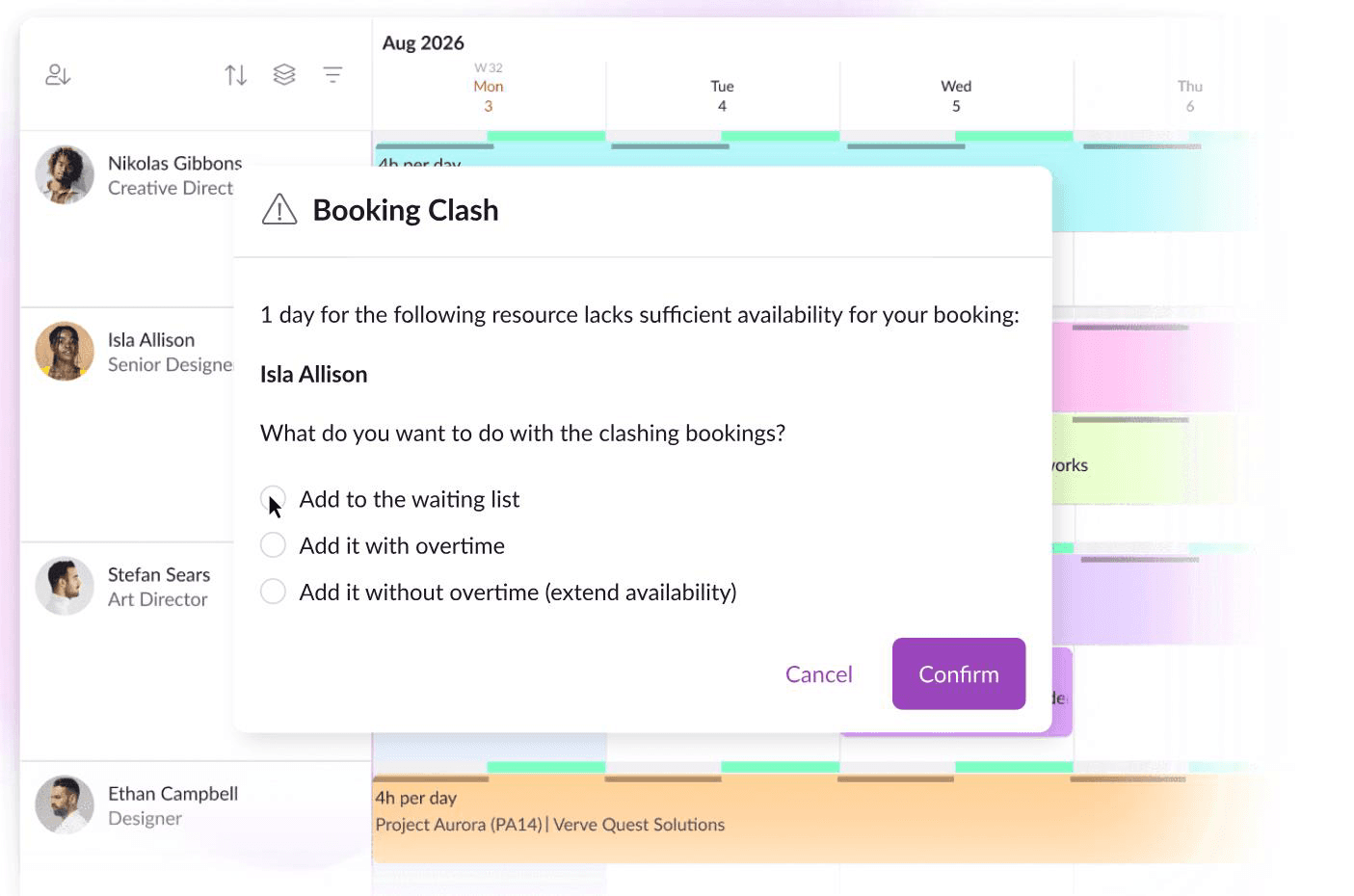
Resource Guru's Clash Management dashboard lets managers proactively avoid scheduling conflicts.
Resource Guru provides a focused scheduling environment for teams that value clarity and conflict prevention. Its shared resource calendar combines bookings, capacity heatmaps, custom availability, leave, and clash management, so firms can see who or what is available before assigning work. The platform also supports physical resources, allowing organizations to schedule equipment, rooms, and facilities alongside employees within the same booking process.
Key Features:
- Resource scheduling
- Resource booking
- Resource placeholders
- Leave management
- Clash management
- Equipment scheduling
- Shared resource calendar
- Reporting and dashboards
Why Choose Resource Guru Over Wrike?
Choose Resource Guru when uncomplicated booking and scheduling control is more critical than broad project and workflow management. Waiting lists, booking approvals, custom availability, and proactive clash detection create a more purpose-built experience for coordinating shared resources. It is also a practical choice for teams that must reserve equipment, meeting rooms, or other non-human assets together with employees.
Check out our blog on Resource Guru alternatives for simple scheduling across complex projects.
Float
Perfect for Resource Scheduling & Financial Planning
Best for: Small to mid-sized organizations.
Pricing: Starts at $7 per scheduled person/month for the Starter plan and $12 per scheduled person/month for the Pro plan. Enterprise pricing is available on request.
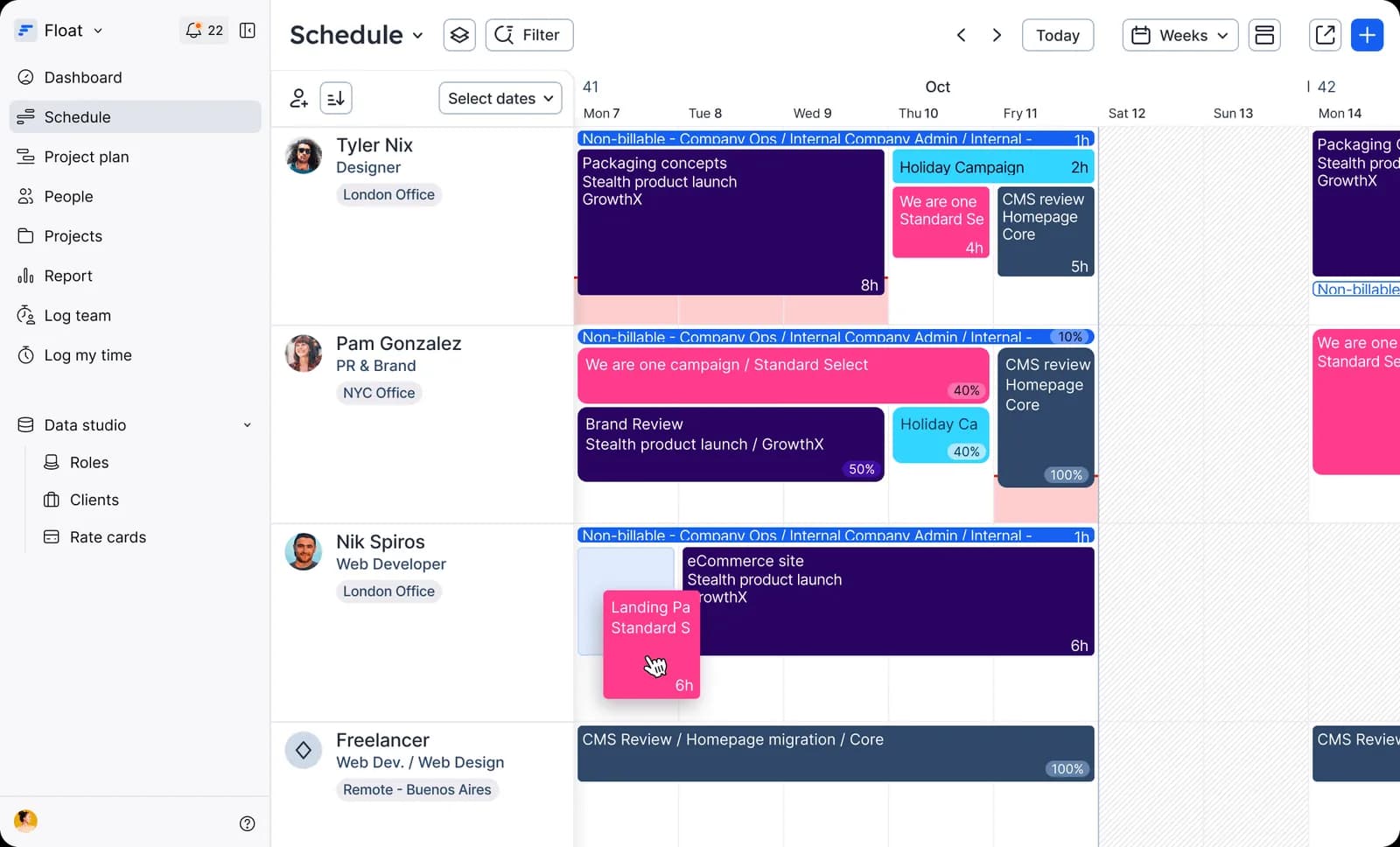
Float's Resource Schedule dashboard visualizes project allocations, making reallocations easier.
Float places a visual schedule at the center of resource planning. Firms can allocate work in hours or percentages, adjust bookings through drag-and-drop controls, and monitor live capacity with overbooking warnings. Its planning context extends beyond availability by linking project estimates, budgets, costs, bill rates, and resource utilization. This helps service teams understand both staffing feasibility and the financial health of delivery plans.
Key Features:
- Visual resource scheduling
- Team availability tracking
- Capacity planning
- Project estimates
- Project planning
- Time tracking
- Time-off management
- Reporting and dashboards
Why Choose Float Over Wrike?
Choose Float when teams want a dedicated, resource-first schedule that can work alongside their existing project management system. It is a strong fit when availability, capacity, project budget, and margin visibility are more important than extensive task workflows or approval structures. This separation lets managers plan people and project economics without replacing the tools used for detailed execution.
Dive into our SAVIOM vs. Float blog to identify the better option for resource planning.
Runn
Ideal for Simple Resource Planning & Scheduling
Best for: Small to medium-sized organizations.
Pricing: Annual billing starts with Lite at $7 per resource seat/month, Standard plan at $11, and Advanced at custom quote-based rates.
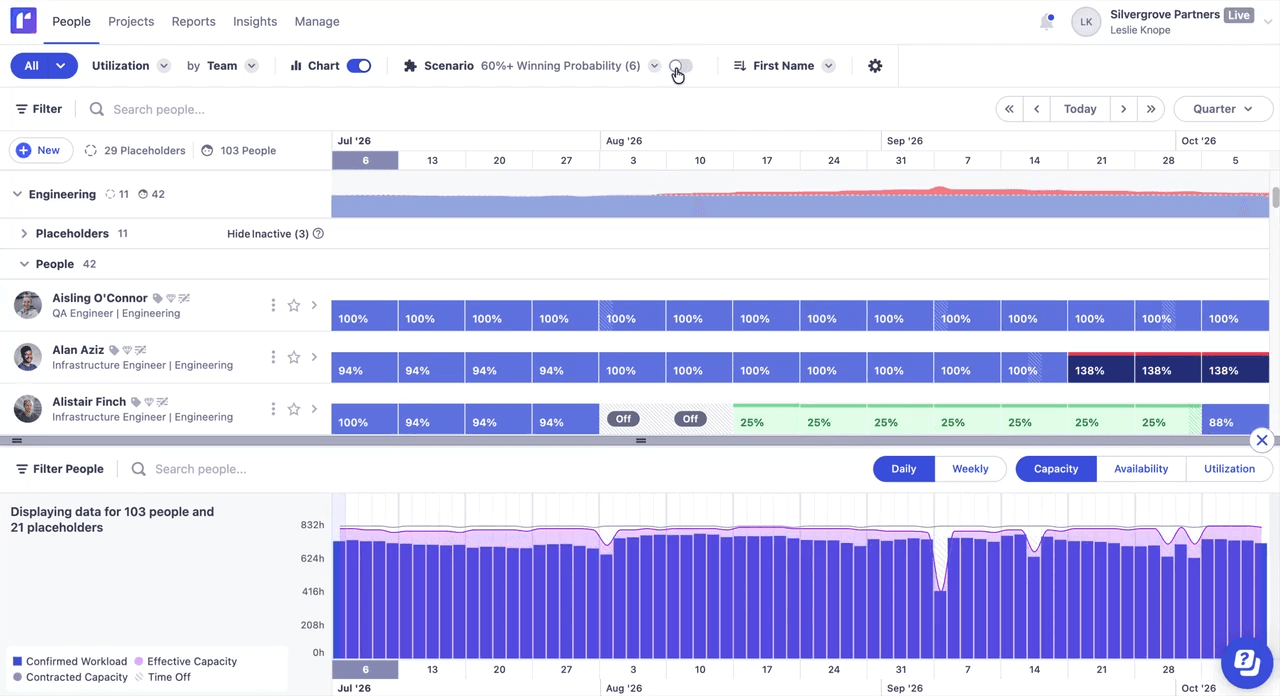
Runn's People Planner offers real-time visibility into project schedules, capacity, skills, utilization, and more.
Runn connects resource planning with the commercial realities of project-based teams. Businesses can compare capacity with demand, schedule people or placeholders, plan by role and skill, track resource utilization, and test what-if scenarios. Project financials, forecasts, budgets, revenue, and timesheet data give managers a shared view of how upcoming work may affect staffing, performance, and financial outcomes.
Key Features:
- Capacity management
- Demand forecasting
- Role-based scheduling
- Placeholder workflow
- Utilization heatmaps
- What-if scenarios
- Timesheets
- Integrations and API access
Why Choose Runn Over Wrike?
Choose Runn when resource decisions must reflect the project pipeline, future demand, utilization, and expected financial performance. It suits project teams that need to understand whether the right people and skills are available, how project scope changes could affect delivery, and where capacity or margin risks may emerge.
Explore our Runn alternatives blog to support increasing resource planning complexity.
ClickUp
Optimal for Flexible Workload Management
Best for: Startups and small to large-sized businesses.
Pricing: The annual billing starts with Basics at $9.99 per user/month, Accelerate at $24.99, Optimize, and Enterprise at custom rates.
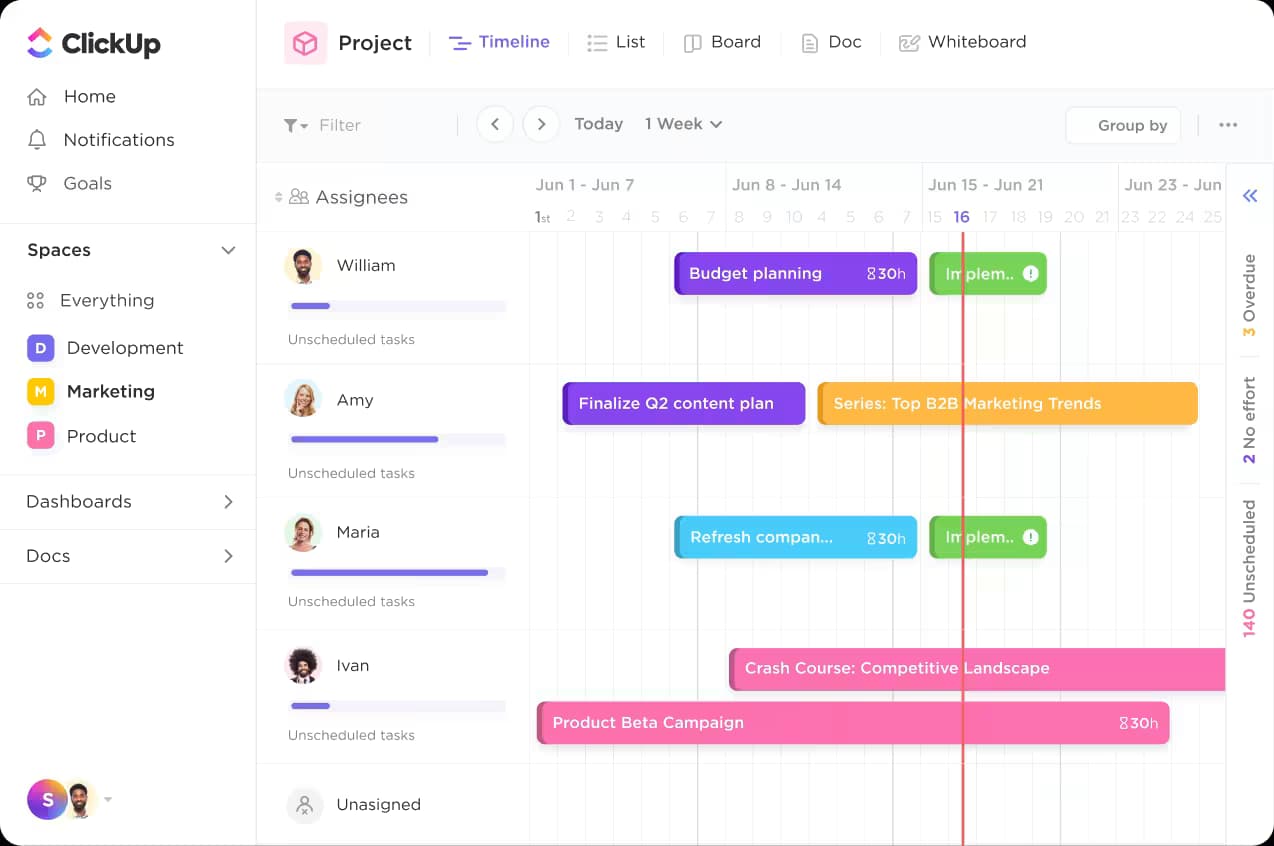
ClickUp's Workload view helps see daily resource capacity and adjust it using the drag-and-drop feature.
ClickUp connects workload planning directly with the tasks employees complete each day. Its Workload view helps firms compare assignments with individual capacity across projects and identify people who are overloaded or available for more work. Time estimates, native time tracking, portfolios, dashboards, and automations add operational context, making the platform most useful for near-term workload balancing rather than advanced enterprise forecasting or workforce scenario modeling.
Key Features:
- Workload view
- Portfolio management
- Task scheduling
- AI-assisted automations
- Native time tracking
- Custom dashboards and reports
Why Choose ClickUp Over Wrike?
Choose ClickUp when flexible workload management must remain closely tied to active assignments and day-to-day execution. Its configurable views, time estimates, tracked hours, and dashboards help managers compare planned effort with completed work and adjust short-term capacity. It is a suitable Wrike alternative for teams that want broad workspace flexibility and operational resource visibility without a specialized planning system.
Discover more in our blog on SAVIOM vs. ClickUp for informed tool selection.
Monday.com
Suitable for Workload Planning & Workflow Automation
Best for: Small, medium, and large organizations.
Pricing: Public pricing that varies by region, team size, and plan. The annual pricing starts with the free plan, then the Basic plan at $9 per seat/month, Standard at $12, Pro at $19, and Enterprise at a quote-based price.
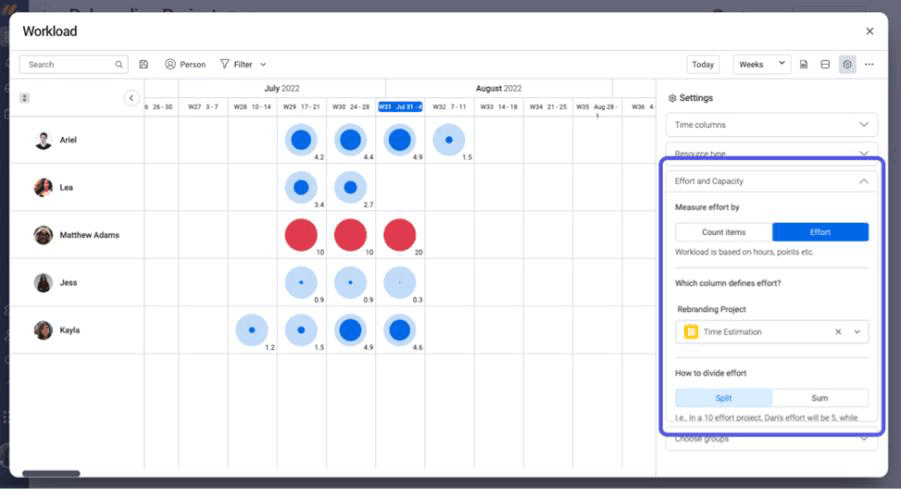
Monday.com's Workload Management dashboard helps track booked hours, assigned tasks, and available capacity.
Monday.com is a suitable Wrike alternative for teams that need to balance workloads while standardizing how work moves across departments. It helps firms redistribute assignments before capacity imbalances affect delivery. Meanwhile, configurable automations streamline recurring approvals, notifications, handoffs, and status updates, reducing manual coordination while allowing each team to adapt workflows to its operational needs.
Key Features:
- Workload widgets and views
- Resource planner
- Resource directory
- AI-assisted risk insights
- Workflow automation
- Task and project tracking
- Cross-functional collaboration
Why Choose Monday.com Over Wrike?
Choose Monday.com when teams need an adaptable resource management framework built around their own terminology, capacity measures, approvals, and allocation workflows. It supports departments with different operating models while maintaining shared portfolio visibility. The platform is especially relevant for firms that want to progress from team-level workload planning to centralized utilization oversight without sacrificing configurable cross-functional execution.
Read our blog on SAVIOM vs. Monday.com and learn how they support resource planning.
Next, we shall understand the key criteria on which these Wrike alternatives were assessed and selected as leading choices.
How Did We Evaluate These Wrike Alternatives?
We evaluated each platform by how well it helps teams anticipate demand, assign resources, balance workloads, test plans, automate processes, and scale without introducing unnecessary administrative effort. So, here are the key evaluation criteria:
Demand Forecasting
Assess whether the platform helps teams anticipate future resource requirements across confirmed and pipeline projects. It should provide early visibility into changing demand by role, skill, project, and timeline, enabling proactive staffing decisions.
Dive into our resource forecasting guide and enable strategic alignment effectively.
Resource Capacity Planning
The platform should compare available resource capacity and project demand to reveal shortages or surpluses early. Stronger options also expose skill gaps and hiring requirements, helping leaders address constraints before they delay delivery.
Resource Scheduling and Allocation
Companies should be able to see availability clearly, assign work, reallocate, and resolve clashes without excessive manual effort. The platform should also support allocations based on leave, part-time schedules, and placeholders.
Read our blog on resource scheduling and ensure successful project delivery.
Resource Utilization Optimization
The software should show non-billable and billable utilization, bench capacity, overallocations, and uneven workloads. These insights help redistribute workload, redeploy available people, and maintain productive utilization without increasing burnout risk.
Scenario Modeling
Assess whether the platform allows teams to create and compare multiple what-if plans without affecting live schedules. Also evaluate whether it clearly shows each scenario's impact on staffing gaps, workloads, costs, profitability, and delivery feasibility.
Learn more about scenario planning and streamline business operations.
Reporting and Dashboards
Evaluate whether the platform provides real-time dashboards and reports that surface actionable projects and resource insights. Also assess whether views can be tailored by role, from operational details for managers to portfolio-level summaries for PMOs and executives.
Workflow Automation
We examined whether each tool could streamline recurring updates, approvals, resource requests, notifications, and handoffs. Custom fields, templates, configurable workflows, and role-based views also indicate how well the platform can reflect existing business language and processes.
Integrations and Scalability
A suitable alternative should connect with relevant projects, HR, finance, CRM, calendar, communication, and time-tracking systems. It should also remain practical as teams expand across departments, locations, and increasingly complex project portfolios.
Pricing and Trial Options
We compared free plans, trials, product demonstrations, sales consultations, and the availability of advanced capabilities across subscription tiers. Buyers should also consider the complete cost of implementation, administration, integration, and adoption.
Check out our blog on buyer's guide to select resource management software.
Final Verdict
Wrike remains a capable option for organizations seeking project management, workload planning, reporting, automation, and collaboration in one environment. However, the right platform depends less on total feature volume and more on which planning problem the business needs to solve.
In this case, SAVIOM leads resource planning and optimization at enterprise-level, while Resource Guru simplifies booking, and Float supports visual scheduling and financial planning. Runn connects resource capacity forecasting with project pipelines, ClickUp enables flexible workload execution, and Monday.com supports configurable workflows. Ultimately, shortlist the tools that match your use case, then validate them using real data.
Move beyond reactive resource management. Use SAVIOM to anticipate demand, address capacity gaps, allocate talent effectively, and maintain balanced workloads across projects. Book a free demo now!

Wrike Alternatives FAQs
Why do organizations look for Wrike alternatives?
Organizations compare Wrike alternatives when they need more specialized resource management, deeper demand forecasting, simpler scheduling, stronger financial visibility, or a different workflow model. Pricing, implementation effort, integrations, usability, administration, and team adoption may also influence whether another platform is better aligned with current requirements.