


Introduction
What happens when business demand shifts faster than your workforce plans can adapt?
Skills become scarce, workloads turn uneven, hiring becomes reactive, and labor costs rise. But with robust workforce planning software, organizations can gain reliable insights into future demand, employee capacity, and capability needs, enabling proactive staff deployment decisions.
However, not every workforce planning tool solves the same problem. Each organization has different workforce structures, planning challenges, growth ambitions, and operational priorities. This makes it essential to assess which solution can deliver meaningful, long-term value.
This listicle compares the 10 best workforce planning software features, pricing, trial availability, strengths, and limitations, helping firms identify the solution that best supports their business goals.
Best Workforce Planning Software: Side-by-Side Overview
 Medium to enterprise-level organizationsWorkforce demand forecasting, capacity planning, scenario modeling, intelligent allocation, utilization tracking, cost planning, and workforce analytics60-day free trial and demo available
 Mid-sized to large enterprisesHeadcount planning, workforce cost modeling, talent planning, capacity planning, driver-based scenario planning, and reporting30-day free trial & demo available
 Small, mid-sized, and large enterprisesOperational workforce planning, strategic workforce planning, position planning, scenario modeling, compensation planning, workforce analytics, and connected planningPersonalized demo available
 Small to medium organizationsResource scheduling, capacity forecasting, utilization charts, skills/tags, project financials, placeholders, and what-if scenarios30-day free trial
 Medium-sized to enterprise-level organizationsStrategic workforce planning, capacity planning, what-if scenarios, granular workforce analytics, and labor cost planningCustomized demo available
 Mid-sized organizationsResource planner, workload balancing, capacity forecasting, utilization tracking, budget forecasting, scenario builder, and time tracking14-day free trial and demo available
 Small, mid-sized, and large teamsWorkload view, boards, dashboards, automation, integrations, project tracking, and team collaborationFree plan and 14-day free trial
 Small to mid-sized companiesWorkload view, Box view, time tracking, dashboards, task scheduling, portfolio workload management, and automationDemo available
 Medium to large-sized enterprisesPredictive workforce analytics, scenario modeling, workforce cost optimization, strategic workforce planning, and HR data integrationCustomized demo is available
 Small, medium, and large shift-based businessesEmployee scheduling, time tracking, availability, leave management, payroll reporting, communication, and reporting30-day free trial and demo available
SAVIOM
Best for: Medium to large organizations.
Pricing: Custom pricing.
Free Trial/Demo: Offers a customized demo and a 60-day free trial.
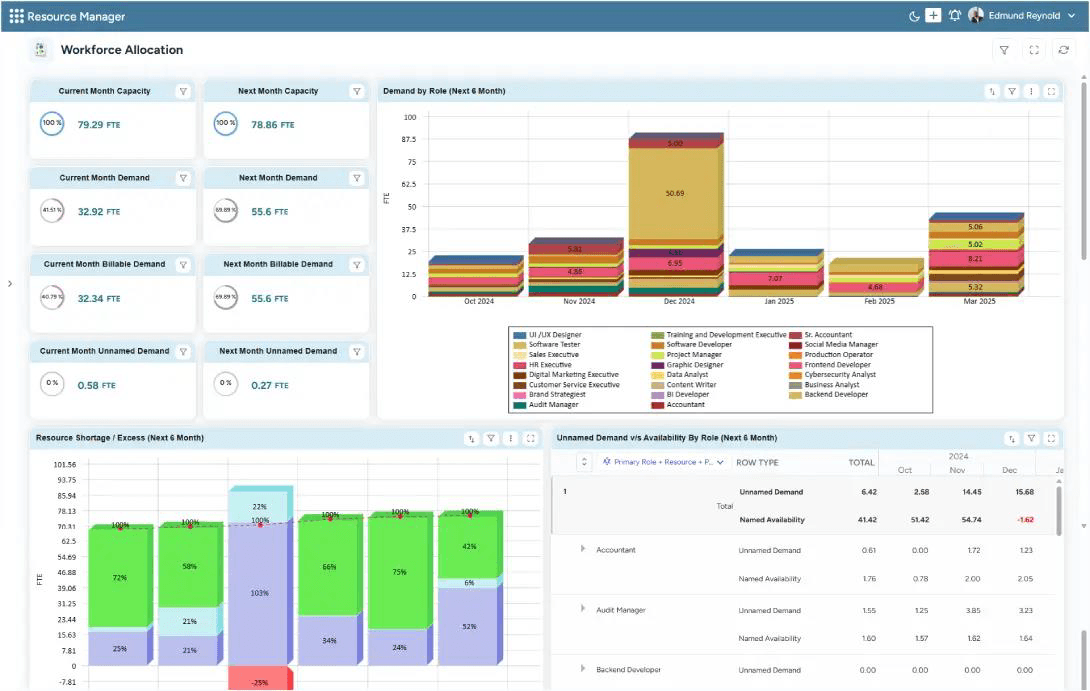
SAVIOM's Workforce Allocation dashboard visualizes current and future staff capacity vs. demand analysis to track shortages and surpluses.
SAVIOM is a leading provider of workforce planning software trusted by numerous Fortune 500 companies across 50+ nations. The tool provides enterprise-wide visibility into workforce availability, skills, roles, locations, costs, allocations, and workloads across projects and business units. Its demand forecasting capabilities help firms identify the talent required for future work, supporting both operational and strategic needs. The workforce capacity planning helps track available skills, highlighting shortages and surpluses.
With its scheduling & allocation feature, firms can allocate people based on availability, skills, cost, and demand. Also, the workforce utilization capability helps track bench capacity, workload imbalance, and burnout risk. Finally, scenario modeling supports decision-making around hiring, redeployment, outsourcing, demand shifts, and more. Overall, SAVIOM is well-suited for enterprises seeking to align talent with evolving business demand while improving resource utilization and controlling labor costs.
Key Features:
- Workforce demand forecasting
- Operational workforce planning
- Strategic workforce planning
- Workforce capacity planning
- Workforce scheduling and allocation
- Scenario modeling
- Workforce talent planning
- Workforce cost and financial planning
- Skill tracking
- Workforce analytics
Pros and Cons
 Facilitates end-to-end workforce planning
- Supports better demand forecasting, risk intelligence, and talent optimization
- Easy to customize and highly scalable
- Smooth integration with other existing business applications
 Initial setup may require significant time
- Feature-rich design may demand a learning curve
- Custom pricing may require buyer consultation
For an in-depth understanding of benefits, steps, KPIs, and challenges, read our workforce management guide.
Workday Adaptive Planning
Best for: Medium to large-sized enterprises.
Pricing: Offers quote-based pricing for Workday Adaptive Planning and Workday Adaptive Planning Close & Consolidation plans.
Free trial/demo: Offers a customized demo and a 30-day free trial.
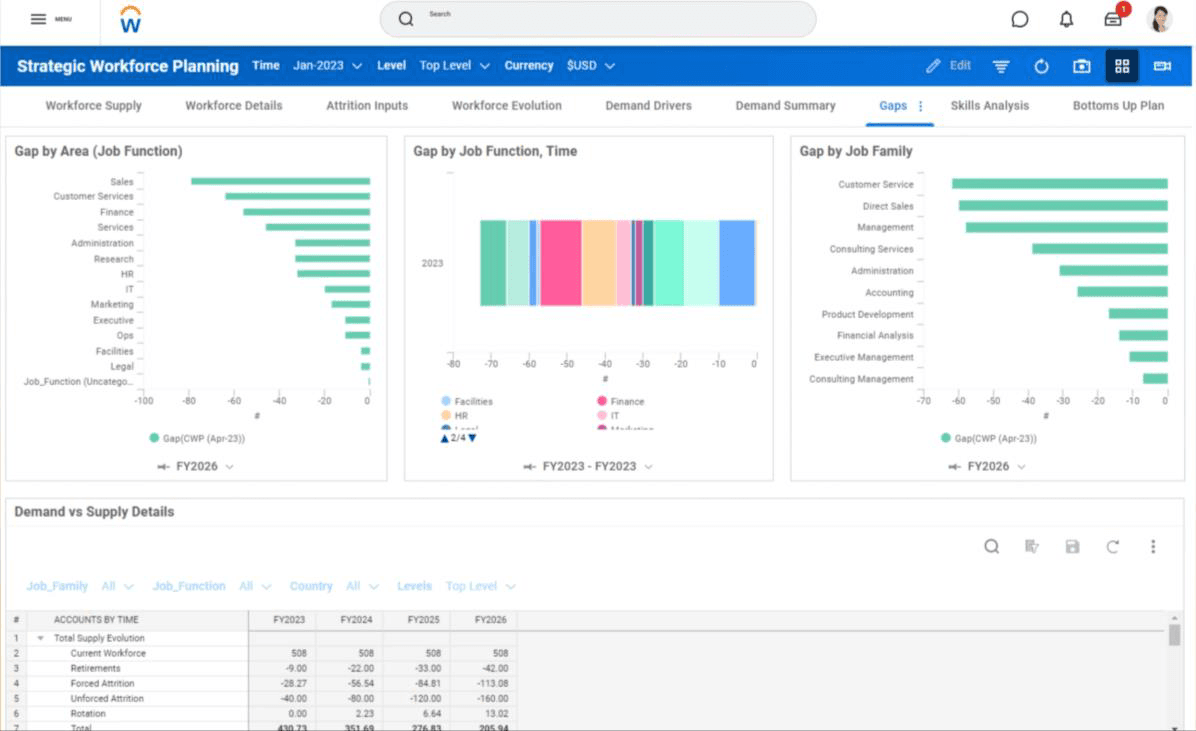
Workday's Strategic Workforce Planning dashboard visualizes workforce supply vs. demand to identify gaps across multiple dimensions.
Workday Adaptive Planning is an enterprise-grade workforce planning software that gives finance, HR, and business leaders a shared view of headcount, open positions, workforce costs, and talent requirements across multiple dimensions. Its capacity planning capabilities help identify emerging talent gaps. At the same time, its workforce forecasting features connect staffing decisions with budgets, financial models, and employee costs.
It allows teams to build headcount and talent plans, then model hiring, transfers, and retention using driver-based scenarios. Moreover, its automated reports, dashboards, real-time collaboration, and HR system integrations improve workforce planning accuracy. This makes it a strong choice for organizations that want workforce planning closely tied to financial planning and budgeting.
Key Features:
- Workforce capacity planning
- Headcount planning
- Talent planning
- Financial forecasting
- Driver-based scenario planning
- Position and open role analysis
- Automated reporting and analytics dashboards
- Real-time collaboration
Pros and Cons
- Simplifies financial planning, budgeting, and workforce forecasting in a unified platform
- Offers robust scenario planning features
- Improves visibility into employee-related planning, like leave and salary management
- Smooth integration with existing HR, finance, and operations systems
- Demands a steep learning curve and is on the higher side of the price spectrum
- Some reporting and dashboard customization can feel rigid
- Initial setup is tough and time-consuming
Anaplan
Best for: Small, medium, and large-sized businesses.
Pricing: Not publicly listed.
Free trial/demo: Offers a personalized demo.
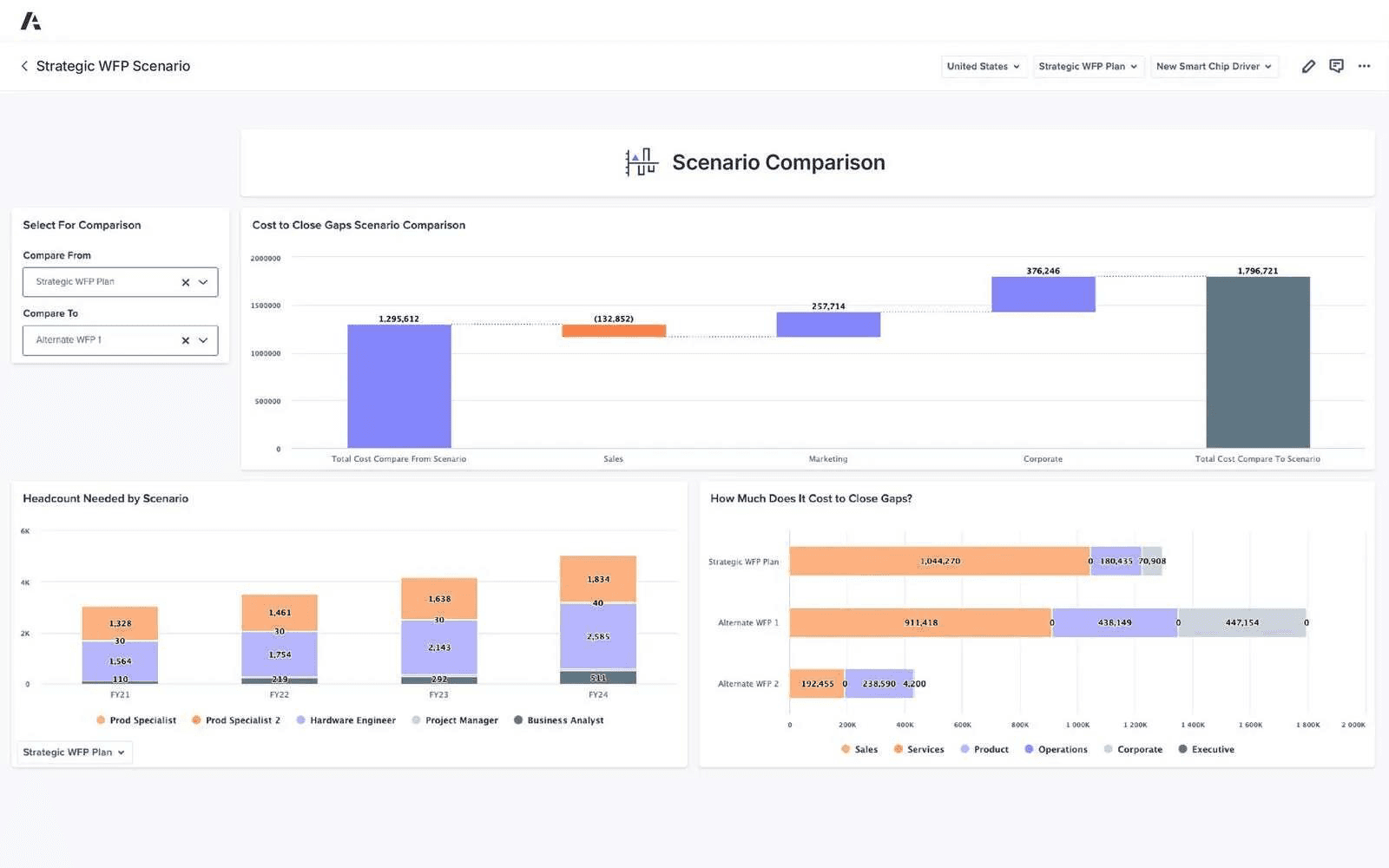
Anaplan's Scenario Modeling feature helps compare and assess workforce and financial impact before commitment.
Anaplan is an AI-driven scenario planning and analysis platform that offers workforce planning solutions for HR, finance, talent acquisition, and business leaders. It supports strategic and operational workforce planning, talent strategy, compensation planning, and position-level planning. Its capacity planning feature helps teams balance hiring needs with available budgets as business priorities change.
The scenario modeling and plan-to-hire capabilities enable teams to test hiring, compensation, and structural changes before making commitments, while workforce risk analysis and AI-assisted insights help surface potential issues. Finally, the purpose-built planning applications, APIs, CloudWorks, and broader integration options make it well-suited to organizations that need advanced, cross-functional workforce modeling at enterprise scale.
Key Features:
- Operational workforce planning
- Strategic workforce planning
- Position and headcount planning
- Plan-to-hire workflows
- Scenario modeling
- Talent strategy planning
- Workforce risk analysis
- AI-assisted workforce insights
Pros and Cons
- Supports real-time connected planning across multiple business functions
- Provides intuitive dashboards for business users
- Offers strong API, CloudWorks, and integration capabilities
- Offers strong community, documentation, and enablement resources
- Requires a steep learning curve
- Expensive for smaller or limited use cases
- Customer support may not always resolve complex issues effectively
Runn
Best for: Small to medium-sized organizations.
Pricing: Annual billing starts with Lite at $7 per resource seat/month, Standard plan at $11, and Advanced at custom quote-based rates.
Free trial/demo: Offers a 30-day free trial.
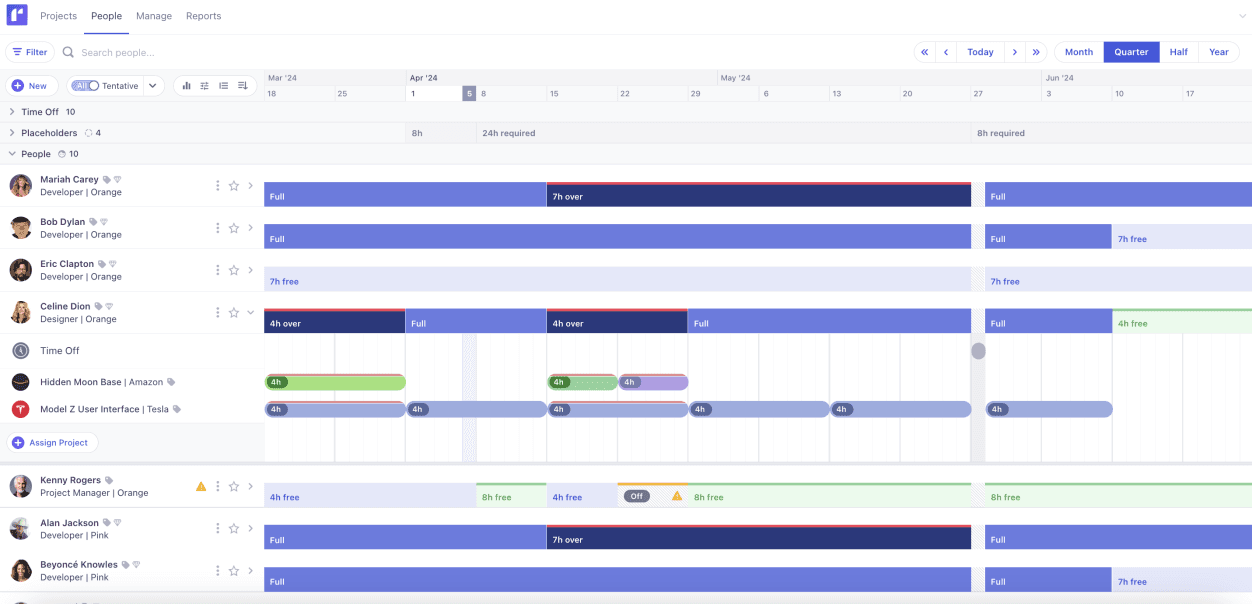
Runn's People Planner visualizing current workforce capacity to gain visibility into project bookings.
Runn is a resource planning tool that gives project-based businesses real-time visibility into workforce availability, scheduled work, capacity, utilization, and project financials. Its capacity forecasting feature helps compare upcoming demand with available people, so managers can assess whether the workforce can support pipeline projects and where additional hiring may be required.
The scheduling interface aligns the workforce to projects and enables teams to adjust allocations as priorities change. Also, the capacity and utilization charts highlight availability, overbooking, underutilization, and emerging resource shortages, while project financials help reveal potential margin risk. Finally, the what-if scenarios, timesheets, reports, dashboards, integrations, and API access round out the platform, making Runn a practical option for workforce planning.
Key Features:
- Resource scheduling
- Capacity management
- Utilization charts
- What-if scenarios
- Placeholders
- Timesheets
- Reporting and dashboards
- Integrations and API
Pros and Cons
- Clear visibility into capacity, demand, utilization, and project financials
- Helpful placeholder workflow for future hiring and unfilled roles
- Supports what-if scenarios across plans
- Advanced dashboards and custom reports may require higher-tier plans
- May not provide deep HR workforce modeling or compensation planning
Check out our SAVIOM vs. Runn: Which Platform Should You Choose? blog to see how both platforms differ in resource planning.
Planful
Best for: Medium to enterprise-level organizations.
Pricing: Not listed publicly.
Free trial/demo: Offers a customized demo.
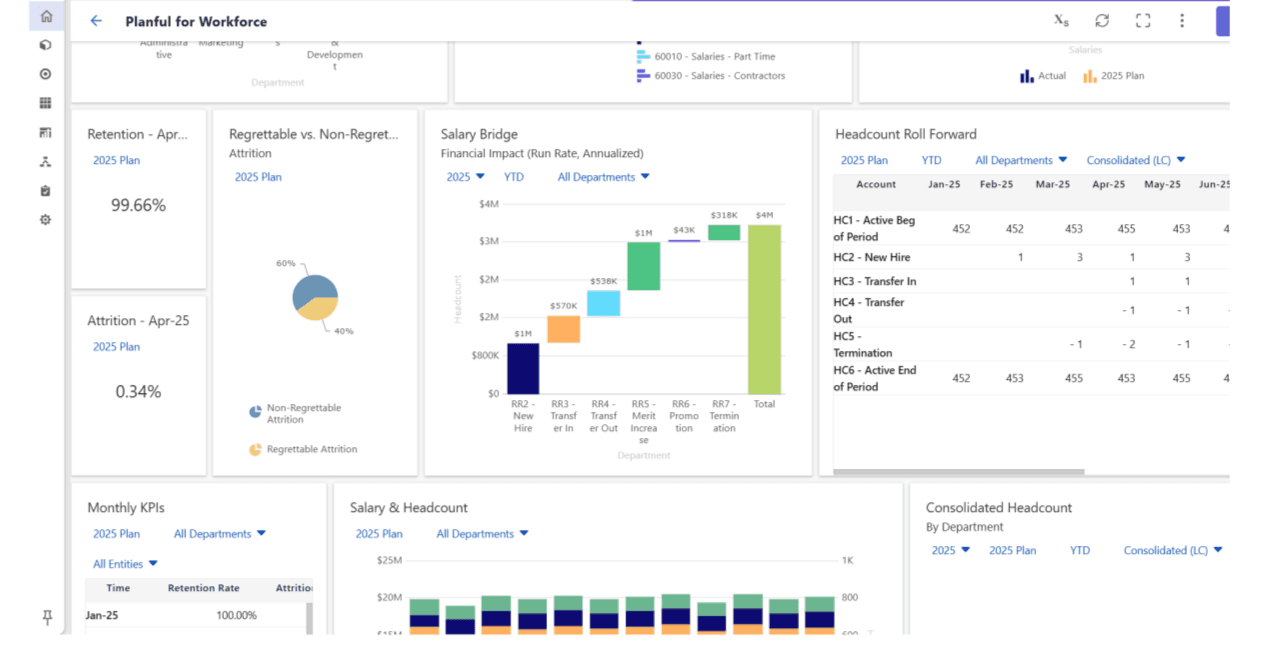
Planful's Workforce Planning dashboard offers a complete view of real-time workforce insights to align financial goals.
Planful replaces reactive, spreadsheet-based workforce planning with structured, finance-driven decision-making. Its workforce planning capabilities help teams balance talent needs and labor budgets. The employee lifecycle data, including salaries, benefits, taxes, and other compensation costs, supports this by providing additional context for workforce decisions.
The tool's what-if scenario modeling lets teams evaluate the financial impact of hiring, restructuring, growth, and acquisition, and update forecasts accordingly. Planful also offers interactive dashboards, granular workforce reports, automated planning workflows, and Excel-based reporting extensions. This makes it easier to track headcount trends, analyze cost fluctuations, and communicate workforce plans across departments.
Key Features:
- Strategic workforce planning
- Workforce forecasting
- Capacity planning
- Workforce cost visibility
- What-if scenario planning
- Interactive reporting and dashboard
- Seamless integration
Pros and Cons
- Centralizes workforce and budgeting planning data
- Reduces dependency on Excel-based budgeting and manual reporting
- Easy to use once the platform is set up
- Integrates with HRIS, recruitment, payroll, and ERP systems for consistent data
- New users may face a learning curve
- Initial setup and template configuration may take time
- Spotlight reports in Excel may feel confusing due to long formulas
Productive
Best for: Medium to enterprise-level organizations.
Pricing: Offers user-based pricing with the Essential plan at $10/month, Professional at $25, and Ultimate at customized rates.
Free trial/demo: A customized demo and 14-day free trial are available.
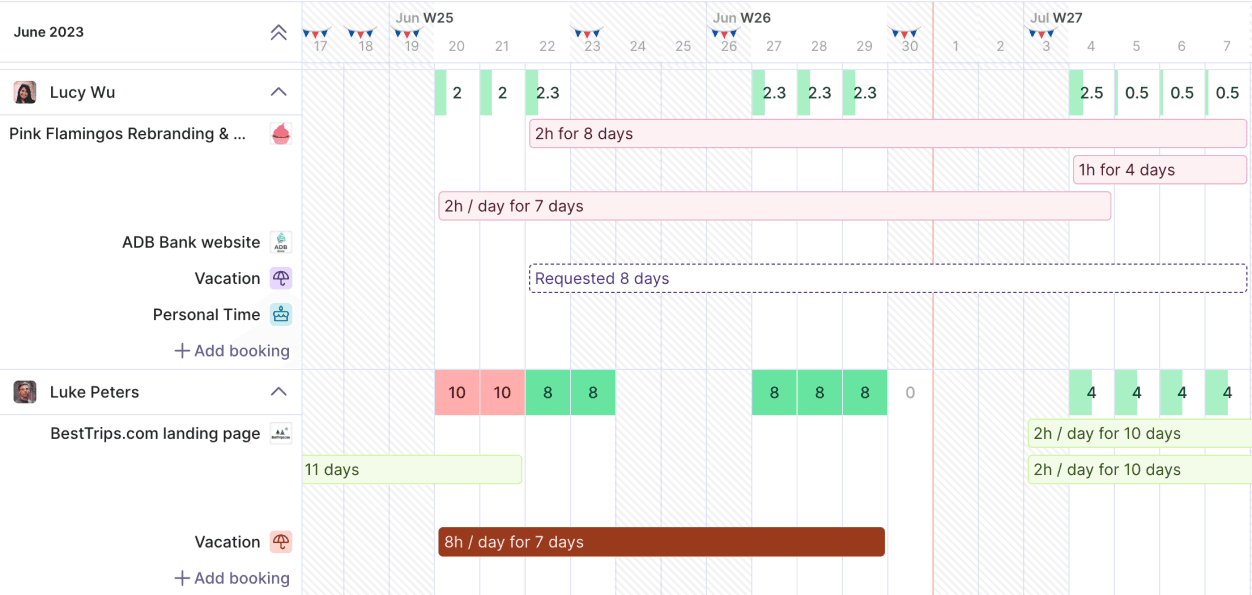
Productive's Heatmap dashboard visualizes the current workload of the workforce, along with time-off requests.
Productive is a professional services automation platform that centralizes workforce planning data, including roles, skills, business units, project assignments, time off, and cost rates. Its resource planner helps schedule people across projects, manage tentative bookings, adjust allocations as priorities change, and use placeholders for future staffing needs.
The platform also supports utilization management and forecasting, helping leaders compare future demand with available capacity, identify over- or underutilized teams, and make informed hiring decisions. It connects resource plans with billable hours, project budgets, costs, and profitability. Built-in time tracking, customizable reports, automation, project management capabilities, and integrations further support end-to-end business operations.
Key Features:
- Employee management
- Resource planning
- Utilization management and forecasting
- Budgeting and financial forecasting
- Time tracking
- Workforce reporting and dashboards
- Integrations with HR, accounting, CRM, calendar, and collaboration tools
Pros and Cons
- Offers responsive workforce planning across multiple projects, clients, departments, and teams
- Combines project management, task management, resourcing, CRM, budgeting, time tracking, and reporting in one platform
- Provides 50+ customizable reporting templates with dashboards and automated report sharing
- Supports tentative bookings and placeholders for future staffing needs
- Custom fields and advanced reporting are available on higher-tier plans
- Requires accurate employee, project, and cost data to support reliable planning
- Integrations may require configuration depending on the existing tech stack
Monday.com
Best for: Small, medium, and large organizations.
Pricing: Public pricing varies by region, team size, and plan. Annual pricing starts with the Free plan, then Basic at $9 per seat/month, Standard at $12, Pro at $19, and Enterprise at a quote-based price.
Free trial/demo: Offers a 14-day free trial.
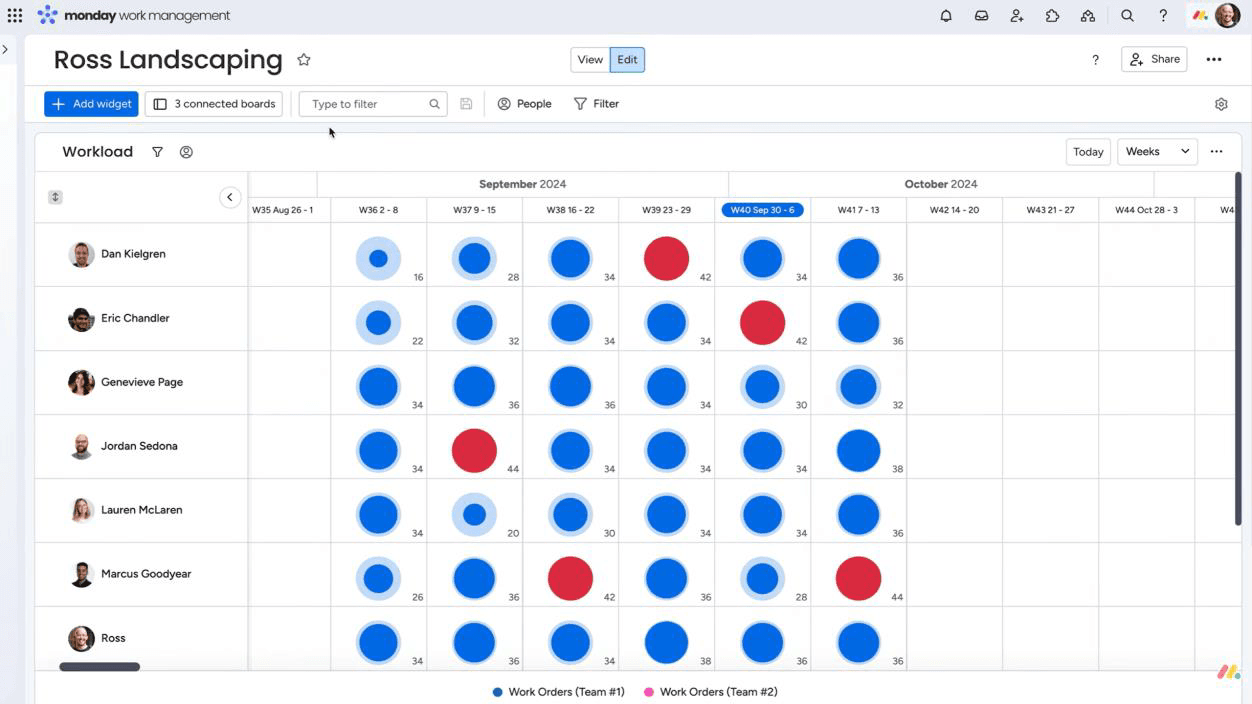
Monday.com's Workload Widget View helps identify over- and underutilized workforce capacity for timely workload management.
Monday.com is an AI-powered work management platform for organizing projects, workloads, and team capacity. It supports workforce planning by helping managers organize work by team, role, or initiative, and configure work schedules to reflect realistic capacity. Workload widgets and AI-assisted forecasting features can help teams identify where assignments may exceed available capacity, although the platform is not designed for deep enterprise headcount or talent modeling.
Scenario modeling, dashboards, reporting, and AI-assisted risk insights support better staff planning, while workflow automation reduces manual coordination through reminders, updates, status changes, and reassignment rules. This makes Monday.com a flexible choice for organizations that prioritize visual workload planning and collaboration over specialized strategic workforce planning.
Key Features:
- Workload view and workload widgets
- Scenario modeling capabilities
- AI-powered workforce forecasting
- Custom boards and dashboards
- AI-assisted workforce risk insights
- Workflow automation
- Collaboration tools
- Reporting
Pros and Cons
- Highly visual and easy to customize
- Offers multiple views such as board, timeline, calendar, and table views
- Supports automations that reduce manual follow-ups and repetitive updates
- Enterprise security includes two-factor authentication, IP restrictions, BYOK, SSO, and tenant-level encryption
- Advanced setups may involve a learning curve
- Governance consistency can become challenging across multiple teams
- Large boards or automation-heavy setups may experience lag
ClickUp
Best for: Startups and small to large-sized businesses.
Pricing: Annual billing starts with Basics at $9.99 per user/month, Accelerate at $24.99, while Optimize and Enterprise are available at custom rates.
Free trial/demo: No free trial is listed, but a 1:1 demo is available.
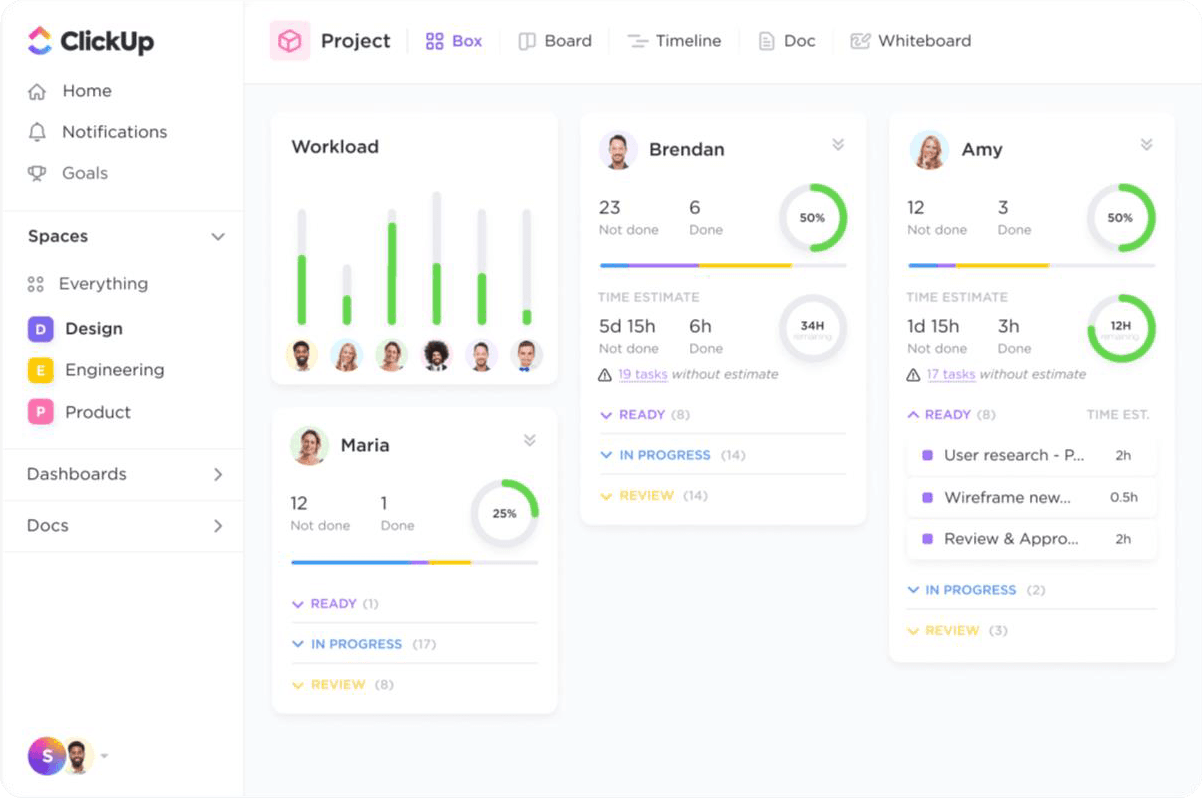
ClickUp's Workload View visualizes real-time workforce insights for timely decisions.
ClickUp is an AI-powered work management platform that provides centralized visibility into project updates, employee attendance, task ownership, and team performance through multiple work views. Its Workspace-to-Subtask hierarchy, templates, and configurable fields help teams structure workforce and project plans around their existing processes. Managers can use workload views to assess capacity, organize upcoming work, and identify where assignments may need to be redistributed.
The Time Tracking feature provides a practical picture of effort and utilization, while dashboards and workforce planning templates make recurring planning easier to standardize. Finally, the platform offers flexible settings, integrations, collaboration features, and more than 15 project views. This makes ClickUp a broad work management option for organizations that want workforce coordination and project execution on one platform.
Key Features:
- Customizable dashboards
- Attendance tracking
- Task and project management
- Resource management
- Time tracking
- Work breakdown structure
- 15+ project views
- Workforce planning templates
Pros and Cons
- Highly customizable for different workforce planning and project management workflows
- Offers workforce planning templates such as the Workforce Action Template
- Integrates with existing tools to support broader workflow management
- A feature-rich platform may involve a learning curve
- Too many features and settings may feel overwhelming for new users
- Strategic workforce planning may require manual setup using templates and dashboards
Visier
Best for: Mid to large-sized enterprises.
Pricing: Not publicly listed.
Free trial/demo: Offers a 30-minute customized demo.
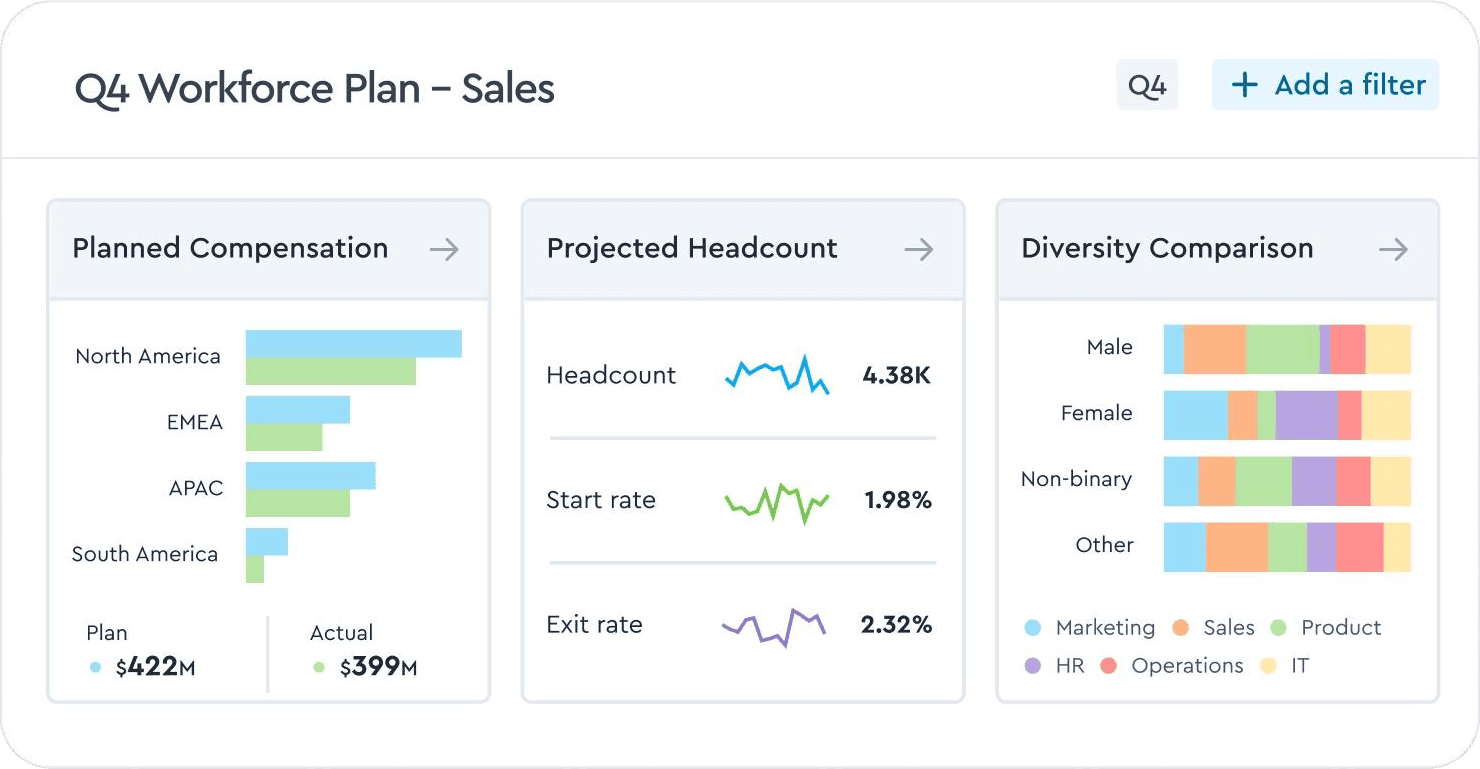
Visier's Workforce Planning dashboard helps align HR, finance, and business requirements on one platform.
Visier is an AI-powered workforce planning and people analytics platform designed primarily for large enterprises with complex matrix structures. It consolidates information from HRIS, payroll, talent management, and operational systems into a centralized analytics layer. This gives HR and finance teams greater visibility into headcount, turnover, productivity, compensation, engagement, and other workforce trends.
The platform supports workforce forecasting, headcount planning, predictive attrition analysis, talent-gap identification, and scenario modeling. Organizations can test different staffing strategies, evaluate their potential business impact, and use customizable dashboards to support hiring, retention, compensation, and workforce optimization decisions. However, reliable insights depend on clean source data, and implementation can be complex for organizations with fragmented systems.
Key Features:
- Workforce and people analytics
- AI-powered predictive workforce insights
- Headcount and workforce forecasting
- Workforce scenario modeling
- Talent and skills-gap identification
- HRIS, payroll, ATS, and operational data integration
- Custom dashboards and pre-built analytics templates
Pros and Cons
- Offers robust predictive analytics for headcount, attrition, and workforce risks
- Makes complex workforce metrics easier for business users to interpret
- Provides pre-built dashboards and detailed analytical drill-downs
- Implementation can be complex and may require dedicated IT or data resources
- Reporting customization and data-export options may feel limited
Planday
Best for: Shift-based small, mid-sized, and large organizations.
Pricing: Starts with the Starter plan at £2.99 per user/month, the Plus plan at £4.99 per user/month, and the Pro plan at a custom price.
Free trial/demo: Offers a 30-day free trial and demo.
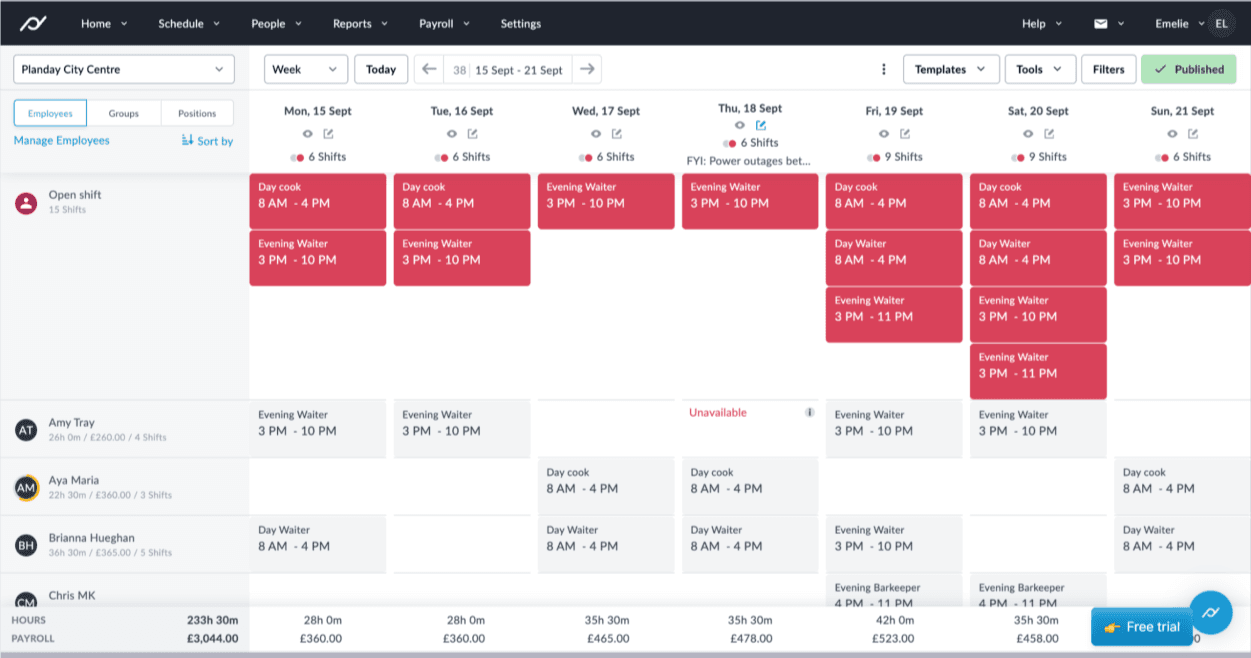
Planday's Scheduling dashboard displays work schedules and open shifts for the workforce.
Planday gives shift-based businesses a clear view of employee availability, leave, attendance, working hours, overtime, and staffing coverage across locations. Its workforce planning focus is operational, helping managers understand who can work, where coverage is thin, and how upcoming absences or shift changes may affect service. Rather than long-range talent or capacity forecasting, the platform is designed to keep hourly workforces adequately staffed and meet near-term demand.
Managers can create and adjust schedules, assign shifts, approve swaps, and coordinate availability, so the right people are working at the right time. Timesheets, overtime management, and absence tracking features improve visibility into actual staffing and labor use. Furthermore, features like reporting, payroll outputs, integrations, communication, and auto-scheduling help reduce administrative effort.
Key Features:
- Employee scheduling
- Staff availability
- Time tracking & timesheets
- Overtime management
- Absence and leave management
- Shift swaps
- Reporting and insights
- Integrations and API
Pros and Cons
- Strong fit for shift-based workforce management
- Built-in time tracking and payroll reporting streamline operations
- Leave and absence tools improve staffing visibility
- Helps managers avoid understaffing and scheduling gaps
- Not designed for strategic workforce planning or project staffing
- Advanced planning metrics and auto-scheduling may require higher plans
- Limited fit for organizations that need skills-based project allocation or portfolio-level capacity planning
Check out our listicle on the 10 best resource management software and make informed selections.
The following section discusses the criteria based on which these workforce planning tools were selected as the best for companies.
How We Evaluated the Best Workforce Planning Software?
Each platform was assessed against a consistent set of criteria to understand how well it helps organizations plan talent, forecast workforce needs, manage capacity, reduce risks, and support informed staffing decisions. Let us see them in detail:
Workforce Planning Depth
We assessed whether each tool supports core workforce planning needs such as headcount planning, demand forecasting, capacity planning, skills planning, scenario modeling, and labor-cost visibility. Broader coverage indicates that a platform can support both current operations and strategic workforce planning decisions.
Demand Forecasting
We reviewed whether teams could estimate future workforce demand using project pipelines, business activity, seasonal patterns, sales pipelines, or operational trends. Reliable forecasting helps organizations move from reactive hiring to proactive workforce preparation.
Read our demand management guide and align workforce capacity effectively.
Capacity and Workload Visibility
We examined how clearly managers can see who is available, overbooked, underutilized, on leave, or at risk of burnout. Real-time visibility is essential for workload balancing and preventing staffing gaps before they affect delivery.
Skills and Role-Based Planning
We looked for the ability to plan by skills, roles, experience, location, cost, department, or business unit. This helps organizations move beyond headcount totals and understand whether the right capabilities are available for future work.
Learn more about the skill matrix and optimize team deployment effectively.
Scenario Modeling
We evaluated whether the platform supports what-if planning for hiring, outsourcing, attrition, project delays, budget changes, or demand shifts. Scenario modeling allows leaders to compare options and understand likely consequences before committing resources.
Workforce Cost Planning
We checked whether workforce decisions can be connected with labor costs, budgets, margins, revenue, or profitability. This is especially important for organizations that need to balance talent requirements with financial constraints.
Reporting and Analytics
We reviewed the dashboards and reports available to HR leaders, finance teams, PMOs, operations leaders, resource managers, and executives. Useful analytics should convert workforce data into clear, decision-ready insight.
Explore the key benefits of using business intelligence in firms.
Automation and Workflows
We considered capabilities such as alerts, approvals, reminders, scheduling rules, status updates, resource requests, and workflow automation. These features reduce manual coordination and help planning processes remain consistent at scale.
Scalability and Governance
We assessed whether each platform could support larger teams, multiple departments, role-based permissions, access controls, integrations, and enterprise governance. Scalability matters when workforce planning expands across business units, geographies, or portfolios.
Integrations
We reviewed connectivity with HRIS, ERP, finance, CRM, project management, timesheets, payroll, accounting, and collaboration systems. Strong integrations reduce data duplication and improve planning accuracy across functions.
Pricing and Trial Access
We compared pricing transparency, availability of free trials or demos, custom quote requirements, and whether the expected cost matches the depth of planning offered. Buyers should evaluate total value rather than selecting a tool solely at the lowest price.
Anticipate future demand, identify capacity gaps, and prepare talent strategies for evolving business priorities with SAVIOM's workforce planning software. Book a Demo Today.
Conclusion
The best workforce planning software depends on business size, operating model, and planning needs. SAVIOM suits medium to large enterprises requiring end-to-end forecasting, capacity planning, allocation, utilization, and workforce analytics. Workday Adaptive Planning, Planful, and Anaplan are stronger for finance-led and connected enterprise workforce planning.
Runn and Productive fit project-based businesses, while Monday.com and ClickUp support flexible workload and task planning. Visier is ideal for workforce analytics, and Planday is best for shift-based scheduling. Ultimately, the right platform should help businesses forecast demand, plan capacity, reduce workforce risks, and align talent with business goals.
Best Workforce Planning Software FAQs
What are workforce planning tools?
Workforce planning tools are solutions that help organizations forecast staffing needs, assess workforce capacity, identify skill gaps, manage workloads, and plan future hiring. They give leaders real-time visibility into employee availability, demand, utilization, and labor costs so they can align people with business goals.