

Introduction
Managing resources across large, growing teams is rarely straightforward. Inefficient allocations, conflicting schedules, and limited real-time visibility can silently derail even the most carefully planned projects. When hybrid work models and cross-functional dependencies enter the equation, the demands on your resource management platform intensify.
While Resource Guru remains a popular choice for simple resource scheduling, it may not meet the needs of every growing organization. As resource planning becomes more complex, firms often look for alternatives that offer greater flexibility, richer reporting, and stronger scalability.
This guide delivers a detailed, side-by-side comparison of the top alternatives, evaluating features, pricing, and real-world fit for your business needs.
Quick Comparison: Best Resource Guru Alternatives
Choosing the right Resource Guru alternative depends on how your team schedules resources, manages capacity, tracks resource availability, and plans for upcoming work. Some tools focus mainly on resource scheduling, while others offer broader resource management capabilities. The table below provides a quick, side-by-side view of the top alternatives so you can compare their strengths at a glance.
 Medium to enterprise-level organizationsDemand forecasting, resource capacity planning, skills-based allocation, scenario planning, utilization optimization60-day free trial and demo available
 Small to mid-sized firmsClient project delivery, time tracking, budgets, workload planning30-day free trial and demos available
 Small to medium-sized organizationsCapacity planning, utilization tracking, project forecasting, financial visibility30-day free trial
 Small to medium-sized organizationsVisual scheduling, capacity planning, team availability, workload visibility30-day free trial
 Small, mid-sized, and large companiesCustom workflows, dashboards, workload views, automationsFree plan and 14-day free trial available
 Small to large organizationsProject planning, dashboards, automation, portfolio visibility, workload trackingDemo available and trial upon contact only
Next, let us take a look at the evaluation criteria for selecting the best Resource Guru alternatives.
How We Evaluated These Resource Guru Alternatives?
Resource management software buyers typically look for solutions that go beyond basic scheduling. They need tools that can help forecast demand, manage workforce capacity, improve resource utilization, and support informed project delivery decisions.
A strong Resource Guru alternative should make it easier to identify who is available, what skills are needed, how future demand will impact delivery, and whether existing staffing plans are operationally and financially viable.
The Resource Guru alternatives are evaluated on the basis of the following factors:
- Can it support enterprise scalability as teams, projects, and resource pools grow?
- Does it offer flexible resource scheduling and allocation across multiple projects?
- Can teams perform resource capacity planning to identify demand-supply gaps?
- Does it support resource forecasting and predictive planning for future workload?
- Can users run scenario modeling to compare different staffing or project outcomes?
- Does it help improve resource utilization optimization and reduce overbooking, underutilization, or bench time?
- Can it provide early warnings for capacity shortages, scheduling conflicts, or delivery risks?
- Does it offer reporting and analytics for utilization, availability, demand, and project performance?
- Can it support resource financial planning, including costs, budgets, bill rates, or profitability?
- Does it provide sufficient customization, integrations, security, and governance to meet business needs?
Read our blog to understand how to select resource management software.
Now, let us look at the various Resource Guru alternatives.
SAVIOM
Best Resource Guru Alternative for Enterprise Resource Management
Best for: Medium to enterprise-level organizations.
Pricing: Custom pricing.
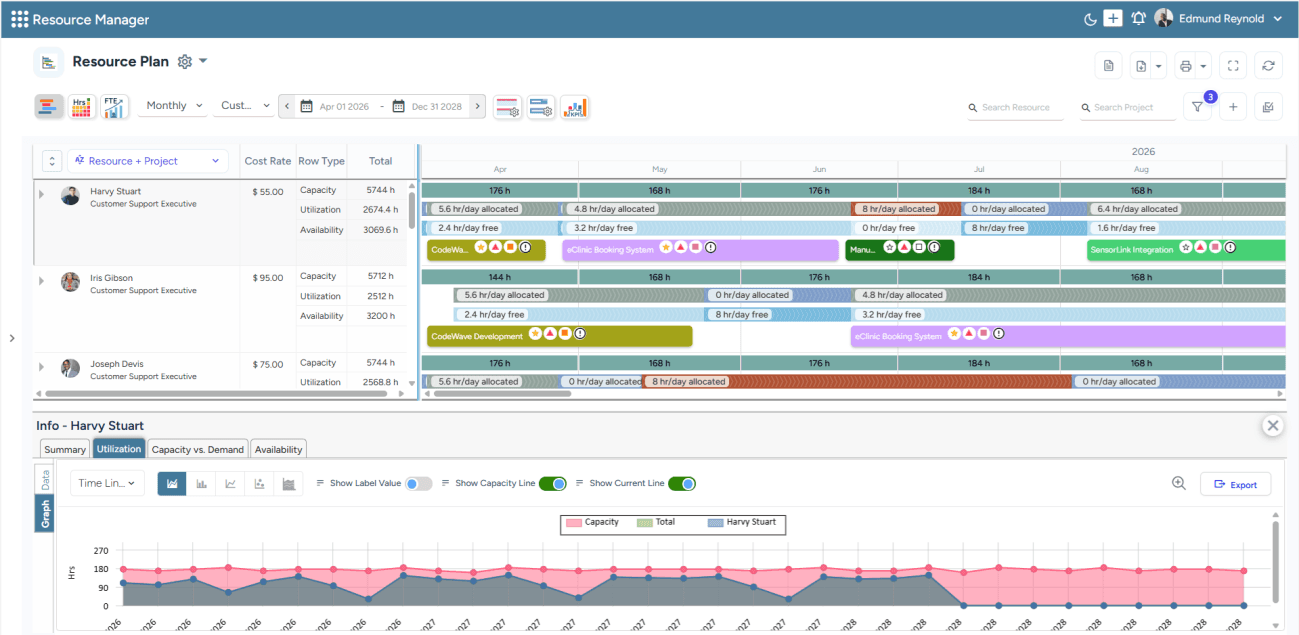
SAVIOM's All-in-One Resource Plan dashboard helps visualize current capacity, utilization, and availability in a centralized view.
SAVIOM is a strong Resource Guru alternative for organizations that have outgrown basic resource booking and need a more mature, enterprise-grade resource management software. Unlike tools that focus mainly on resource scheduling, SAVIOM helps enterprises forecast future needs, align capacity with project requirements, and optimize resource utilization through real-time visibility and data-driven planning.
Key Features:
- Enterprise scalability
- Resource forecasting and predictive planning
- Resource capacity planning
- Intelligent matchmaking
- Resource utilization optimization
- Scenario modeling
- Bench management
- Resource financial planning
- Reporting and analytics
- Multidimensional analysis
- Resource requesting
- Automation and workflow
Why Choose SAVIOM Over Resource Guru?
Choose SAVIOM over Resource Guru when your organization needs strategic resource management, not just simple team booking or availability tracking. It is better suited for teams that need accurate forecasting, capacity planning, governance, utilization optimization, and financial visibility across complex resource pools. For growing or enterprise-level businesses, SAVIOM provides the visibility and control needed to make smarter staffing, delivery, and profitability decisions at scale.
For a detailed understanding of benefits, components, key metrics, and best practices, read our resource management guide.
Teamwork.com
Best for Client-Facing Project Delivery Teams
Best for: Small to mid-sized firms.
Pricing: The annual billing starts with Basics at $9.99 per user/month, Accelerate at $24.99, Optimize, and Enterprise at custom rates.
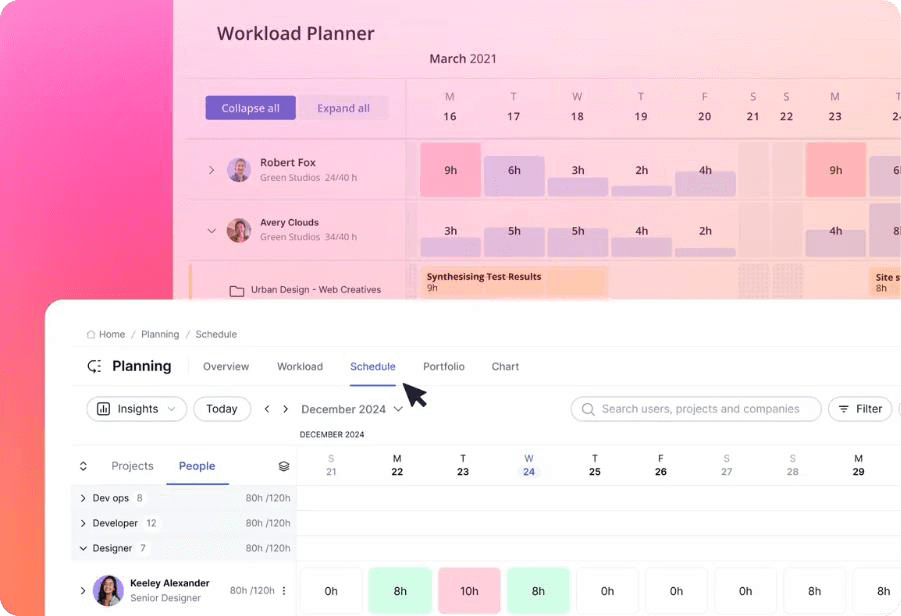
Teamwork's Workload Planner dashboard to track current work distribution among resources.
Teamwork.com is a practical Resource Guru alternative for firms that need resource planning as part of a broader client project delivery workflow. It helps project managers monitor team capacity, assign work, track time, manage project costs, oversee client communication, and improve billable utilization. This makes it a good fit for businesses that need a more delivery-focused platform to keep client projects on schedule, within budget, and aligned with profitability goals.
Key Features:
- Resource forecasting
- Workload planning
- Resource scheduling
- Capacity planning
- Utilization tracking
- Task allocation
- Time tracking
- Cost management
- Budgeting and profitability
Why Choose Teamwork.com Over Resource Guru?
Choose Teamwork.com over Resource Guru if your team needs resource planning within a broader client project delivery platform. It is better suited for service teams that want to manage resources, tasks, time tracking, budgets, billable work, and client communication from one centralized system.
Runn
Best for Resource Forecasting and Project Financial Visibility
Best for: Small to medium-sized organizations.
Pricing: The annual billing starts with Lite at $7 per resource seat/month and Standard at $11. The Advanced plan is available at custom quote-based rates.
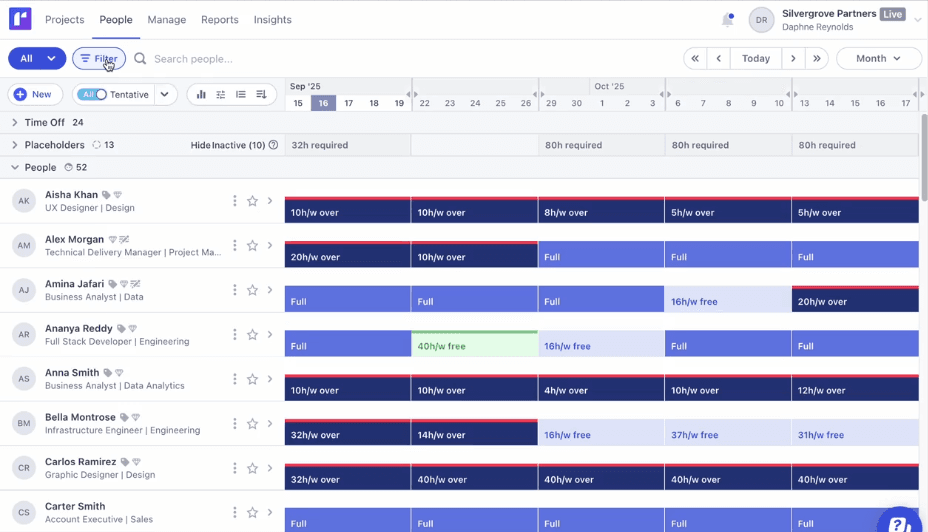
Runn's Capacity Management dashboard helps align capacity vs. demand effectively.
Runn is a direct Resource Guru alternative for organizations that need deeper forecasting, capacity visibility, workload planning, and project financial planning. Runn places more emphasis on forward-looking planning. Teams can use it to manage resource schedules, forecast demand, monitor utilization, model scenarios, and connect people planning with project budgets and revenue visibility. This makes it a good choice for firms that need to make staffing decisions based on both capacity and commercial impact.
Key Features:
- Resource scheduling
- Capacity management
- Utilization tracking
- Project planning
- Project forecasting
- Timesheets
- Budget and revenue visibility
- Dashboards and custom reports
- Integrations and API
Why Choose Runn Over Resource Guru?
Choose Runn over Resource Guru if your team needs stronger scheduling, utilization analysis, and financial visibility in one platform. It is better suited for teams that want to connect resource planning with project budgets, revenue forecasts, and future workload demand.
Dive into our SAVIOM vs. Runn comparison article to understand which tool better fits your business needs.
Float
Best for Visual Resource Scheduling
Best for: Small to mid-sized organizations.
Pricing: The annual billing starts at $7 per scheduled person/month. The Pro plan starts at $12 per scheduled person/month. Enterprise pricing is custom.
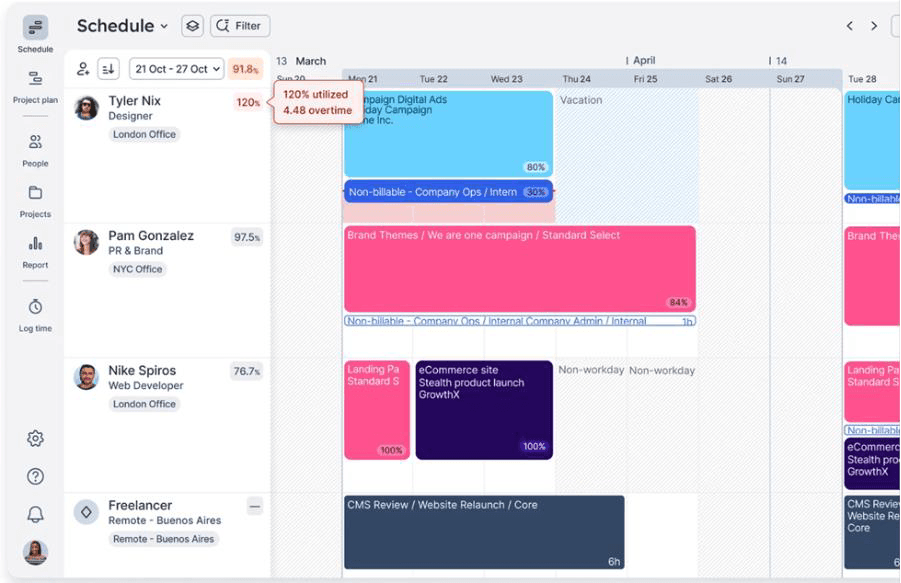
Float's Resource Scheduling dashboard provides real-time insights into project allocations.
Float offers a visual resource management platform that brings capacity planning, resource availability, drag-and-drop scheduling, time-off, and workload management into one shared view. Beyond scheduling, Float supports project forecasting and financial visibility through budget estimates, planned vs. actual tracking, utilization insights, margin visibility, and time tracking with pre-filled timesheets. These capabilities help teams manage capacity, control profitability risks, and keep projects on track.
Key Features:
- Visual resource scheduling
- Team availability tracking
- Capacity planning
- Project estimates
- Project planning
- Time tracking
- Time-off management
- Reporting and dashboards
Why Choose Float Over Resource Guru?
Choose Float over Resource Guru if your team wants a modern, visual scheduler that makes workload, capacity, and availability easy to understand at a glance. It is especially useful for agencies and creative teams that need to make quick scheduling decisions, adjust bookings, and balance workloads without heavy enterprise complexity.
Monday.com
Best for Flexible Workflow and Workload Management
Best for: Small to large companies.
Pricing: Public pricing varies by region, team size, and plan. The annual pricing starts with the free plan. The Basic plan starts at $9 per seat/month, Standard at $12, Pro at $19, and Enterprise at a quote-based price.
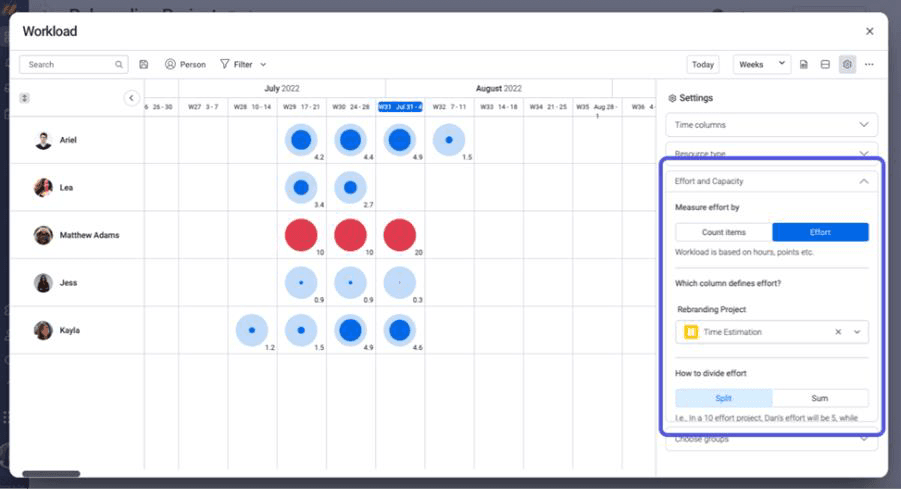
Monday.com's Workload Management dashboard helps track booked hours, assigned tasks, and available capacity.
Monday.com is a flexible alternative for companies that need resource visibility within a customizable work management platform. With workload views, dashboards, automations, integrations, and enterprise resource management capabilities, monday.com helps teams centralize project and resource data. This makes it useful for organizations that want a highly adaptable platform to manage people, work, priorities, and employee performance without relying on a standalone scheduling tool.
Key Features:
- Workload view
- Resource allocation
- Capacity visibility
- Custom dashboards
- Workflow automation
- Task and project tracking
- Team schedules
- Reporting widgets
- Cross-functional collaboration
Why Choose monday.com Over Resource Guru?
Choose monday.com over Resource Guru if your team needs resource visibility within a broader work management system. It is a better fit for organizations that want resource planning connected with workflows, approvals, project tracking, dashboards, automations, and cross-functional collaboration.
Smartsheet
Best for Project and Resource Planning in a Work Management Platform
Best for: Small to mid-sized and large organizations.
Pricing: The annual billing starts at $9 per member/month for the Pro plan and $19 for the Business plan. The Enterprise and Advanced Work Management plans are available at custom quote-based rates.
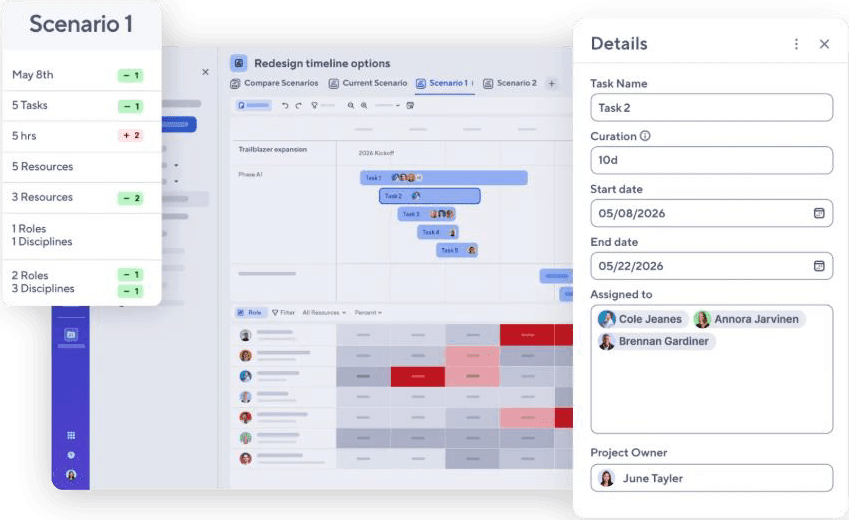
Smartsheet's Scenario Planning dashboard helps explore multiple resourcing options before commitments.
Compared to Resource Guru's scheduling-focused approach, Smartsheet offers broader project and portfolio visibility through dashboards, automation, cross-team resource planning, workload balancing, capacity planning, approval workflows, and real-time reporting. This makes it a good fit for teams that need a flexible platform to track project progress, improve cross-departmental collaboration, automate routine work, and gain better visibility across the firm.
Key Features:
- Project planning
- Capacity planning
- Resource allocation
- Workload tracking
- Time tracking
- Dashboards and reports
- Workflow automation
- Portfolio visibility
- Spreadsheet-style planning
Why Choose Smartsheet Over Resource Guru?
Choose Smartsheet over Resource Guru if your team needs resource planning connected to project execution, project portfolio management, reporting, and workflow automation. It is especially useful for teams that prefer spreadsheet-style planning but need stronger governance, dashboards, visibility into capacity, and real-time reporting across multiple projects.
Use this enterprise resource management software checklist to evaluate vendors and choose the best tool for your business requirements.
Final Verdict
Choosing the best Resource Guru alternative depends on the level of resource visibility and planning that your organization requires. For enterprise teams that need advanced capacity planning, scenario planning, and utilization optimization, SAVIOM is a strong fit. On the contrary, for smaller teams, tools like Float, Runn, Teamwork.com, monday.com, and Smartsheet offer practical options based on scheduling, project delivery, or workflow needs.
Before making a decision, assess whether your team needs simple resource scheduling or a more strategic resource management software. The right platform should help you balance workloads, forecast demand, improve resource utilization, and support profitable project delivery. By comparing each tool's strengths, you can select the solution that best aligns with your current operations and future growth.
Use SAVIOM to move from fragmented planning to smarter, centralized resource decisions. Book a Demo Today.