


Introduction
Many managers still rely on spreadsheets and disconnected tools to track who's available, who's overbooked, and who's behind on deliverables. This manual, ad hoc approach works fine for small teams, but as headcounts grow and project loads increase, it quickly breaks down, leading to scheduling conflicts, uneven workloads, and avoidable delivery delays.
This is where resource scheduling software makes a real difference. It gives managers a centralized view of resource availability, capacity, skills, and workload across the organization. This makes it easier to assign the right talent to the right projects, spot potential conflicts early, and adjust plans proactively.
In this blog, we compare the 10 best resource scheduling tools on the market, evaluating their core features, pricing, and ideal use cases to help you make an informed decision.
Best Resource Scheduling Software: A Quick Comparison
 Mid-sized and large-scale enterprisesIntelligent match-making, resource request & demand workflow, multi-dimensional analysis, availability and workload management, drag and drop scheduling60-day free trial and demo available
 Small to medium-sized organizationsDrag and drop scheduling, real-time availability and workload visibility, skills-and role-based matching, capacity-gap identification, tags and custom fields30-day free trial
 Small to mid-sized businessesVisual team scheduling, drag-and-drop scheduling. cross-project allocation visibility, over-capacity warnings, saved custom views30-day free trial
 Small to mid-sized companiesResource-centric Gantt charts, employee and equipment scheduling, double-booking and conflict detection, filters and customizable views14-day free trial and demo available
 Small to mid-sized businessesSkills- and role-based allocation, overbooking warnings, part-time and freelancer availability tracking, custom and filtered scheduling views14-day free trial and demo available
 Mid to large-scale enterprisesShared availability and staffing views, skills-, experience-, and qualification-based resource search, AI-assisted team building and best-fit matching, generic role planning before named assignmentsDemo available
 Large-scale organizationsAI-powered resource matching, suitability scoring, firm-wide scheduling optimization, automated conflict avoidanceFree demo available
 Small to mid-sized organizationsResource scheduling, clash management, tentative bookings, repeat bookings, leave management, configurable schedule views30-day free trial available
 Small-scale businessesVisual team scheduling timeline, employee and project schedule views, real-time collaborative scheduling, ghost-to-confirmed booking conversion15-day free trial available
 Small to mid-sized firmsCentralized team calendars, skills- and role-based allocation, workload and capacity visibility, double-booking and conflict prevention, over-capacity warnings30-day free trial, and demo available
SAVIOM
Best for: Medium to enterprise-level organizations.
Pricing: Custom pricing.
Free Trial/Demo: 60-day free trial and demo available.
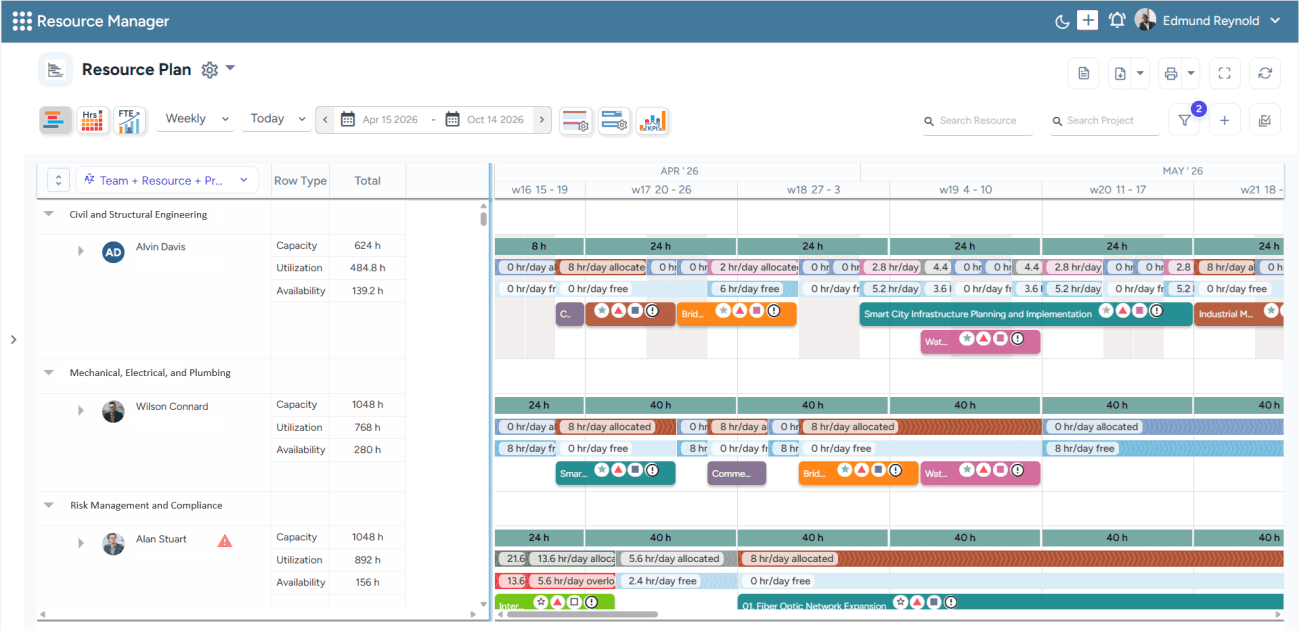
SAVIOM's All-in-One Resource Planner provides a centralized view of resource schedules, utilization, and availability.
SAVIOM is a global leader in resource management, serving numerous Fortune 500 companies across more than 50 countries. Its advanced resource scheduling software enables managers to submit and manage requests through configurable workflows. Managers can select the most suitable resources for each project by considering factors such as skills, experience, availability, location, cost, and project priorities. The platform also supports bulk booking, bulk editing, and split booking, allowing managers to plan and update resource allocations efficiently at scale.
Its intuitive drag-and-drop interface enables users to adjust schedules and rebalance workload for overloaded resources as priorities change. Furthermore, managers can create placeholders as soon as resource requirements are defined and leverage the tool's early warning system to identify overbooking, double assignments, and dependency clashes. Its configurable structure, enterprise-wide visibility, and advanced analytics make it well-suited for large-scale resource management.
Key Features:
- Intelligent match-making
- Resource request & demand workflow
- Multi-dimensional analysis
- Availability and workload management
- Multi-project & portfolio visibility
- Conflict detection & resolution
- Drag and drop scheduling
- Bulk booking and bulk editing
- Real-time BI analytics & reporting
Pros and Cons
 Strong fit for complex large-scale resource planning
- Supports capacity planning, forecasting, allocation, and utilization in one platform
- Provides early warnings for booking conflicts and scheduling risks
- Helps identify capacity gaps, skill shortages, bench time, and overutilization risks
- Offers skill-based and availability-based resource matching
 Pricing is not publicly listed
- May be too advanced for very small teams
- Setup may take time for complex workflows
For a detailed overview of benefits, core components, challenges, and best practices, read our resource scheduling guide.
Runn
Best for: Small to medium-sized organizations.
Pricing: Annual billing starts with Lite at $7 per resource seat/month, Standard plan at $11, and Advanced at custom quote-based rates.
Free Trial/Demo: Offers a 30-day free trial.
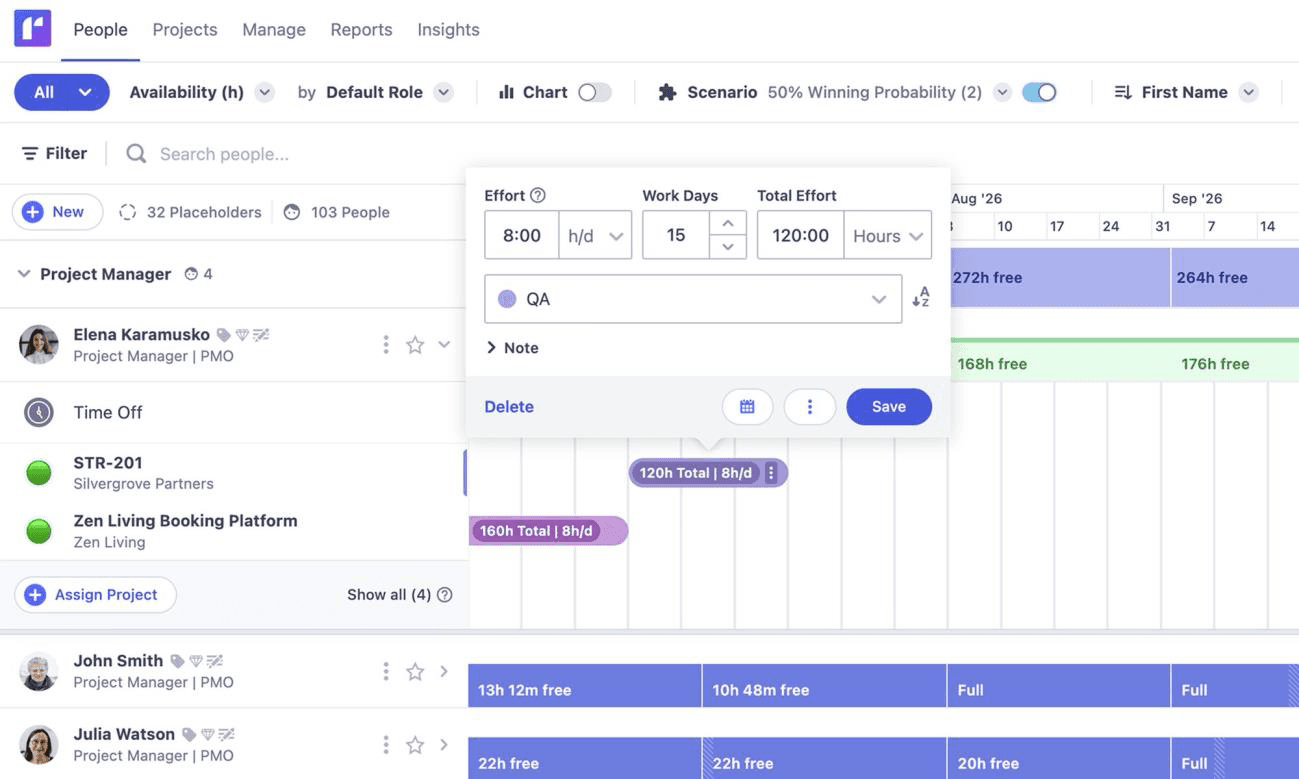
Runn's resource scheduling dashboard helps managers view availability, assign projects, and adjust resource effort across a visual timeline.
Runn is an advanced resource management software for project-based businesses. Its resource scheduling capabilities give managers real-time visibility into people, projects, availability, and workloads. Teams can drag and drop assignments, adjust schedules as priorities change, view work across timelines, and identify capacity gaps early to prevent resourcing bottlenecks.
Managers can search and filter people by skills and roles to identify suitable resources for the projects. The platform also supports cross-team resource requests, helping organizations address unmet demand and identify potential hiring needs. Tags and custom fields organize workforce data, while notifications keep teams informed about assignments and schedule changes. Runn is well-suited to organizations that need resource scheduling and capacity forecasting on a single platform.
Key Features:
- Drag and drop scheduling
- Real-time availability and workload visibility
- Skills-and role-based matching
- Capacity-gap identification
- Tags and custom fields
- Assignment notification and approvals
Pros and Cons
- Real-time visibility into availability, workload, and utilization
- Supports pipeline projects and what-if scenario planning
- Helps teams forecast capacity gaps and future demand
- Connects resource planning with project financials
- Skills and tags make it easier to find suitable people
- Not built for scheduling equipment or physical resources
- Less suitable for very complex enterprise resource management
- May feel more forecasting-heavy than needed for simple scheduling
Compare SAVIOM vs. Runn side by side to see which resource management platform best fits your team.
Float
Best for: Small to mid-sized businesses.
Pricing: The annual billing for Float starts at $7 per scheduled person/month. The Pro plan starts at $12 per scheduled person/month. Enterprise pricing is custom.
Free Trial/Demo: 30-day free trial available.
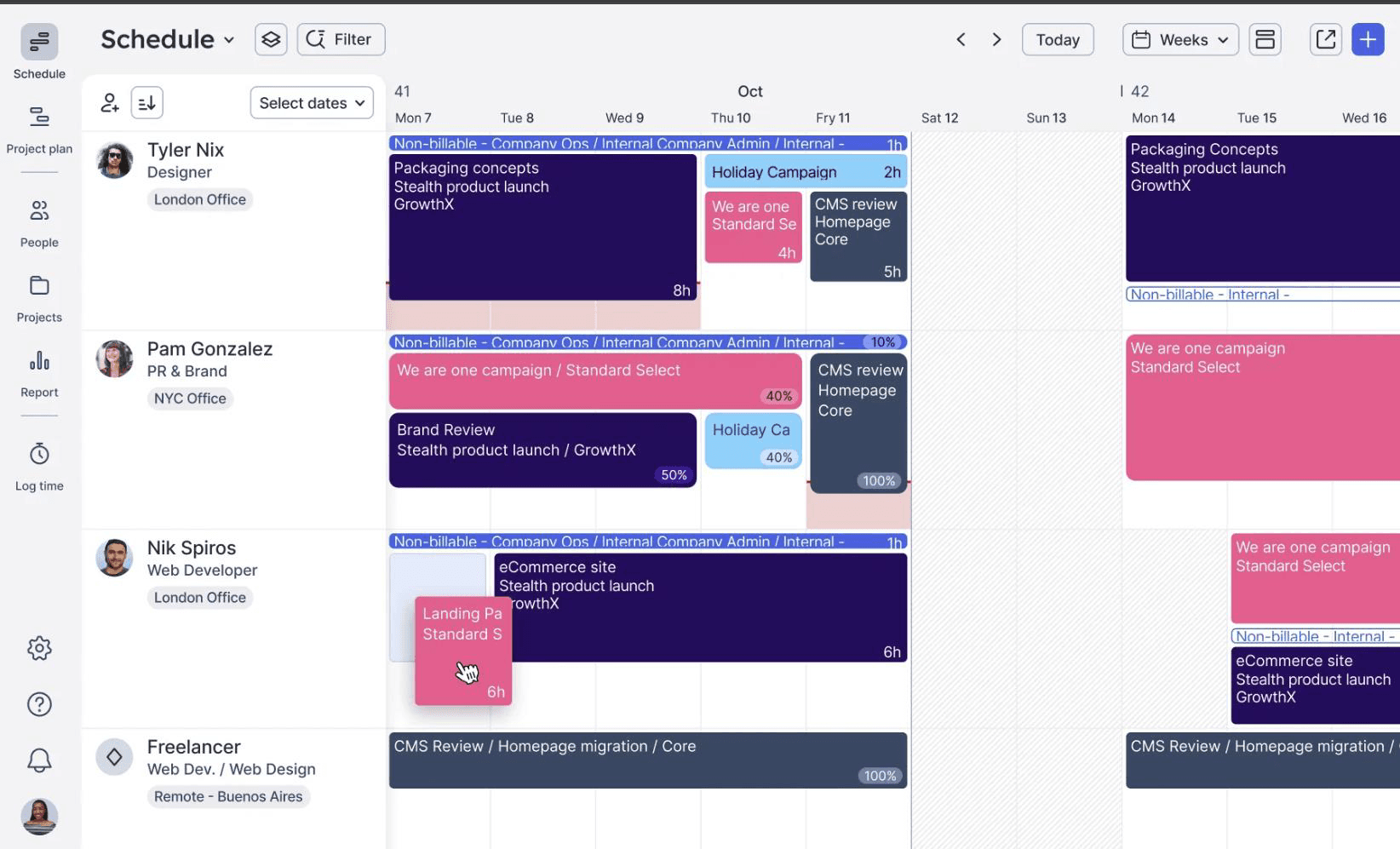
Float's resource scheduling interface helps teams visualize project assignments, working hours, and non-billable activities across a shared timeline.
Float is a resource management tool with dedicated scheduling capabilities. It provides teams with a clear view of their resource availability, workloads, and project demands, helping managers plan both current and upcoming work. They can assign team members to projects, account for time off and public holidays, and identify resource scheduling challenges or capacity constraints before they affect delivery.
Its visual scheduling interface lets managers allocate work by hours or percentages, and its drag-and-drop functionality makes it easy to adjust allocations as plans change. Live utilization indicators and over-capacity warnings support day-to-day scheduling decisions, while color coding, custom tags, and filters help teams focus on the information most relevant to their workflows. Overall, Float is best suited to service-based teams that need fast, visual resource scheduling alongside capacity planning.
Key Features:
- Visual team scheduling
- Drag-and-drop scheduling
- Cross-project allocation visibility
- Over-capacity warnings
- Color coding, custom tags, and filters
- Saved custom views
Pros and Cons
- Clean and visual resource scheduling interface
- Helps teams see availability, capacity, and time off in one place
- Supports project estimates and planned vs. actual tracking
- Project finance dashboard helps track margins
- Less suitable for very complex enterprise-grade resource planning
- Advanced financial and actuals tracking features require higher-tier plans
- Primarily designed for people scheduling, not equipment-heavy scheduling
Discover the best Float alternatives for resource management in our latest article.
Ganttic
Best for: Small to mid-sized companies.
Pricing: Resource-based pricing model, starting at $250 yearly for up to 20 resources.
Free Trial/Demo: Offers a 14-day free trial.
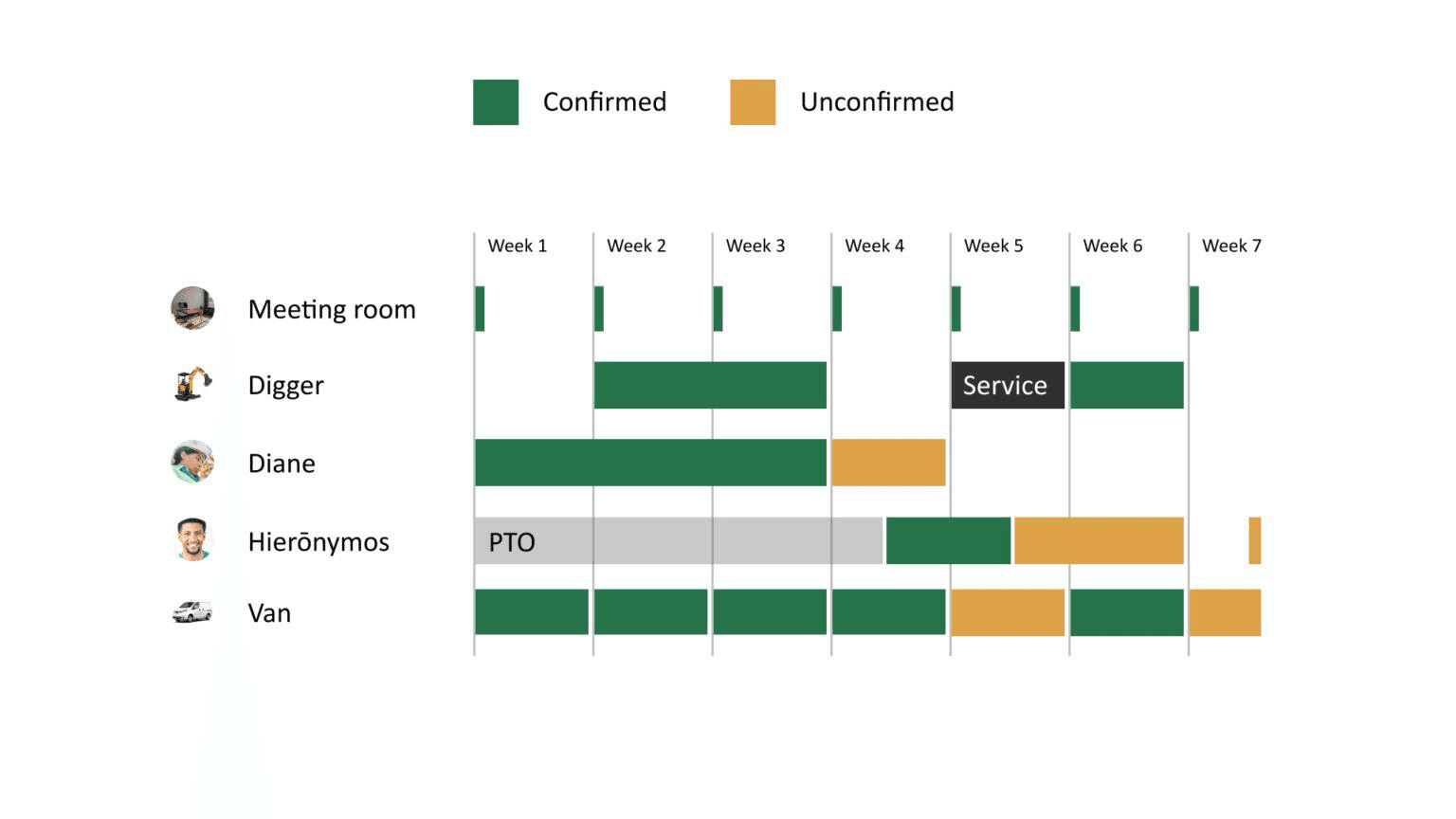
Ganttic's resource scheduling dashboard helps teams visualize bookings, time off, and maintenance activities across people, equipment, vehicles, and facilities.
Ganttic is a resource planning software that offers flexible scheduling capabilities. Its visual, resource-centric Gantt charts allow teams to schedule people, vehicles, machinery, facilities, tools, and other assets across projects and timelines. Managers can review availability and workloads, create bookings with drag-and-drop controls, and quickly reassign tasks when priorities change.
The platform helps teams prevent double bookings, identify scheduling gaps, and forecast capacity for upcoming work. Custom data fields, filters, color coding, and tailored views make it easier to find suitable resources and organize schedules by factors such as location, department, skills, or resource type. Ganttic is a go-to tool for organizations that need visual scheduling across both employees and equipment.
Key Features:
- Resource-centric Gantt charts
- Employee and equipment scheduling
- Double-booking and conflict detection
- Workload and utilization tracking
- Holiday, vacation, and PTO scheduling
- Filters and customizable views
Pros and Cons
- Can schedule people, equipment, rooms, vehicles, and machinery
- Strong visual Gantt-based scheduling
- Unlimited users included in paid plans
- Useful for mixed human and physical resource planning
- API access is available for paid accounts
- Interface may feel more operational than modern AI-led platforms
- Pricing depends on resource count, which may require careful setup
- May require configuration for complex workflows
- Advanced enterprise workforce planning may need a stronger platform
Teamdeck
Best for: Small to mid-sized businesses.
Pricing: Starts at $2/month for Light Members and $6/month for Full Members on monthly billing.
Free Trial/Demo: 14-day free trial and demo available.
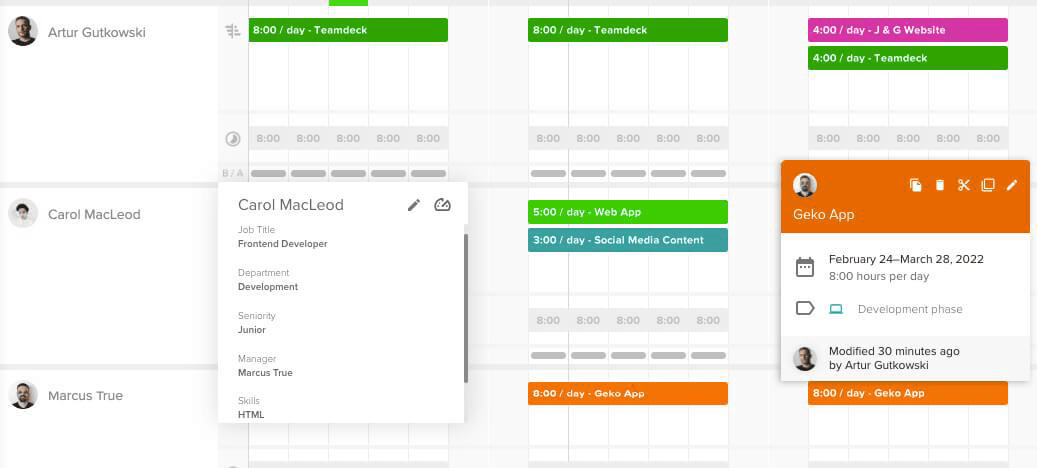
Teamdeck's resource scheduling interface helps teams visualize employee bookings, daily workloads, and project assignments across a shared calendar.
Teamdeck is a team management platform with dedicated resource scheduling capabilities for project-based businesses. Its shared calendar lets managers assign people to projects, plan work by hours, and schedule assignments based on availability, skills, roles, and other relevant criteria. Drag-and-drop controls make it easy to move, resize, duplicate, or split bookings as project plans change.
The platform shows who is fully booked or under-allocated, while flagging overlapping assignments that may lead to resource overutilization. Managers can also account for vacations, sick leave, part-time schedules, and freelancer availability when planning resources. In essence, Teamdeck is particularly well-suited to organizations that need visual resource scheduling, time tracking, and reporting in one system.
Key Features:
- Skills- and role-based allocation
- Overbooking warnings
- Underbooking identification
- Part-time and freelancer availability tracking
- Custom and filtered scheduling views
- Tags and descriptions for scheduled assignments
Pros and Cons
- Combines resource scheduling, time tracking, and leave management
- Good fit for software, creative, and product teams
- Simple pricing structure with light and full member options
- Helps compare scheduled work with actual hours
- Useful for managing workload, vacations, and availability
- Less advanced for enterprise-grade demand forecasting
- Not as financially deep as PSA-style platforms
- May require integrations for broader project management
Mosaic
Best for: Mid-sized to large organizations.
Pricing: Public pricing is plan-based and quote/demo-led; Mosaic lists Starter, Professional, and Enterprise plans but does not publicly display fixed per-user pricing.
Free Trial/Demo: Demo available.
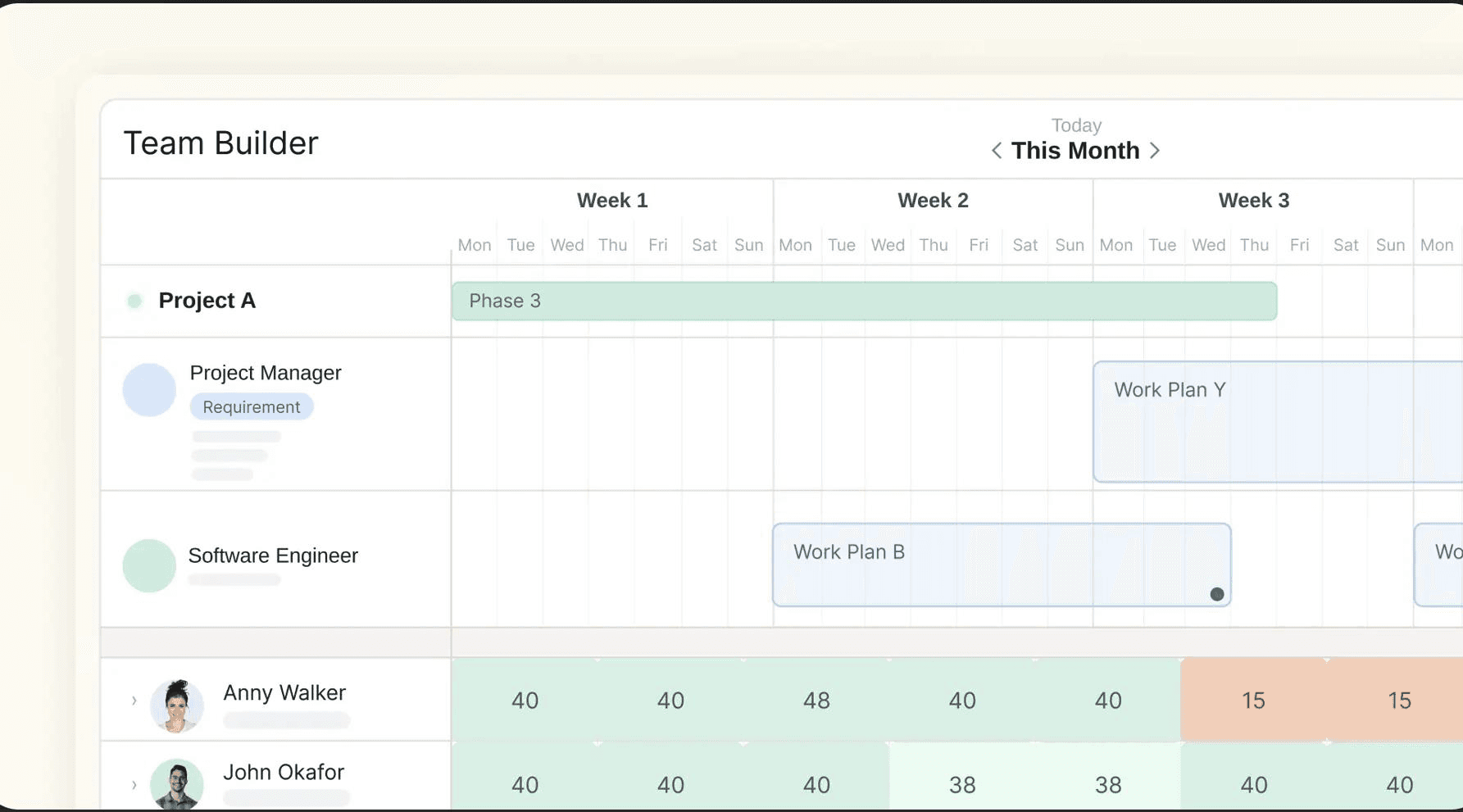
Mosaic's Team Builder view helps managers plan project roles, assign work, and compare team capacity across a visual timeline.
Mosaic is an AI-powered resource management software designed to help project-based organizations coordinate people, projects, workloads, and capacity. Its shared staffing view brings together availability, skills, current assignments, and open roles, allowing managers to allocate employees based on project requirements and real-time capacity. Teams can search for suitable people by skills, experience, and workload, while AI-assisted recommendations help assemble project teams more quickly.
The platform supports role-based planning, allowing managers to schedule generic roles before replacing them with named employees as project dates approach. Conflict alerts highlight potential double bookings and staffing bottlenecks, while fast edits, bulk actions, and real-time synchronization make it easier to reallocate people as priorities change. Overall, the tool is particularly well-suited to professional services firms seeking dynamic, firm-wide resource scheduling.
Key Features:
- Shared availability and staffing views
- Skills-, experience-, and qualification-based resource search
- AI-assisted team building and best-fit matching
- Generic role planning before named assignments
- Open-role and bench visibility
- Double-booking and staffing-conflict alerts
Pros and Cons
- Strong AI-assisted resource planning and forecasting
- Helps improve utilization and profitability visibility
- Useful for mid-sized and large project-based teams
- Supports capacity planning and resource allocation
- Helps forecast staffing and hiring demand
- Teams may need some initial setup and training at the start
- May not be the best fit for teams with simple scheduling needs.
- Best suited for people and project planning, not equipment scheduling
Compare the 10 best resource management software to find the right solution for your organization.
Dayshape
Best for: Large-scale enterprises.
Pricing: Custom pricing based on firm needs.
Free Trial/Demo: Free demo available.
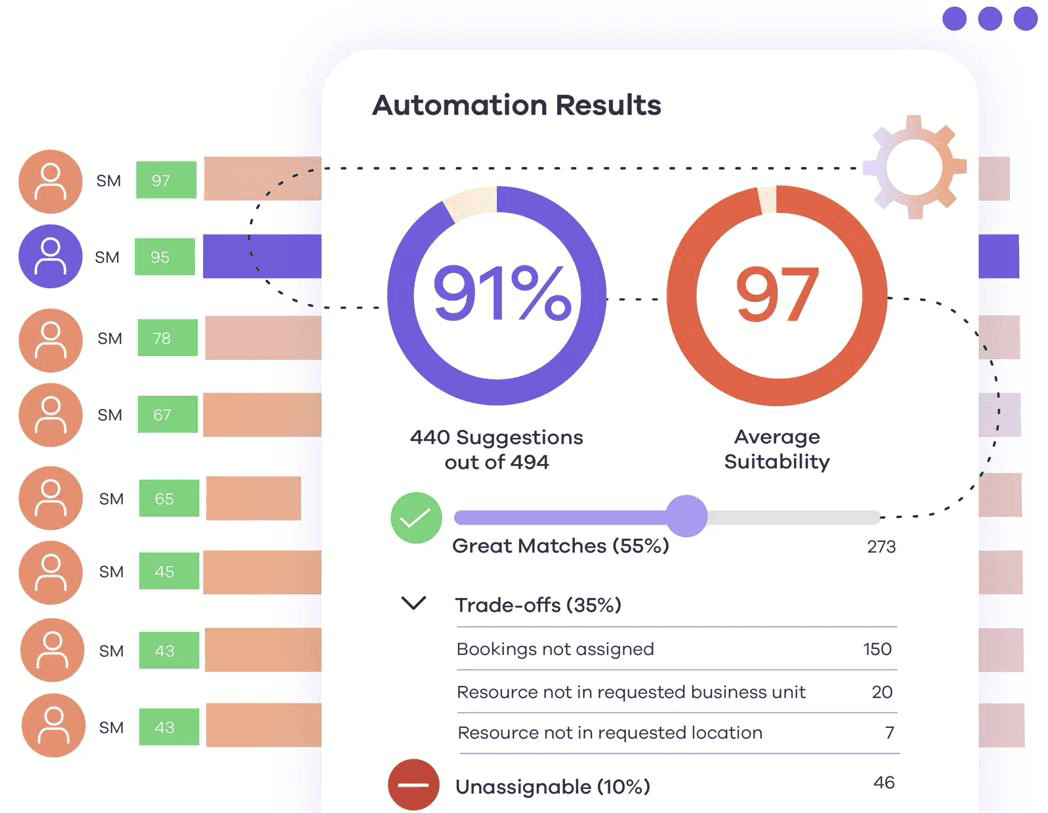
Dayshape's resource scheduler uses intelligent automation to evaluate resource suitability, identify strong matches, and highlight assignment trade-offs.
Dayshape is an AI-driven resource management platform designed primarily for large professional services firms. Its scheduling engine recommends suitable employees for assignments based on skills, qualifications, location, preferences, and availability. Managers can review these matches, compare scheduling options, and allocate people across multiple projects, teams, offices, and service lines.
The platform processes large numbers of scheduling scenarios to help firms balance competing project requirements, avoid resource conflicts, and fill out assignments more efficiently. Recommendations clearly identify strong matches, potential trade-offs, and unfilled roles, giving managers greater control when finalizing schedules. Dayshape is particularly well-suited to organizations that need scalable, firm-wide resource scheduling across a large workforce and complex project portfolio.
Key Features:
- AI-powered resource matching
- Suitability scoring
- Firm-wide scheduling optimization
- Automated conflict avoidance
- Schedule imports and engagement duplication
Pros and Cons
- Strong fit for large professional services firms
- AI-powered scheduling supports complex resource matching
- Supports firm-wide reporting and dashboards
- Useful for capacity planning and workforce optimization
- Helps forecast staffing and hiring demand
- Not ideal for small teams or simple scheduling needs
- Custom pricing may not suit budget-conscious buyers
- Likely requires implementation and change management
Resource Guru
Best for: Small to mid-sized organizations.
Pricing: Starts at $5/person/month on monthly billing or $4.16/person/month on annual billing.
Free Trial/Demo: 30-day free trial available.
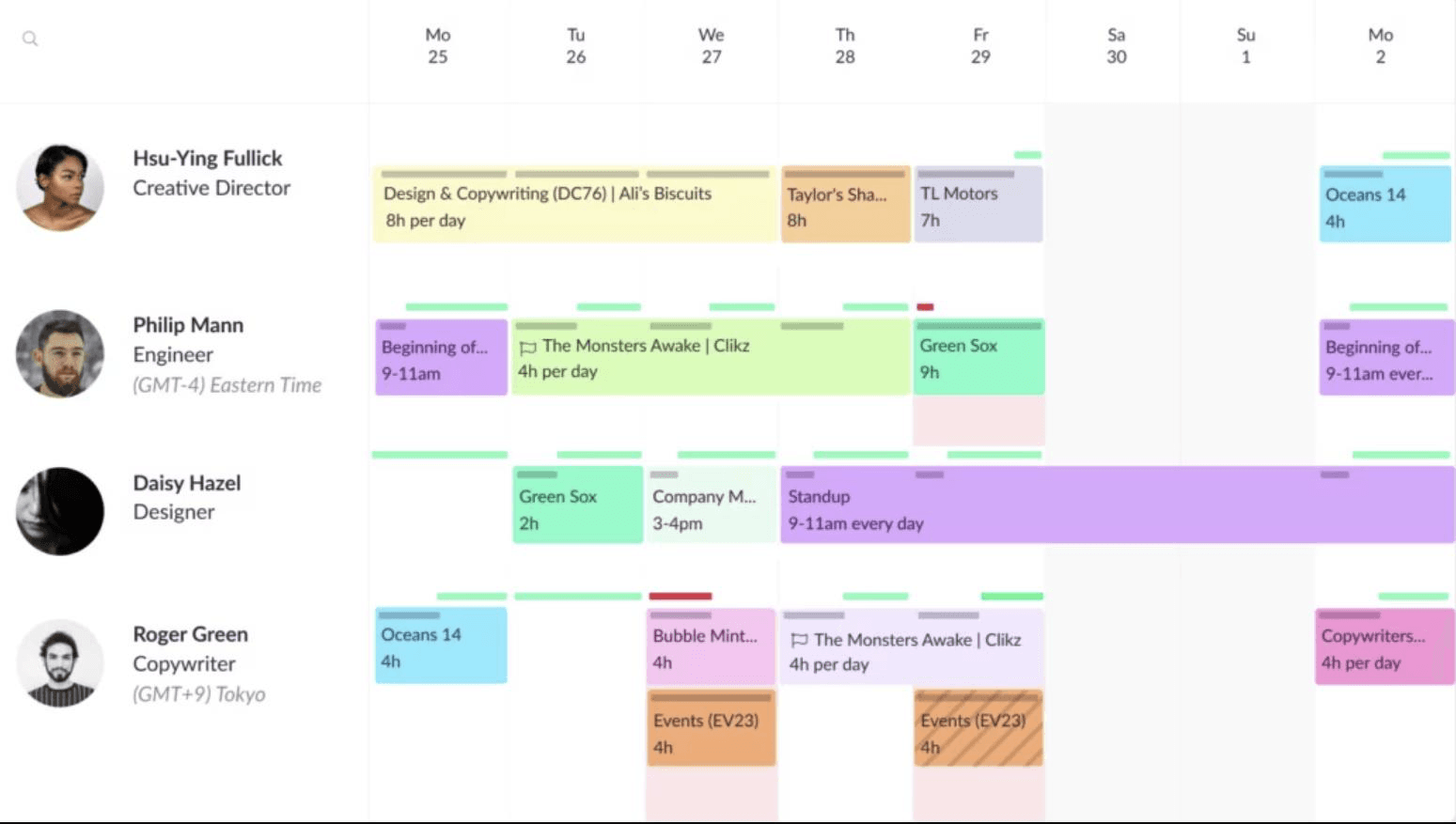
Resource Guru's resource scheduling dashboard helps visualize team availability, project bookings, and daily workloads.
Resource Guru is a visual resource scheduling tool that helps teams coordinate people, equipment, meeting rooms, vehicles, and other resources across projects and timelines. Managers can create individual or multi-resource bookings, set recurring assignments, account for time off, and review availability from a shared schedule. Its clash management system highlights bookings that exceed a resource's available capacity, helping teams address conflicts and reduce accidental overbooking.
The platform also supports tentative bookings for unconfirmed work, time-zone management, customizable schedule views, and utilization reporting. Teams can assign hourly rates to resources, forecast the value of scheduled work, and monitor project budgets using scheduled and logged hours. Resource Guru is particularly suited to organizations that need accessible, scheduling-led resource planning without implementing a broader enterprise-grade resource management system.
Key Features:
- Resource scheduling
- Clash management
- Tentative bookings
- Repeat bookings
- Leave management
- Configurable schedule views
- Customizable reports
Pros and Cons
- Simple and user-friendly resource scheduling
- Good clash management helps prevent overbooking
- Supports people and non-human resources
- Calendar sync and leave management improve visibility
- Useful for fast booking and availability management
- Reporting is stronger on higher-tier plans
- Less suitable for complex enterprise forecasting
- Less focused on long-term workforce planning
Review the top Resource Guru alternatives to choose the right resource management tool for your team.
Paymo
Best for: Small-scale businesses.
Pricing: Paymo offers plan-based pricing, including a free plan and paid plans. The solo plan starts at $5.9/month, the plus plan starts at $10.9/user/month, and the pro plan starts at $16.9/user/month.
Free Trial/Demo: 15-day free trial available; no credit card required.
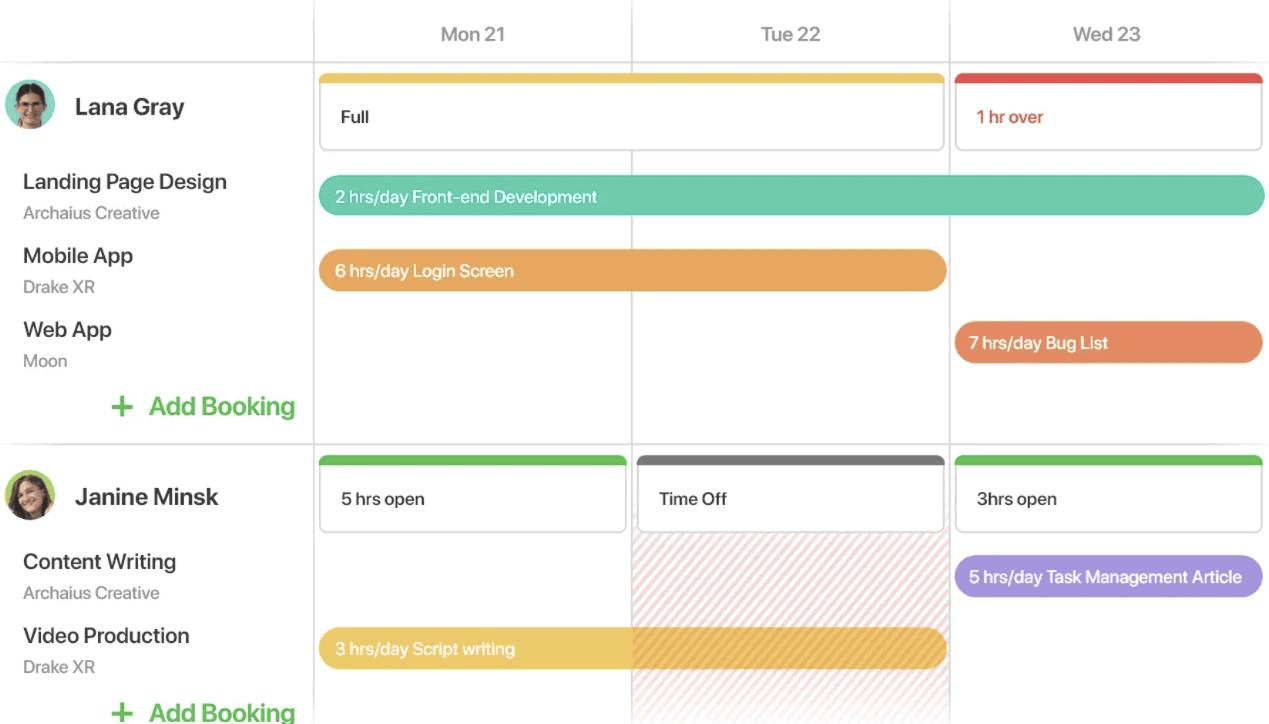
Paymo's visual resource schedule interface highlighting team availability, project assignments, time off, and workload conflicts.
Paymo is a project management and time tracking platform with visual resource scheduling capabilities for small teams. Its shared timeline shows employee and project schedules in one place, helping managers see who is available, overbooked, or under-allocated. Teams can create hourly task bookings, schedule unplanned work directly on the timeline, and account for employee leave when allocating assignments.
Managers can move, resize, or extend bookings using drag-and-drop controls as priorities change to balance workloads. Paymo also creates automatic ghost bookings from existing task details, which can be converted into confirmed bookings to speed up planning. Paymo is particularly well-suited to small service-based teams that want resource scheduling closely connected with task management and time tracking.
Key Features:
- Visual team scheduling timeline
- Employee and project schedule views
- Real-time collaborative scheduling
- Ghost-to-confirmed booking conversion
- Direct scheduling of unplanned tasks
- Drag-and-drop booking adjustments
Pros and Cons
- Combines resource scheduling with project management and billing
- Good fit for small agencies and service teams
- Helps identify underbooked and overbooked team members
- Includes time tracking, expenses, and invoicing
- Useful for managing client work from planning to payment
- Less dedicated to resource scheduling than tools like Ganttic or Teamdeck
- May not be deep enough for enterprise-level resource planning
- Not designed for complex skills-based allocation
Teamwork
Best for: Small to mid-sized professional services firms and client-service teams that need resource scheduling, project delivery, and profitability tracking.
Pricing: Starts at $9.99/user/month, billed yearly, for the Basics plan. The Accelerate plan starts at $24.99/user/month. They also offer Optimize and Enterprise plans.
Free Trial/Demo: 30-day free trial and demo available.
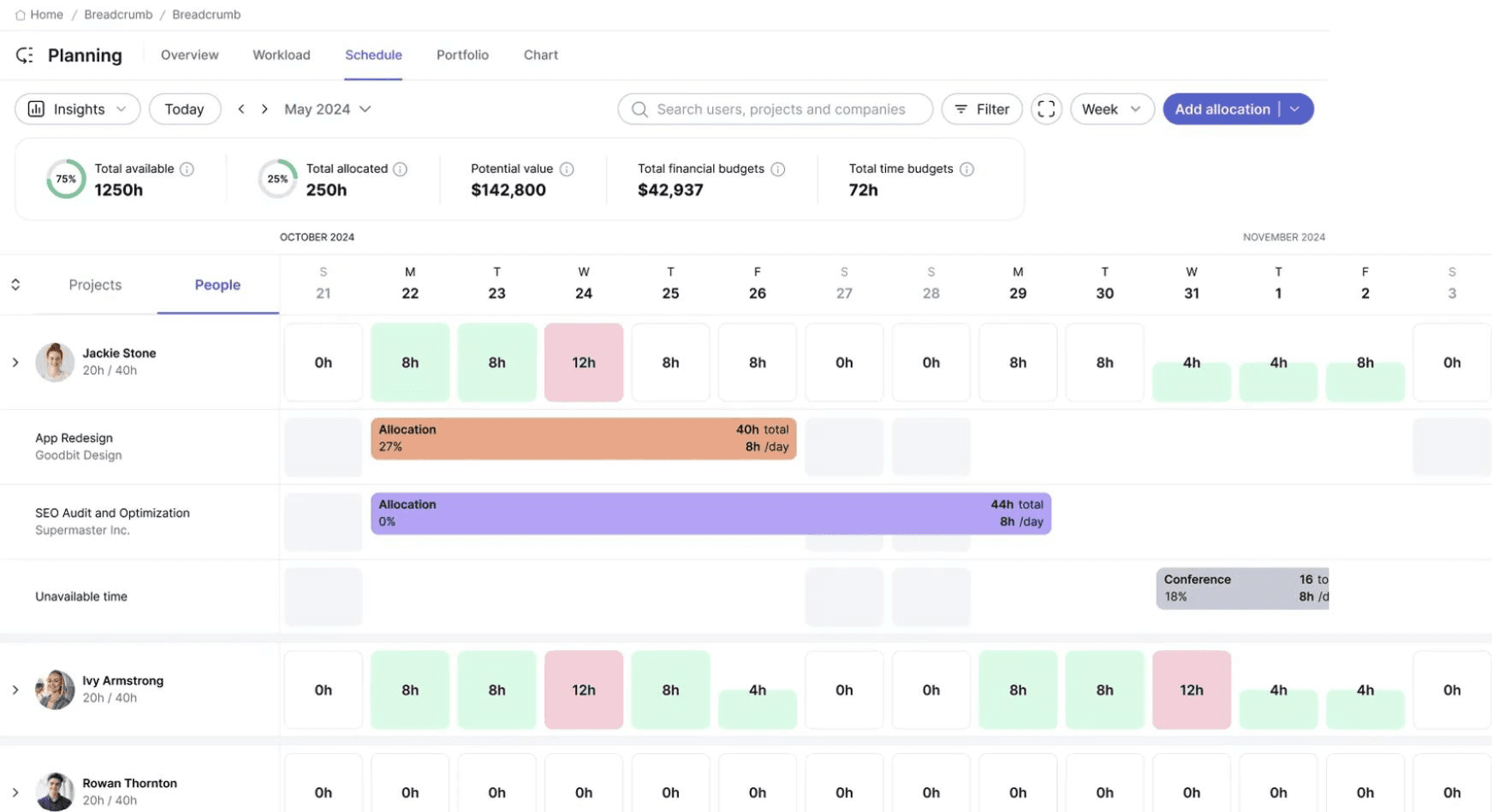
Teamwork's resource scheduling dashboard helps teams visualize availability, workload, and financial insights across a shared schedule.
Teamwork is an AI-powered professional services automation platform with dedicated resource scheduling capabilities. Its centralized planning view brings together team calendars, workloads, availability, capacity limits, and fixed commitments, helping managers prevent double bookings and resolve scheduling conflicts. Skills- and role-based allocation also make it easier to match people with suitable tasks and projects.
Real-time scheduling tools allow managers to update bookings, shift priorities, and rebalance assignments without exceeding available capacity. Teams can also book and visualize future work, compare upcoming demand with available resources, and plan staffing needs in advance. Teamwork is particularly well-suited to service-based firms that need resource scheduling connected with broader resource planning and project delivery.
Key Features:
- Centralized team calendars
- Skills- and role-based allocation
- Workload and capacity visibility
- Double-booking and conflict prevention
- Over-capacity warnings
- Future resource booking
Pros and Cons
- Strong fit for professional services and client-service teams
- Connects resource planning with budgets and profitability
- Supports workload planning and live capacity views
- Allows scheduling by role or skill on advanced plans
- Broader project management platform, not purely dedicated scheduling software
- May feel more complex than lightweight scheduling tools
- Not ideal for scheduling equipment or physical resources
Discover the leading Teamwork alternatives to improve resource scheduling and capacity management.
Now that we have reviewed the 10 best resource scheduling software, let us examine the criteria used to evaluate and select them.
How We Reviewed the Best Resource Scheduling Software
To evaluate the best resource scheduling software, we assessed how effectively each platform supports practical resource planning, scheduling, allocation, forecasting, and utilization needs.
We also considered each tool's suitability for different team sizes, industries, planning complexity, reporting requirements, integrations, pricing, and customer support. This helped us identify which tools are better suited for simple resource booking and which can support the complex scheduling needs of large-scale enterprises.
The key criteria to evaluate the best resource scheduling tool are as follows:
Flexible Resource Scheduling and Allocation
We assessed how easily managers can create, move, extend, shorten, or reassign resource bookings as project priorities and timelines change. We also considered whether the platform supports drag-and-drop scheduling, placeholder bookings, and quick schedule adjustments.
Early Warnings and Conflict Detection
We looked for early warning systems and visual indicators that highlight overbooking, double bookings, and other scheduling risks. Early visibility helps managers resolve conflicts before they disrupt projects.
Intelligent Resource Matching
We assessed whether the resource scheduling tool helps identify suitable resources based on skills, availability, role, experience, location, cost, and other attributes. This enables managers to ensure competent resources are assigned to projects rather than allocating people solely based on availability.
Resource Forecasting and Predictive Planning
We reviewed whether each resource booking system helps teams forecast upcoming demand, workload, utilization, and resource requirements. We also considered whether managers can compare resource capacity and demand to support hiring, upskilling, and redeployment decisions.
Resource Capacity Planning
We examined whether the resource booking software provides visibility into current and future capacity across individuals, roles, teams, departments, and projects. We also assessed whether managers can use this insight to identify skill shortages or excess capacity and avoid scheduling more work than teams can handle.
Check out our resource capacity planning guide to learn how it helps businesses stay competitive and future-ready.
What-If Scenario Modeling
We checked whether teams can model different scheduling scenarios before making changes. This may include testing the impact of undertaking new projects, shifting timelines of flexible initiatives, reallocating existing capacity, or hiring additional employees.
Resource Utilization Optimization
We assessed whether the resource scheduling tool helps managers monitor resource utilization, balance workloads, and make timely adjustments to allocations. Strong platforms should help reduce overallocation, underutilization, and bench time while ensuring resources are scheduled productively across projects.
Multi-Project and Portfolio Visibility
We considered whether managers can view resource schedules, demand, capacity, and workloads across multiple projects, programs, or portfolios. This is particularly important for organizations managing shared resources and competing priorities.
Reporting and Analytics
We reviewed the dashboards, reports, and analytics available for tracking capacity, resource utilization, and scheduling efficiency. We also considered whether the resource booking software provides customizable reports that can be shared with different stakeholders.
Resource Financial Planning
We examined whether the resource allocation software connects schedules with costs, billing rates, project budget, margins, and profitability. This helps businesses understand the financial impact of resource allocation and staffing decisions.
Integrations
We checked whether the resource allocation software integrates with commonly used project management, HR, finance, CRM, ERP, calendar, collaboration, and productivity platforms. Strong integrations reduce manual data entry and improve planning accuracy.
Vendor Support and Implementation
We considered the level of support each vendor provides during evaluation, onboarding, implementation, and ongoing use. This included product demos, training, setup assistance, documentation, customer support availability, and guidance for driving user adoption.
Explore the enterprise resource management software checklist for informed tool selection.
Anticipate future demand, identify capacity gaps, and prepare talent strategies for evolving business priorities with SAVIOM's workforce planning software. Book a Demo Today.

Conclusion
Choosing the best resource scheduling software depends on the size of your team, the complexity of your project portfolio, and how far ahead you need to plan. Tools such as Float, Resource Guru, Runn, Ganttic, Teamdeck, Mosaic, Dayshape, Paymo, and Teamwork support different needs, from simple workload visibility and day-to-day scheduling to multi-project planning, forecasting, reporting, and financial management.
SAVIOM is better suited to medium and large organizations that need advanced resource scheduling, capacity planning, demand forecasting, skills-based allocation, scenario planning, and utilization optimization. Ultimately, the right resource allocation software should reduce scheduling conflicts, improve workforce visibility, align capacity with demand, and help project-driven businesses make faster, more confident resourcing decisions.
Resource Scheduling Software FAQs
What is resource scheduling software?
Resource scheduling software is a tool that helps organizations assign the right people, equipment, facility, or other shared assets to tasks, projects, or shifts at the right time. It gives managers visibility into resource availability, capacity, skills, workloads, and existing allocations. By replacing spreadsheets, emails, and fragmented tools, it makes scheduling faster, more accurate, and easier to manage.