


Introduction
When teams lack visibility into capacity, project delivery suffers. Deadlines slip, workloads pile up, and skill gaps go unnoticed until it's too late. Managing people and projects effectively means staying ahead of demand, not reacting to it.
The best resource capacity planning software makes that possible. With real-time availability tracking, demand forecasting, and workload balancing, these tools replace guesswork with data-driven decisions. As a result, organizations can prevent resource-related bottlenecks, improve project outcomes, and make faster workforce decisions.
In this blog, we compare the top resource capacity planning software to help you choose the right solution.
Best Resource Capacity Planning Software: A Quick Glance
Each resource capacity planning software has its own strengths, depending on the team size, project complexity, and planning depth required. The comparison below provides a quick overview of each tool's ideal use case, standout features, and trial or demo availability, so you can quickly identify which option best fits your business needs.
 Medium to large organizationsForecasting, capacity planning, skills-based allocation, utilization tracking, scenario planning, real-time dashboards60-day free trial and demo available
 Small to mid-sized organizationsLive capacity management, scenario planning, utilization reporting, profitability planning30-day free trial
 Small to mid-sized businessesAI-powered forecasting, capacity planning, role demand, resource allocation, utilization insights, dashboards, project financial controlsDemo available
 Small to medium-sized organizationsReal-time resource planning, reports and analytics, project budgeting30-day free trial
 Startups and small, mid-sized, and large businessesWorkload scheduling, capacity views, built-in time tracking, custom dashboardsFree plan and demo available
 Small to mid-sized organizationsResource calendar, clash management, leave tracking, reports, custom fields30-day free trial
 Small, mid-sized, and large companiesAI-based workload alerts, capacity forecasting, executive reporting, team collaborationFree plan and 14-day free trial available
 Small to mid-sized firmsWorkload planning, capacity and utilization views, time tracking, project budgets, profitability forecasting30-day free trial and demo available
 Small to mid-sized companiesCapacity planning, scheduling, utilization tracking, custom fields, reports and charts14-day free trial and demo available
 Small to large organizationsWorkload tracking, dashboards, automation, reports, resource management add-onDemo available and trial upon contact
SAVIOM
Best for: Medium to large organizations.
Pricing: Custom pricing.
Free Trial/Demo: Offers a customized demo and a 60-day free trial.
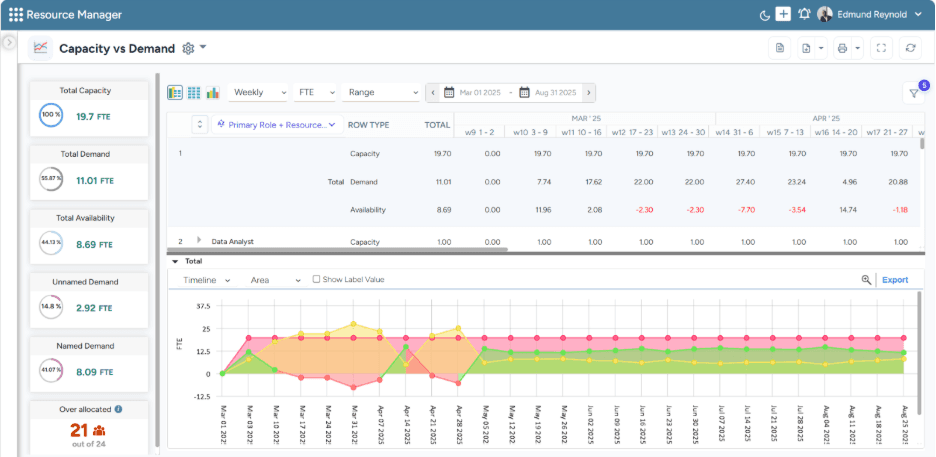
SAVIOM's Capacity vs. Demand dashboard helps managers quickly spot resource shortages/excesses and take timely action to balance supply and demand.
SAVIOM is a pioneer in resource management, trusted by numerous Fortune 500 companies across more than 50 countries. Its enterprise-grade resource capacity planning software is designed for organizations managing large teams, complex portfolios, and multiple concurrent projects. This next-gen software enables managers to gain a clear understanding of current workforce availability and future project demand before making critical staffing decisions.
SAVIOM also supports resource forecasting, scenario modeling, intelligent matchmaking, bench management, and utilization optimization, making it suitable for long-term workforce planning. Furthermore, its real-time BI reports and dashboards provide insights into capacity vs. demand gap, resource utilization, project vacancies, and people on the bench. As a result, enterprises can identify skill shortages/excesses, improve billable utilization, prevent burnout, and make faster, data-backed decisions.
Key Features:
- Resource forecasting and predictive planning
- Resource capacity planning
- Intelligent matchmaking
- Flexible resource scheduling and allocation
- Resource utilization optimization
- Scenario modeling
- Bench management
- Real-time BI reports and analytics
- Resource requesting
Pros and Cons:
 Highly customizable for different business structures and workflows
- Scalable for large and growing organizations
- Provides early warnings for overutilization, burnout, skill shortages, and bench time
- Supports drag-and-drop scheduling for faster allocation
- Offers sandbox-style simulation for scenario planning
- Strong fit for strategic resource planning and enterprise governance
 Initial setup may take time due to advanced configuration options
- Feature-rich design can involve a learning curve
- Custom pricing requires buyer consultation
For an in-depth look at the concept, benefits, frameworks, and best practices, explore our resource management guide.
Book a demo with SAVIOM to see how it streamlines the resource management lifecycle.
Float
Best for: Small to mid-sized organizations.
Pricing: Annual billing starts at $7 per scheduled person/month. The Pro plan starts at $12 per scheduled person/month. Enterprise pricing is custom.
Free Trial/Demo: Offers a 30-day free trial.
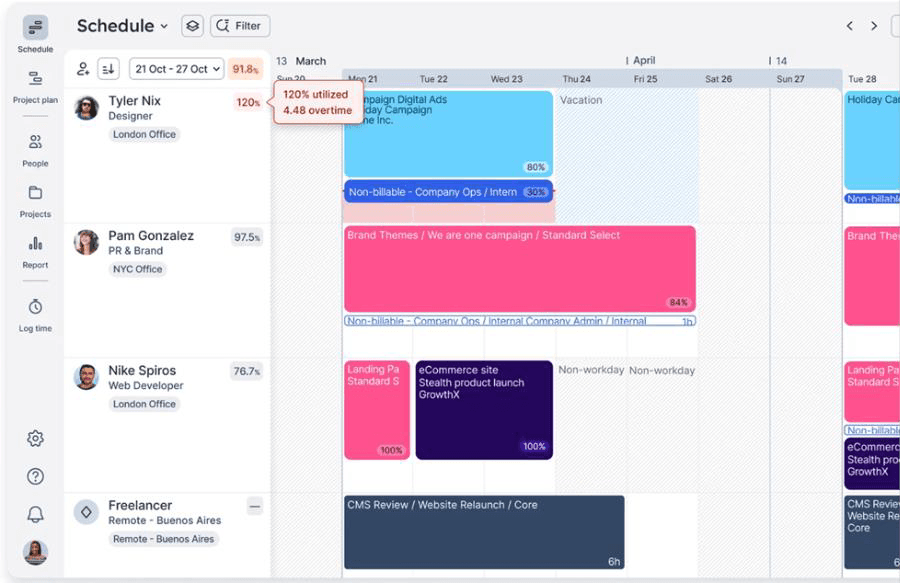
Float's Resource Scheduling dashboard to view real-time capacity insights.
Float is a visual resource capacity planning software designed for teams that need a simple, practical way to track availability, schedule people, and manage workloads. It gives managers a clear view of who is working on what, helps them adjust bookings quickly, and reduces reliance on spreadsheets for capacity planning. Moreover, its drag-and-drop scheduling, time-off management, and capacity views make it easier for small and mid-sized service teams to respond to changing project needs.
The platform also supports project planning, time tracking, and profitability management, which helps teams connect resource planning with project performance. In addition, Float's project finance dashboards give managers visibility into profit margins and budget usage, while reporting features help them understand team capacity and workload distribution. As a result, teams can improve scheduling accuracy, protect profitability, and make faster capacity planning decisions with a clean, visual interface.
Key Features:
- Capacity and time-off management
- Visual resource scheduling
- Drag-and-drop allocation
- Project scoping
- Utilization trends
- Project margin tracking
- Project finance dashboard
- Integrations with tools
Pros and Cons:
- Clean and intuitive scheduling interface
- Helpful for teams that need fast visual capacity planning
- Useful time-off and capacity visibility
- Supports utilization and profitability tracking
- Less suitable for complex enterprise-level scenario planning
- Advanced reporting may require higher-tier plans.
Explore the best Float alternatives for resource management in our article.
Mosaic
Best for: Small to mid-sized businesses.
Pricing: Custom/demo-based pricing.
Free Trial/Demo: Demos are available.
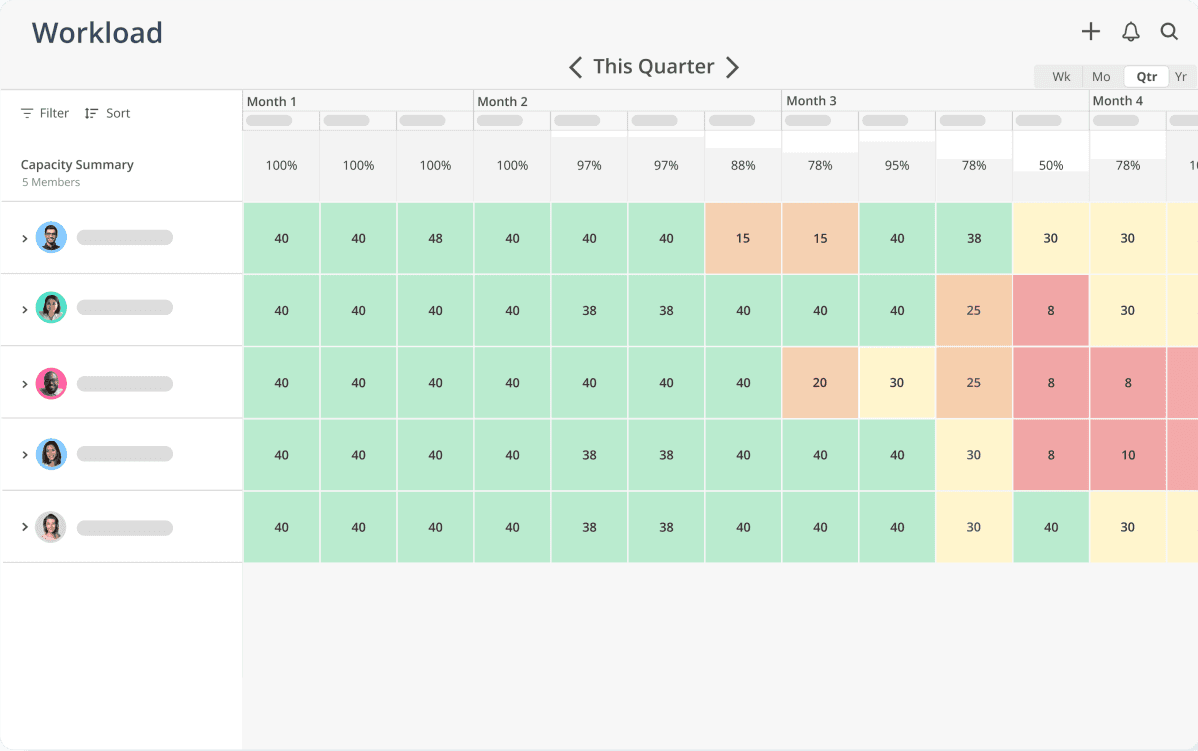
Mosaic's Workload dashboard highlights a capacity heatmap for the quarter.
Mosaic is an AI-powered resource capacity planning platform built for project-based businesses that need to plan work based on their teams' real capacity. It gives executives, team leaders, and project managers a shared view of people, projects, schedules, workloads, and future demand. Its AI-powered planning capabilities use project, budget, pipeline, and staffing data to forecast workload, identify capacity gaps, and support smarter hiring and allocation decisions.
The platform also supports role demand forecasting, resource allocation, skills tracking, utilization reporting, team planning, project planning, and budget visibility. Its real-time dashboards help managers monitor who is working on what, where bottlenecks are forming, and how projects are progressing against scope and budget. As a result, businesses can reduce burnout, improve staffing decisions, limit manual planning, and protect profitability through stronger capacity and utilization visibility.
Key Features:
- AI-powered resource planning
- Capacity planning
- Role demand forecasting
- Resource allocation
- Skills matrix
- Utilization reporting
- Real-time dashboards
- Project planning
Pros and Cons:
- Skill and role-based filters support faster staffing decisions
- Strong visibility into who is working on what and when
- Helpful for preventing double booking, bottlenecks, and burnout
- Real-time dashboards make capacity, utilization, and project data easier to understand
- Some advanced features may be better suited for firms with ongoing project and workforce complexity
- Organizations looking only for simple task management may find it broader than required
Runn
Best for: Small to medium-sized organizations.
Pricing: Annual billing starts with the Lite plan at $7 per resource seat/month, the Standard plan at $11 per resource seat/month, and the Advanced plan at custom quote-based rates.
Free Trial/Demo: Offers a 30-day free trial.
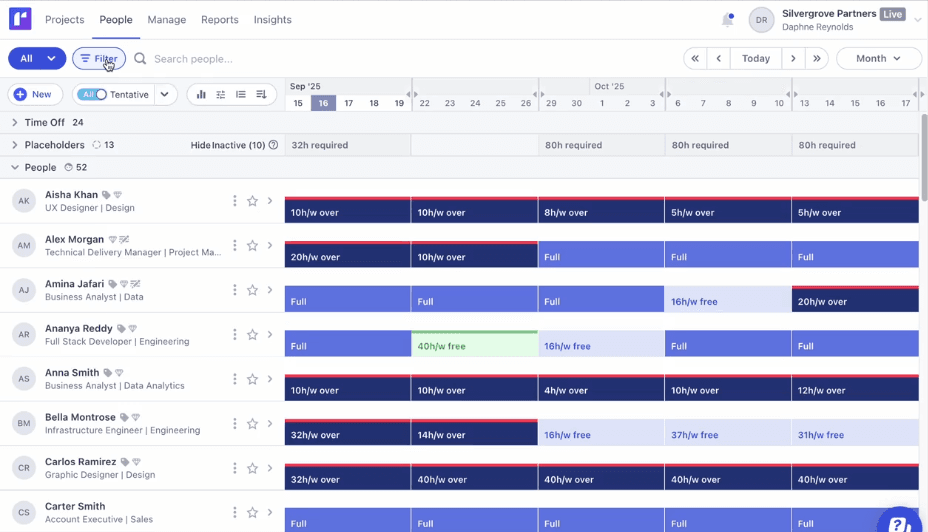
Runn's Capacity Management dashboard helps align capacity vs. demand effectively.
Runn is a forward-looking resource capacity management software built for teams that need to forecast people, project demand, utilization, and budgets. It helps managers assess whether they have sufficient capacity to deliver upcoming projects, based on current assignments, future bookings, and role requirements. Moreover, its placeholder allows teams to plan for unfilled roles in advance, enabling more informed hiring and staffing decisions.
The platform also supports resource scheduling, demand forecasting, role-based planning, and rate-card-based budgeting. In addition, its reporting and visibility features help managers identify overbooked employees, underutilized resources, future capacity gaps, and project budget risks. As a result, teams can plan projects more effectively, align staffing with demand, and maintain clear visibility into resources and budgets.
Key Features:
- Capacity management
- Demand forecasting
- Resource scheduling
- Placeholder workflow
- Utilization heatmaps
- Timesheets
Pros and Cons:
- Helpful placeholder functionality for planning unfilled roles
- Supports role and rate-card-based planning
- Good visibility into utilization and capacity
- Useful for teams that need both resource and project budget visibility.
- Scenario planning may be limited compared to enterprise tools
- Advanced governance and multi-level planning controls may be limited
- Larger organizations may require more customization than the tool provides
Explore SAVIOM vs. Runn side by side to see which resource management platform best fits your team.
ClickUp
Best for: Startups and small to large businesses.
Pricing: Public pricing varies by plan. Free plan and paid plans are available. Demo available.
Free Trial/Demo: Free plan and demo available.
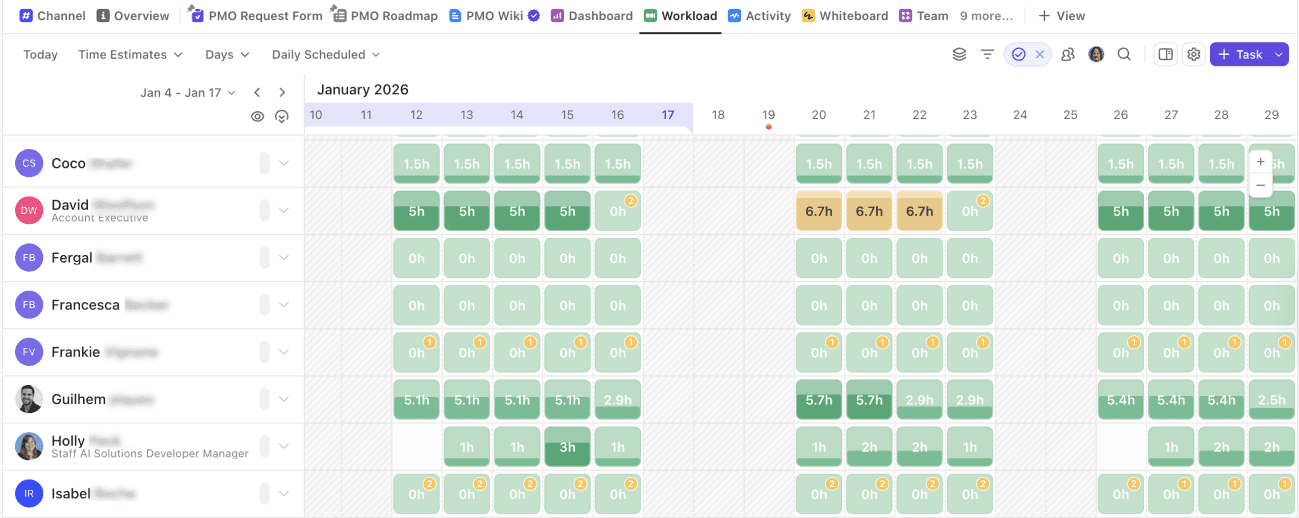
ClickUp's Workload dashboard shows daily time estimates, assigned hours, and resource availability.
ClickUp is an all-in-one work management platform with resource capacity planning features for startups and growing teams. It helps managers plan tasks, track assignments, and understand workload distribution across different views such as Workload, Calendar, Timeline, List, Board, and Gantt. Its Workload view helps teams identify who is over capacity, who has available bandwidth, and where assignments need to be adjusted.
The platform also supports native time tracking, task scheduling, AI-assisted automations, project portfolio management, collaboration, custom dashboards, and API integrations. In addition, its dashboards and reporting views help teams compare planned work with actual effort, monitor project progress, and keep capacity data visible across the workspace. As a result, teams can manage tasks, collaborate, automate routine updates, and support basic workforce capacity planning within one flexible platform.
Key Features:
- Custom dashboards
- Native time tracking
- Task scheduling
- AI-assisted automations
- Portfolio management
- Collaboration
Pros and Cons:
- Highly customizable dashboards
- Multiple task views support different planning styles
- Built-in docs, chat, and whiteboards support collaboration
- Broad feature sets can create a steep onboarding curve.
- Leave approval workflows may need manual setup
- Advanced capacity controls may require higher-tier plans
Resource Guru
Best for: Small to mid-sized and large organizations.
Pricing: Annual billing starts at $4.16 per person/month with the Grasshopper plan. The Blackbelt plan costs $6.65 per person/month, and the Master plan costs $10 per person/month.
Free Trial/Demo: Offers a 30-day free trial.
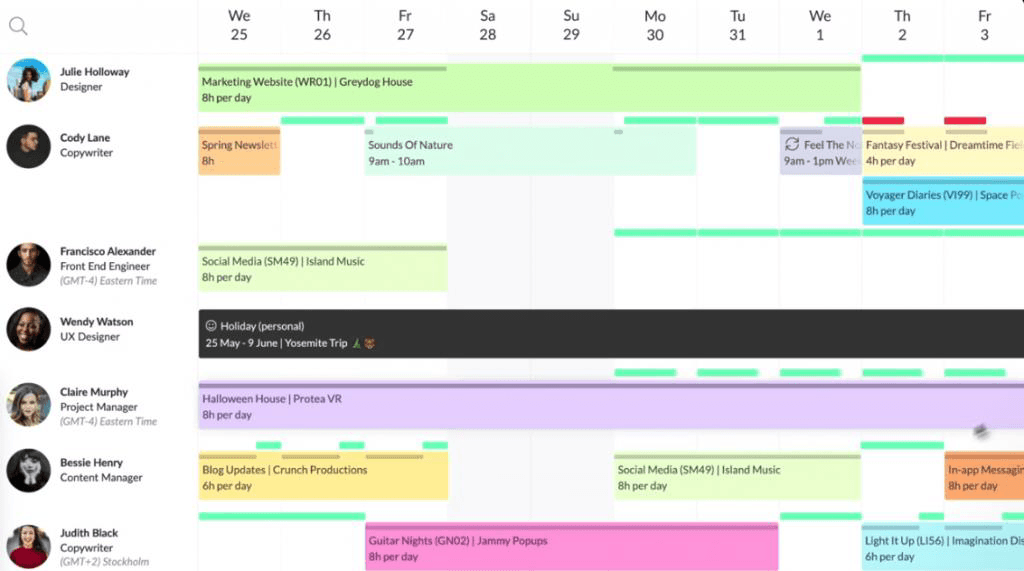
Resource Guru's Capacity Planning dashboard highlights real-time resource capacity and availability.
Resource Guru is a booking-focused resource capacity planning software designed for teams that need accurate availability tracking and conflict-free scheduling. It helps managers understand who is available, who is already booked, and where workload conflicts may affect delivery. Moreover, its resource calendar, multi-resource bookings, tentative resource bookings, repeat bookings, and clash management features help teams prevent overbooking and maintain a realistic view of usable capacity.
The platform also supports leave management, timesheets, equipment planning, availability tracking, and forecasting reports, making it useful for firms that manage both human and non-human resources. In addition, its schedule heatmap and availability bar provide managers with a clearer view of workload pressure, capacity gaps, and underutilized time. As a result, businesses can improve scheduling accuracy, balance workloads, and manage day-to-day capacity without relying on workforce planning tools.
Key Features:
- Resource calendar
- Multi-resource bookings
- Tentative and repeat bookings
- Clash management
- Leave management
- Timesheets
- Equipment management
- Project forecasting reports
Pros and Cons:
- Simple and easy-to-understand resource booking interface
- Strong clash management and overbooking prevention
- Useful for leave and availability tracking
- Helps monitor scheduled, billable, non-billable, and unscheduled hours
- Advanced reporting may be limited to higher plans
- Less focus on skills, rates, and strategic planning
- Not ideal for complex scenario modeling
Review the top Resource Guru alternatives to choose the right resource management tool for your team.
Monday.com
Best for: Small, mid-sized, and large companies.
Pricing: Public pricing varies by region, team size, and plan. Annual pricing starts with a free plan, followed by Basic at $9 per seat/month, Standard at $12 per seat/month, Pro at $19 per seat/month, and Enterprise at a quote-based price.
Free Trial/Demo: Free plan and 14-day free trial available.
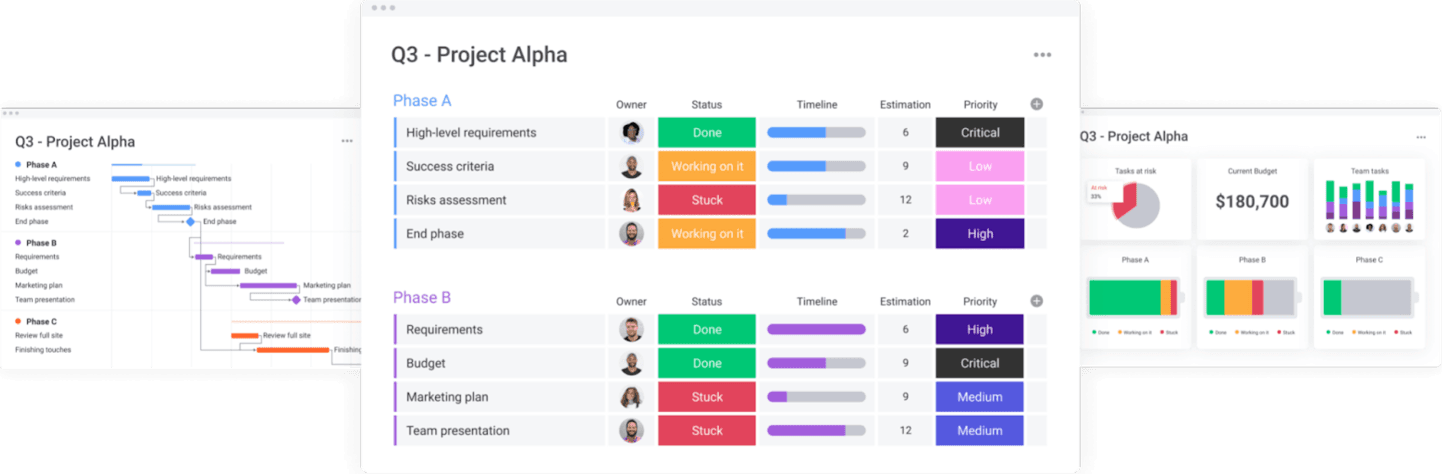
Monday.com's Capacity Planning dashboard shows task owners, estimated effort, statuses, and timeline progress.
Monday.com is a visual work management platform that supports resource capacity planning through configurable boards, workload views, dashboards, automation, and project tracking. It helps teams use Timeline, Gantt, Kanban, Calendar, and Workload views to understand task ownership, resource distribution, and delivery progress. Moreover, its Workload View and Workload Widget help managers identify overcapacity, uneven workloads, assignment gaps, and shifting project priorities.
The platform also supports resource allocation, resource planning, capacity management, AI-assisted risk insights, workflow automation, and integrations with Jira. In addition, its dashboards give leaders high-level visibility into team capacity, project status, workload trends, and delivery risks. As a result, teams can coordinate work more easily, reduce repetitive updates, improve collaboration, and make faster capacity planning decisions in a highly visual workspace.
Key Features:
- Workload widgets and views
- Gantt charts and kanban boards
- AI-assisted risk insights
- Workflow automation
- AI-assisted resource allocations
- Resource planner
- Capacity manager
- Portfolio dashboards
- JIRA integration
Pros and Cons:
- Highly customizable boards and dashboards
- Visual status tracking makes workloads easier to scan
- Workflow automation reduces repetitive coordination
- Task filtering can be restrictive or confusing
- High-level capacity dashboards may need manual setup
- Timesheets and leave tracking may require external tools
Teamwork
Best for: Small to mid-sized firms.
Pricing: Annual billing starts with Basics at $9.99 per user/month, Accelerate at $24.99 per user/month, and Optimize and Enterprise at custom rates.
Free Trial/Demo: Offers a 30-day free trial and demo.
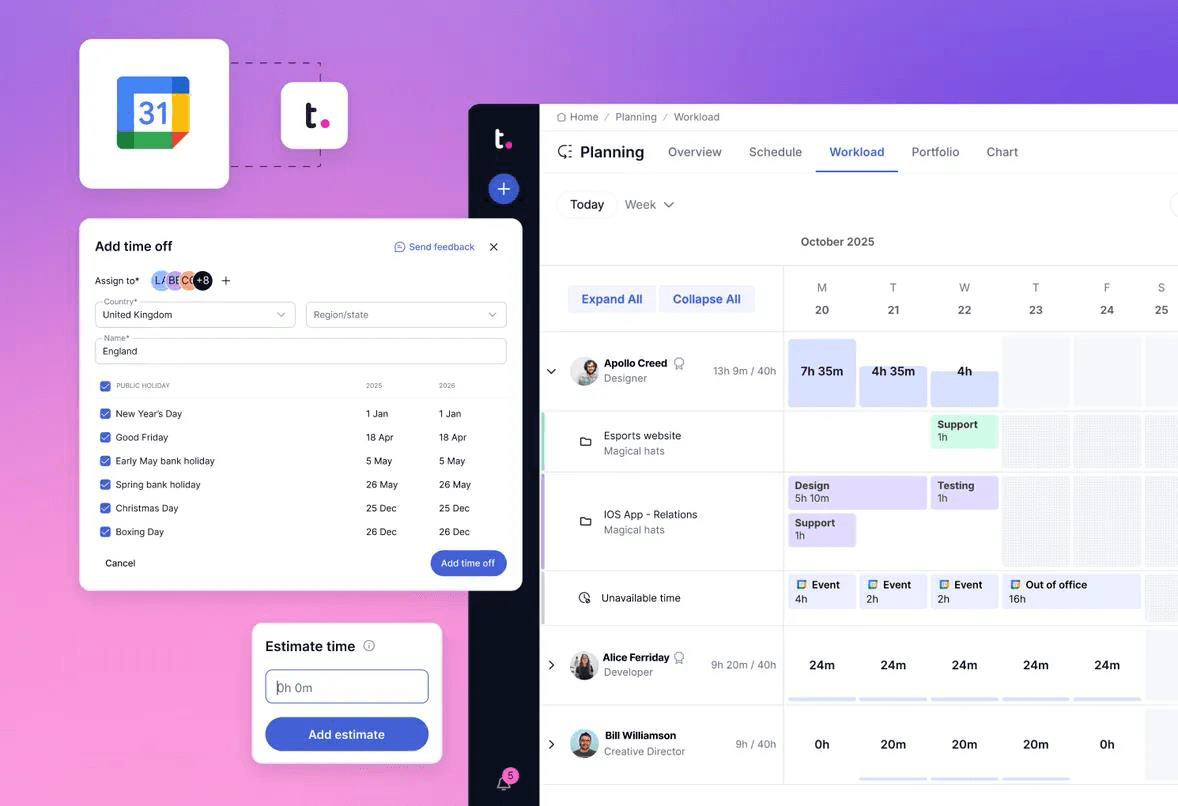
Teamwork's Capacity Planning dashboard shows team schedules, time off, calendar integration, and estimated task time.
Teamwork is a resource capacity planning platform designed for client-facing services teams that need to connect workload planning with project delivery. It helps managers understand workload distribution, available hours, planned work, and capacity risks across multiple projects. Moreover, its workload planner helps teams identify overutilized resources, rebalance assignments, and address delivery risks before they affect timelines or client commitments.
The platform also supports role demand forecasting, resource allocation, skills tracking, utilization reporting, project planning, and project financial controls. In addition, its real-time dashboards help managers monitor who is working on what, identify bottlenecks, and track how projects are progressing against scope and budget. As a result, businesses can reduce burnout, ensure data-driven staffing decisions, and improve project profitability.
Key Features:
- Workload planner
- Resource scheduler
- Utilization reporting
- Time tracking
- Task dependencies
- Project templates
Pros and Cons:
- Strong client-facing project visibility
- Built-in time tracking and invoicing support
- Useful workload planning for service delivery teams
- Project templates help standardize recurring work
- Integrates with billing and productivity tools
- Gantt chart customization may be limited
- Time tracking may not always flow smoothly into invoicing
- New users may need time to learn the platform
- Advanced capacity planning may be less comprehensive
Explore the best Teamwork alternatives for resource planning, scheduling, and capacity management.
Ganttic
Best for: Small to mid-sized companies.
Pricing: Resource-based pricing model, starting at $250 yearly for up to 20 resources.
Free Trial/Demo: Offers a 14-day free trial and demo.
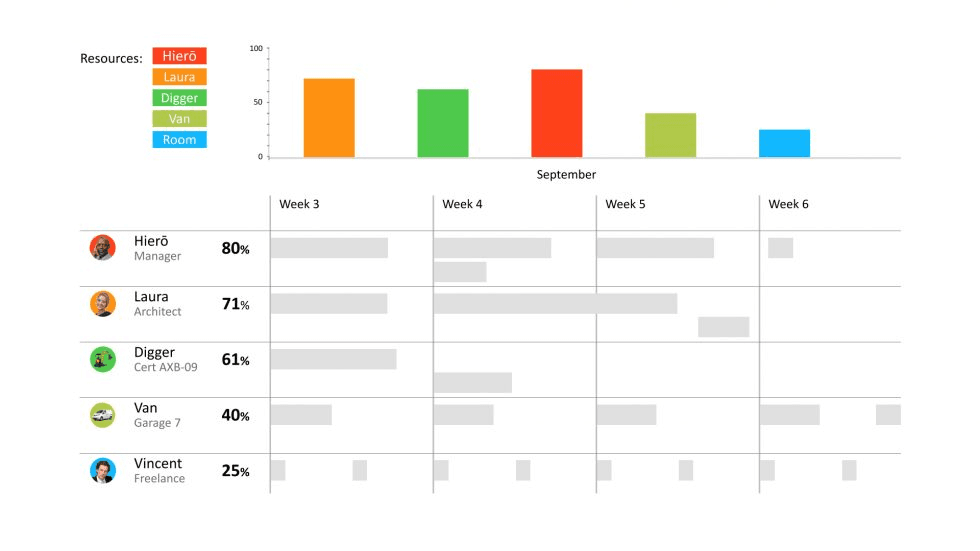
Ganttic's Capacity Planning dashboard helps assess resource capacity via role labels, capacity levels, and weekly workload timelines.
Ganttic is a Gantt-based resource capacity planning software designed for teams that need visual visibility into resource availability and project timelines. It helps managers plan people, equipment, facilities, and other resources across multiple projects from a timeline-based scheduling view. Moreover, its drag-and-drop planning features enable teams to quickly adjust schedules when capacity changes, priorities shift, or new project requirements arise.
The platform also supports resource tracking, project scheduling, timeline planning, human and non-human resource planning, custom views, customizable reports, and API integrations on paid plans. Its reporting features help teams review resource usage, availability, workload balance, and project progress. As a result, small and mid-sized companies can improve scheduling accuracy, manage capacity visually, and coordinate resources without adopting complex enterprise planning software.
Key Features:
- Gantt-based resource planning
- Customizable reports
- Resource tracking
- Project scheduling
- Timeline planning
Pros and Cons:
- Visual Gantt-based planning is easy to understand
- Useful for managing people, equipment, and other resources
- Flexible views support different planning needs
- Good fit for scheduling-heavy teams
- Reporting may not support very advanced analytics
- Integrations may be limited compared with larger platforms
- May not provide advanced scenario modeling or financial forecasting
Smartsheet
Best for: Small to mid-sized and large organizations.
Pricing: Annual billing starts at $9 per member/month for the Pro plan and $19 per member/month for the Business plan. Enterprise and Advanced Work Management plans are available at custom quote-based rates.
Free Trial/Demo: Demo available and trial upon contact with the sales team.
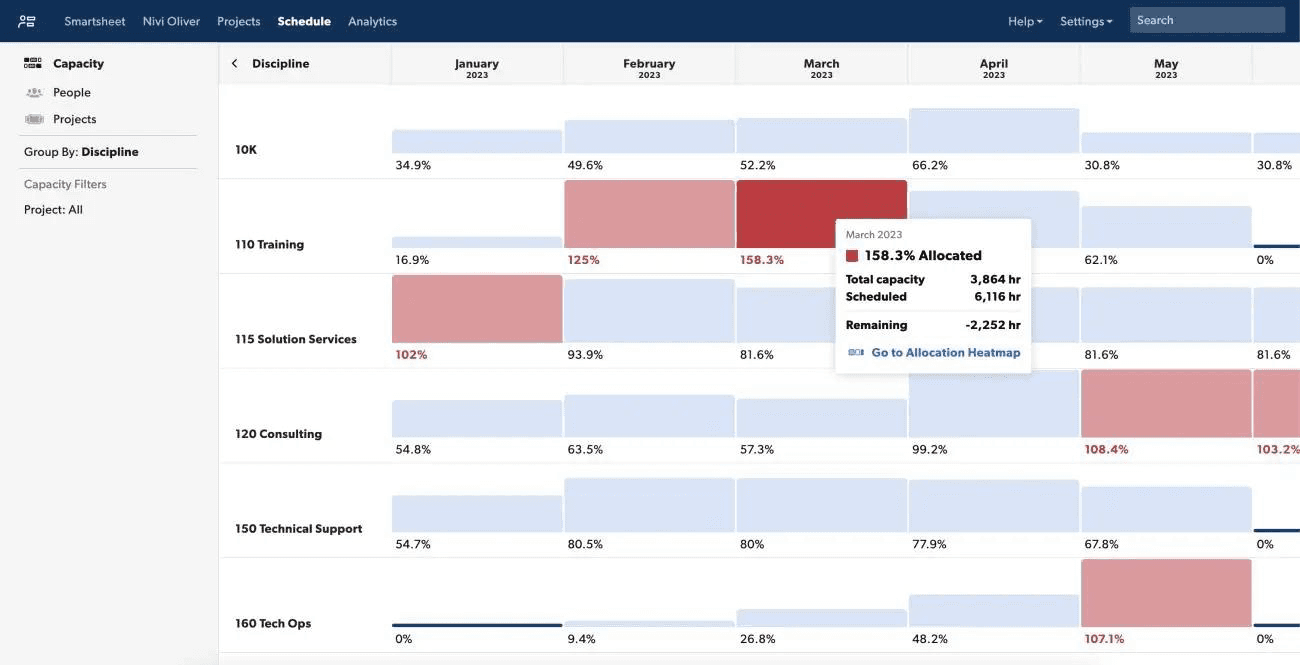
Smartsheet's Capacity View dashboard helps managers view capacity on a monthly basis.
Smartsheet is a work management platform that supports resource capacity planning through workload tracking, dashboards, automation, and resource management capabilities. It helps teams move from manual spreadsheet-based resource capacity requirement planning to a more structured system while keeping a familiar spreadsheet-style interface. Moreover, its workload heatmaps, placeholders, percentage-based allocation, and utilization forecasting help managers understand future demand and available capacity.
The platform also supports demand forecasting, automation workflows, reports, dashboards, AI capabilities, tool integrations, planned vs. actual time tracking, and pipeline visibility. In addition, its dashboards and reporting features help teams monitor capacity data, project status, and resource utilization trends. As a result, organizations can reduce manual updates, improve allocation decisions, strengthen visibility, and manage resource planning within a flexible work management system.
Key Features:
- Workload tracking
- Demand forecasting
- Automation workflows
- Reports and dashboards
- AI capabilities
- Extensive tool integrations
Pros and Cons:
- Skills database can support better allocation decisions
- Strong dashboards and reporting capabilities
- Useful automation and approval workflows
- Integrates with many productivity and business tools
- Resource management may require an add-on
- Bulk project edits may not apply easily to resource fields
- Allocation changes may feel slower for teams that need fast schedule updates.
Explore our SAVIOM vs. Smartsheet comparison to choose the right tool for resource management and capacity planning.
How We Evaluated the Best Resource Capacity Planning Software?
Evaluating the resource capacity planning tool goes beyond basic scheduling. The best tools help teams assess current and future capacity, spot skill gaps, prevent overbooking, reduce bench time, and plan hiring needs. The criteria below help buyers compare tools by business fit, planning depth, scalability, and long-term value.
Evaluation Criteria:
- Enterprise scalability - Assess whether the software can support large teams, multiple departments, distributed locations, complex portfolios, permissions, and governance requirements.
- Customization and flexibility - Check whether teams can configure fields, dashboards, workflows, reports, resource attributes, roles, rates, and planning views.
- Automation and workflow support - Look for features that reduce manual effort through alerts, approvals, notifications, automated scheduling, reminders, and repeatable workflows.
- Early warning indicators - Evaluate whether the tool can surface overbooking, resource underutilization, shortages, skill gaps, burnout risks, and delivery bottlenecks before they become major issues.
- Security and governance - Review permissions, access controls, auditability, SSO, MFA, compliance support, and controlled data visibility.
- Resource capacity planning - Check whether teams can see current and future capacity by person, role, team, location, project, department, and portfolio.
- Demand forecasting - Evaluate whether the tool can forecast upcoming resource demand based on pipeline, confirmed projects, tentative work, roles, skills, and availability.
- Scenario modeling - Look for what-if scenario planning capabilities for hiring, outsourcing, project delays, priority changes, demand shifts, and budget adjustments.
- Skills-based allocation - Check whether the tool can match people to work based on skills, roles, availability, experience, interests, rates, and location.
- Reporting and analytics - Evaluate whether dashboards and reports are useful for resource managers, PMOs, delivery leaders, executives, finance teams, and department heads.
- Vendor support and implementation - Consider onboarding support, demos, training, implementation assistance, documentation, and customer support availability.
- Integrations - Check whether the tool integrates with project management, HR, finance, ERP, CRM, BI, calendar, accounting, and productivity systems.
- Pricing and trial access - Review pricing transparency, trial availability, demo options, and whether the cost aligns with the software's planning depth and scalability.
Check out our enterprise resource management software checklist to make smarter buying decisions.
Looking for next-gen resource management software? Explore SAVIOM for its comprehensive suite of features that effectively align resource capacity with project demand and boost business outcomes.

Conclusion
Selecting the best resource capacity planning software can help businesses enhance visibility, forecasting, and allocation across every project. Additionally, it enables teams to proactively manage workloads, identify skill gaps, improve resource utilization, and make more accurate staffing decisions.
Ultimately, the ideal platform depends on your organization's size, complexity, and long-term goals. Therefore, evaluate each option against your capacity planning needs, integration requirements, and budget to choose a software that drives efficiency, protects profitability, and supports sustainable growth.
Resource Capacity Planning Software FAQs
What is resource capacity planning software?
Resource capacity planning software is a tool that helps organizations plan, manage, and optimize their workforce to meet project demands. It gives managers a clear view of employee availability, skills, workloads, utilization, and future staffing needs, enabling them to assign the right people to the right work at the right time.